Category Archives: Digital Security

Digital security is the process of protecting your online identity, data, and other assets from intruders, such as hackers, scammers, and fraudsters. It is essential for trust in the digital age, as well as for innovation, competitiveness, and growth. This field covers the economic and social aspects of cybersecurity, as opposed to purely technical aspects and those related to criminal law enforcement or national and international security.

In this category, you will find articles related to digital security that have a direct or indirect connection with the activities of Freemindtronic Andorra or that may interest the readers of the article published in this category. You will learn about the latest trends, challenges, and solutions in this field, as well as the best practices and recommendations from experts and organizations such as the OECD. You will also discover how to protect your personal data from being used and sold by companies without your consent.

Whether you are an individual, a business owner, or a policy maker, you will benefit from reading these articles and gaining more knowledge and awareness about this topic and its importance for your online safety and prosperity. Some of the topics that you will find in this category are:

  • How to prevent and respond to cyberattacks
  • How to use encryption and cryptography to secure your data
  • How to manage risks and vulnerabilities
  • How to comply with laws and regulations
  • How to foster a culture of security in your organization
  • How to educate yourself and others about this topic

We hope that you will enjoy reading these articles and that they will inspire you to take action to improve your security. If you have any questions or feedback, please feel free to contact us.

Midnight Blizzard Cyberattack Against Microsoft and HPE: What are the consequences?

Digital world map showing cyberattack paths with Midnight Blizzard, Microsoft, HPE logos, email symbols, and password spray illustrations.

Discover Russian Tactics by Midnight Blizzard

Midnight Blizzard, supported by Russian strategy, targeted Microsoft and HPE, orchestrating sophisticated cyberattacks. We delve into the facts, consequences, and effective protective measures such as PassCypher and DataShielder to combat this type of espionage.

Stay informed in our posts dedicated to Digital Security to follow its evolution thanks to our regularly updated topics

[bws_pdfprint display=’print’]Explore our digital security feature on the Midnight Blizzard cyberattack against Microsoft and HPE by Jacques Gascuel. Stay updated and secure with our insights.

Updated March 20, 2024

Midnight Blizzard Cyberattack against Microsoft and HPE: A detailed analysis of the facts, the impacts and the lessons to learn

In 2023 and 2024, two IT giants, Microsoft and Hewlett Packard Enterprise (HPE), which has been using Microsoft 365 as its cloud messaging platform since 2017), fell victim to cyberattacks carried out by a hacker group linked to the Russian government. These attacks allowed hackers to gain access to the internal systems, source code, and sensitive data of companies and their customers. What are the facts, consequences and lessons to be learned from these incidents?

Update: Microsoft 365 Cyberattack Intensifies

Initial Underestimation: Researchers reveal the cyberattack on Microsoft 365 is far more severe than first anticipated.
APT Exploits Data: The APT group, orchestrating the attack, has leveraged exfiltrated data to delve deeper into Microsoft’s network.
Security Experts Raise Concerns: Security professionals express concerns over disjointed defense teams. They fear unidentified vulnerabilities may persist.
Microsoft’s Stance: Popular opinion suggests Microsoft is ‘caught off-guard’ against such sophisticated attacks.
Ongoing Efforts: Microsoft is now bolstering defenses, ensuring tighter coordination across security teams to address these challenges.

For more details, refer to the official Microsoft Security Response Center update.

How were the attacks carried out against Microsoft and HPE?

The attacks on Microsoft and HPE were carried out by the same hacker group, Midnight Blizzard, which is linked to the Russian government. The hackers used the same technique to infiltrate the networks of both companies: compromising Microsoft 365 email. This cloud-based messaging platform is used by many organizations to communicate and collaborate.

“Password Spray” Attack Method Against Microsoft and HPE

The compromise of Microsoft 365’s email and HPE’s email accounts was achieved through a simple but effective method known as “password spraying.” This technique, often used after a brute force attack, involves guessing a password by trying several combinations, usually from previous data breaches.

The hackers used this method to gain access to an old test account on Microsoft’s network. Once they gained access, they were able to infiltrate HPE’s email accounts.

“Password spraying” is a technique where hackers use common passwords to attempt to gain access to multiple accounts on the same domain. Using a list of commonly used weak passwords, a hacker can potentially gain access to hundreds of accounts in a single attack. This differs from “Credential Stuffing”, where a single set of credentials is used to attempt to access different accounts across multiple domains.

In the case of the Midnight Blizzard attack on Microsoft, the hacker group used a password spray attack to compromise a legacy non-productive test account and gain a foothold. They then used the account’s permissions to gain access to a very small percentage of Microsoft’s corporate email accounts, including members of the executive team and employees in cybersecurity, legal, and other functions. They managed to exfiltrate some emails and attached documents.

Once they gained access to email accounts, the hackers were able to exfiltrate sensitive data, such as emails, attachments, source code, and secrets.

Method of attack against Microsoft and HPE customers “phishing, malware or social engineering”

Midnight Blizzard also used this data to carry out subsequent attacks against Microsoft and HPE customers, using phishing, malware, or social engineering techniques.

Why were the attacks successful?

  • Hackers exploited security vulnerabilities such as the lack of multi-factor authentication, the persistence of legacy test accounts, or weak passwords.
  • The hackers acted in a discreet manner, using advanced and persistent techniques, such as encrypting communications, masking IP addresses, or imitating legitimate behavior.
  • The hackers were supported by the Russian government, which provided them with resources, information, and diplomatic protection.

Here’s a diagram that summarizes the steps to Microsoft 365 email compromise:

Microsoft 365 email compromise diagram
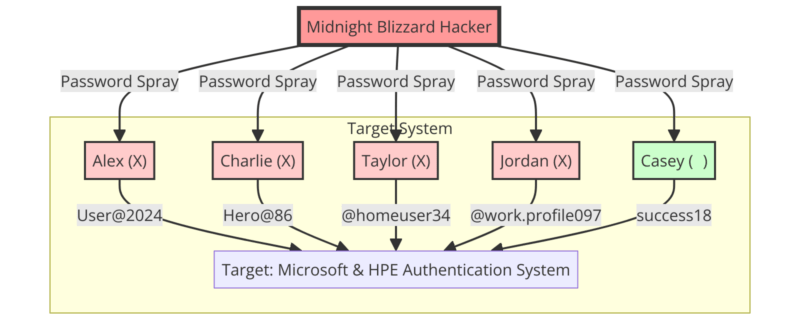
Diagram depicting the 'Midnight Blizzard' cyberattack against Microsoft and HPE using password spray tactics.

Stages of Microsoft’s Security Breach

Microsoft endured a multi-phase assault:

November 2023 saw the initial breach when attackers cracked an outdated test account via password spray attacks, cycling through many potential passwords.

By December, those intruders had penetrated select executive and security team email accounts, extracting sensitive emails and documents.

January 2024 brought Microsoft’s detection and countermeasures to thwart further unauthorized access. The company identified Midnight Blizzard, known by aliases such as APT29 and Cozy Bear, as the culprits.

Come March, it was disclosed that the invaders had also accessed Microsoft’s code repositories and internal systems, utilizing the stolen intel for subsequent assaults on Microsoft’s clientele, targeting to exploit vulnerabilities or clone functionalities.

The different consequences of this attack on Microsoft

Consequences for Microsoft and its customers

The attack had significant consequences for Microsoft and its customers. On the one hand, Microsoft had to tighten its security measures, notify affected customers, investigate the extent of the compromise, and restore trust in its services.

On the other hand, Microsoft’s customers faced the risk of being targeted by subsequent attacks using information stolen from Microsoft, such as secrets, source code, or sensitive data. Some customers may have suffered financial losses, reputational damage, or privacy breaches.

Geopolitical consequence

The attack also had geopolitical consequences, as it revealed the Russian government’s involvement in large-scale cyber espionage operations against Western interests. It has drawn condemnation from several countries, including the United States, the United Kingdom, France and Germany, which have called for a coordinated and proportionate response to the threat. It also reinforced the need to strengthen international cooperation on cybersecurity and to define common standards to prevent conflicts in cyberspace.

Steps to attack HPE

Midnight Blizzard executed the attack on HPE, leveraging Microsoft 365 email for entry—the platform HPE adopted in 2017.

Initially, in May 2023, the hackers infiltrated SharePoint, extracting a select set of files. Post-breach, HPE, alongside cybersecurity experts, promptly engaged in containment and recovery efforts.

Come December, new breaches surfaced; targeted mailboxes related to cybersecurity and business operations were compromised. These intrusions were suspected to be connected to the earlier SharePoint incident.

Finally, in January 2024, HPE disclosed the breach to the SEC, affirming the implementation of measures to remove the threat, alert impacted clients, gauge the breach’s scope, and reinstate service integrity.

The different consequences of this attack on HPE

First, the attack had similar consequences to the attack on Microsoft, but on a smaller scale.

Restoring trust in its services to their customersOn the one hand, HPE had to strengthen its security measures, inform affected customers, and restore trust in its services. HPE’s customers faced the risk of being targeted by subsequent attacks using information stolen from HPE, such as sensitive data.

Justify the lack of economic impact as a result of this attack

On the other hand, HPE stated that the incident did not have a material impact on its operations, financial condition or results of operations.

The similarities and differences between the two attacks

Both attacks were carried out by the same hacking group, Midnight Blizzard, which is linked to the Russian government. Both attacks used the same means of access, Microsoft 365 email, which is a cloud-based email platform used by many organizations. Both attacks allowed hackers to exfiltrate sensitive data, such as emails, attachments, source code, or secrets. Both attacks had consequences for the victim companies, their customers, and geopolitics.

There were also differences between the two attacks. The attack on Microsoft was longer, deeper, and more widespread than the attack on HPE. The attack on Microsoft lasted several months, while the attack on HPE lasted a few weeks. The attack on Microsoft allowed the attackers to gain access to the company’s source code repositories and internal systems, while the attack on HPE was limited to email and SharePoint files. The attack on Microsoft affected thousands of customers, while the attack on HPE did not specify how many customers were affected.

What types of data does Midnight Blizzard exfiltrate?

What types of data does Midnight Blizzard exfiltrate?

Midnight Blizzard is the name given to a group of cybercriminals who have carried out cyber attacks against Microsoft, HPE, and their customers. This group is also known as Nobelium, Cozy Bear, or APT29. It managed to break into these companies’ cloud email systems and steal sensitive data. Microsoft said that Midnight Blizzard also accessed some of its source code and internal systems, but that it did not compromise Microsoft-hosted client systems.

“In recent weeks, we have seen Midnight Blizzard [Nobelium] use information initially exfiltrated from our corporate email systems to obtain, or attempt to obtain, unauthorized access,” Microsoft said in a blog post. “This includes access to some of the company’s source code repositories and internal systems. To date, we have found no evidence that Microsoft-hosted client systems have been compromised.”

Midnight Blizzard Exfiltrated Data Category

The data exfiltrated by Midnight Blizzard can be grouped into three main categories:

Communication data

Communication data is data that relates to interactions between Microsoft and HPE employees, partners, or customers. They include emails, attachments, contacts, calendars, notes, or instant messages. This data may contain confidential, strategic or personal information, such as trade secrets, project plans, contracts, reports, opinions, identifiers. This data was exfiltrated at Microsoft and HPE.

Source code data

Source code data is data that relates to the development of Microsoft’s products or services. They include files, repositories, versions, comments, or tests related to the source code. This data may reveal technical, functional, or security information, such as algorithms, architectures, features, vulnerabilities, patches, or backdoors. This data was exfiltrated only at Microsoft.

Internal system data

Communication and internal system data is data that relates to the exchange and operation of Microsoft and HPE’s internal systems. This includes emails, attachments, contacts, calendars, notes, instant messages, files, configurations, logs, audits, or scans of internal systems. This data may contain confidential, strategic or personal information, such as trade secrets, project plans, contracts, reports, opinions, identifiers. This data can also provide information about the performance, security, or reliability of internal systems. This data was exfiltrated at Microsoft and HPE.

What are the estimated values of the data exfiltrated by Midnight Blizzard?

It is difficult to estimate the exact value of the data exfiltrated by Midnight Blizzard, as it depends on several factors, such as the quantity, quality, freshness, rarity, or usefulness of the data. However, an approximate range can be attempted based on official sources or existing studies.

HPE’s SEC filing indicates that the security incident’s repercussions on their operational, financial, or business performance were minimal. This suggests the exfiltrated data’s worth is on the lower end, possibly just a few thousand dollars. On the other hand, Microsoft’s annual report documents a staggering $168.1 billion in revenue for 2023, with $60.7 billion attributed to their cloud division. Such figures lead to the conclusion that the stolen data from Microsoft could be highly valuable, potentially in the millions. Further, the Ponemon Institute’s study reports the average data breach cost in 2023 at $4.24 million, the highest to date, encompassing various associated costs. These costs include activities like detection and response, as well as indirect losses like diminished productivity and tarnished reputation. Therefore, it stands to reason that the value of data taken from Microsoft and HPE’s customers is similarly high, potentially reaching tens of millions of dollars.

What are the potential consequences of the data exfiltrated by Midnight Blizzard?

The data exfiltrated by Midnight Blizzard can have serious potential consequences for the victim companies, their customers, and geopolitics. Here are a few examples:

  • Communication data can be used to carry out phishing, malware, or social engineering attacks, impersonating trusted individuals, exploiting security vulnerabilities, or manipulating emotions. These attacks can aim to steal other data, take control of systems, destroy or alter data, or extort ransoms.
  • Source code data can be used to discover and exploit vulnerabilities, to copy or modify functionality, to create competing products or services, or to infringe intellectual property. These actions may adversely affect the security, quality, innovation, or competitiveness of Microsoft or HPE products or services.
  • Internal system data may be used to understand and disrupt Microsoft or HPE’s operations, organization, or performance, to reveal sensitive or confidential information, to create false information or rumors, or to influence decisions or behaviors. These actions may damage the reputation, trust, satisfaction, or loyalty of Microsoft or HPE customers, partners, or employees.

How could PassCypher HSM have prevented the cyberattack on Microsoft and HPE?

The cyberattack on Microsoft and HPE used weak or reused passwords to access email accounts. PassCypher NFC HSM or PassCypher HSM PGP is a hardware-based password manager, which allows you to create and use strong, unique, and random passwords, without knowing, remembering, displaying, or entering them manually. It uses Freemindtronic’s EviCore HSM PGP or EviCore NFC HSM technology to communicate contactlessly with compatible devices, and has a complicated and complex random password generator with self-entropy control based on shannon mathematical calculation.

With PassCypher NFC HSM or PassCypher HSM PGP solutions, users can effectively protect themselves against password spray attacks quickly, easily, and even free of charge. This is because PassCypher HSM PGP is originally completely free. He presented for the first time in Marseille on 6-7 March 2024 at AccessSecurity at the PhosPhorus Technology stand, partner of Fullsecure Andorra.

How could DataShielder have protected email messages and email attachments from being exfiltrated by hackers?

As you read more in this article, the cyberattack against Microsoft and HPE exfiltrated communication data, such as emails, attachments, contacts, notes, or instant messages. DataShielder NFC HSM or DataShielder HSM PGP are solutions for encrypting post-quantum data via NFC HSM or HSM PGP. Users encrypt and decrypt their communication data, only from their HSMs via physically outsourced segmented keys from the IT or phone systems. It works without a server or database and without any dependency on the security of communication systems. Of course, without the need to connect to an online service, or entrust your encryption keys to a third party. They have a random AES-256 encryption key generator. In particular, it embeds Freemindtronic’s EviCypher technology, which also encrypts webmail such as Outlook. With DataShielder solutions, users can protect themselves from data exfiltration by hackers and ensure the confidentiality, integrity, and authenticity of their communications.

Recommendations to protect yourself from cyber threats

The cyberattacks against Microsoft and HPE show that cyber threats are real, growing, and sophisticated. They also show that businesses of all sizes, industries, and locations need to take cybersecurity seriously and adopt best practices to protect themselves effectively. Here are some recommendations:

  • Enable multi-factor authentication, which involves requiring two or more credentials to log in to an account, such as a password and a code sent via SMS or email. This helps reduce the risk of being compromised by a password spray attack.
  • Review account permissions, which determine access rights to company resources and data. This helps limit the risk of an attack spreading from a compromised account.
  • Monitor suspicious activity, which may indicate an attempted or successful attack, such as unusual logins, file changes, data transfers, or security alerts. This makes it possible to detect and stop an attack as early as possible.
  • Use security solutions that provide protection, detection, and response to cyber threats, such as antivirus, firewalls, intrusion detection and prevention systems, or monitoring and analytics services. This makes it possible to strengthen the security of the information system and to benefit from the expertise of cybersecurity professionals.
  • Educate users, who are often the weakest link in the security chain, and who can fall victim to phishing, malware, or social engineering. This includes training them in good cybersecurity practices, informing them of the risks and instructions to follow in the event of an incident, and encouraging them to adopt responsible and vigilant behavior.

In conclusion

In conclusion, Midnight Blizzard’s cyberattacks expose critical vulnerabilities in global tech infrastructure. Through these incidents, we learn the importance of robust security measures like PassCypher and DataShielder. Moving forward, adopting advanced defenses and staying informed are key to combating future threats. Let’s embrace these lessons and protect our digital world.

Sources:

PrintListener: How to Betray Fingerprints

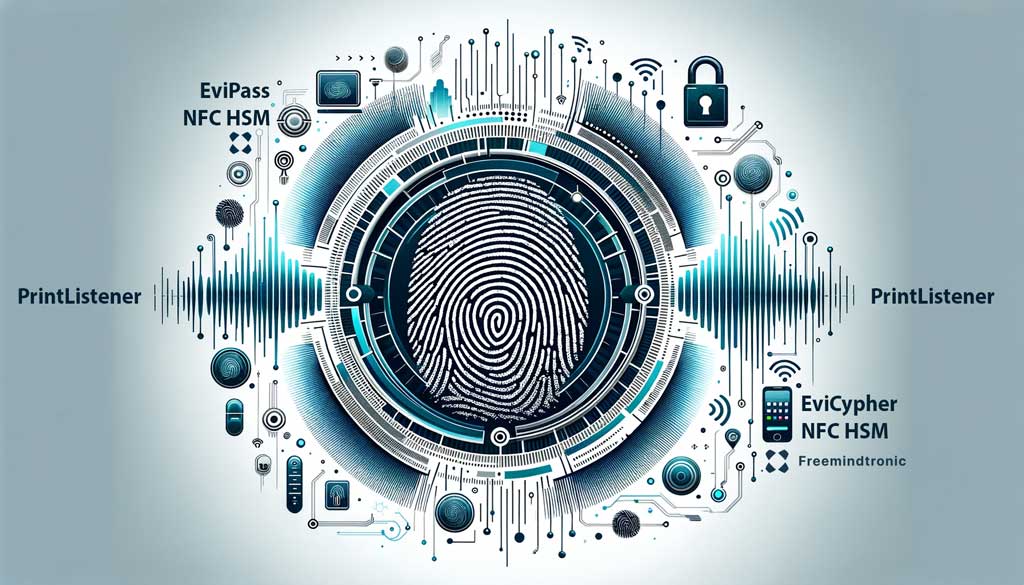
PrintListener technology concept with NFC security solutions.

PrintListener: The Sound of your Fingers can Reveal your Fingerprints

PrintListener emerges as a groundbreaking technology challenging the reliability of fingerprint security. By capturing the unique sound of finger friction on touchscreens, it enables the reproduction of fingerprints. This innovative approach sets PrintListener apart, highlighting its potential to redefine biometric security measures. As we explore its implications, the need for heightened awareness and protective strategies becomes evident.

Stay informed in our posts dedicated to Digital Security to follow its evolution thanks to our regularly updated topics

[bws_pdfprint display=’print’]Learn more through this Digital Security section on the new possibility of corrupting fingerprints written by Jacques Gascuel, creator of data security solutions. Stay informed and safe with our regular updates.

PrintListener: How this Technology can Betray your Fingerprints and How to Protect yourself

PrintListener revolutionizes the realm of Acoustic Analysis Attacks by honing in on the unique sound of finger friction on touchscreens. This novel approach allows for the replication of fingerprints, marking a significant advancement in the field. Unlike traditional techniques that broadly utilize sound to breach security, PrintListener’s methodical focus distinguishes it as a pioneering and distinct attack strategy. This specificity in exploiting fingerprint authentication systems through acoustic signals elevates PrintListener above conventional methods. As we delve deeper into PrintListener, understand the risks it poses to identity and data, and explore protective measures, this article serves as a crucial guide for safeguarding against such innovative threats.

What is PrintListener?

PrintListener is the result of a collaboration between researchers from Zhejiang University, the University of Illinois at Urbana-Champaign, and the University of Washington. They presented their technology at the ACM CCS 2022 conference, one of the most prestigious in the field of computer security. Their paper, titled “PrintListener: Fingerprinting Smartphones from Touchscreen Sound”, describes in detail the working and evaluation of PrintListener¹.

The technology exploits the friction noise of fingers on the screen, which reveals the features of fingerprints. By analyzing this sound with advanced algorithms, PrintListener can create fingerprint copies with high accuracy. You can download the officel document “PrintListener: Uncovering the Vulnerability of Fingerprint Authentication via the Finger Friction Sound“.

How can PrintListener attack fingerprint readers?

Fingerprint readers are increasingly common on smartphones, computers, or applications. They are supposed to offer a high level of security, by verifying the user’s identity from their unique fingerprint.

But PrintListener can fool these readers, by using the fingerprint copies it has generated. The researchers showed that their software could succeed in attacking up to 27.9% of partial fingerprints and 9.3% of full fingerprints in only five attempts, even at the highest security level¹.

Hackers could thus access your accounts, data, or services without your consent. They could capture the sound of your fingers from various sources, such as speakerphone calls, voice messages, or online games.

How to protect yourself against PrintListener?

PrintListener represents a serious threat to biometric security, which was until now considered infallible. To protect yourself against this vulnerability, you should adopt proactive security measures, such as:

  • Updating your antivirus, which could detect and block PrintListener or other malware.
  • Using headphones or earphones, to prevent the sound of your fingers from being captured by the microphone of your smartphone or computer.
  • Activating other authentication modes, such as PIN code or facial recognition, which are less prone to hacking.
  • Changing your passwords regularly, and using strong and different passwords for each account.

How to corrupt a fingerprint?

If PrintListener is not yet available to the public, there are other methods to corrupt a fingerprint. Some are simpler than others, but they all require a certain level of skill and equipment.

  • Making a mold. This involves reproducing the fingerprint of a person from an object they have touched, such as a glass, a door handle, or a keyboard. You then need to use a malleable material, such as clay, wax, or gelatin, to create a faithful imprint. This imprint can then be transferred to a rigid support, such as plastic or metal, to create a fake fingerprint.
  • Using a 3D printer. This involves scanning the fingerprint of a person from a photo, a video, or an optical sensor. You then need to use a 3D modeling software to create a digital model of the fingerprint. This model can then be printed in 3D with a conductive material, such as copper or silver, to create a fake fingerprint.
  • Modifying your own fingerprint. This involves changing the appearance of your fingerprint by using invasive or non-invasive techniques. The invasive techniques consist of injuring, burning, or cutting your finger to modify the lines and ridges of the fingerprint. The non-invasive techniques consist of sticking, painting, or tattooing your finger to mimic the fingerprint of another person.

These methods are more or less effective depending on the type of fingerprint reader used. Some readers are more sensitive than others to the temperature, pressure, conductivity, or depth of the fingerprint. You therefore need to adapt your method according to the reader to attack.

Statistics on fingerprint security

Fingerprint security is widely used in various domains, such as banking, healthcare, law enforcement, or travel. However, it is not flawless, and it can be compromised by different methods, such as PrintListener or others. Here are some statistics on fingerprint security that you should know:

These statistics show that fingerprint security is a popular and growing market, but also a vulnerable and risky one. Therefore, it is important to be aware of the potential threats and to take preventive measures to protect your identity and data.

Summary and further reading

In this article, we have explained what PrintListener is, how it works, how it can attack fingerprint readers, and how to protect yourself against it. We have also provided some statistics on fingerprint security that illustrate the importance and the challenges of this technology.

PrintListener is not the only method to corrupt fingerprint authentication. There are other methods, such as making a mold, using a 3D printer, or modifying your own fingerprint. These methods are more or less effective depending on the type of fingerprint reader used.

If you want to learn more about these other methods, you can read our article (Are fingerprint systems really secure? How to protect your data and identity against BrutePrint), in the Digital Security section of our website. You will find out how they work, what are their advantages and disadvantages, and how to prevent them.

Enhancing Security with EviPass NFC HSM and EviCypher NFC HSM Technologies

Secure Physical Secret Outsourcing

In the wake of vulnerabilities exposed by PrintListener, adopting EviPass NFC HSM and EviCypher NFC HSM technologies becomes crucial. These solutions physically externalize sensitive information like passwords, encryption keys, OTP keys, and enable AES-256 encryption of data and messaging via NFC HSM devices. Even if a device’s fingerprint security is compromised, externally stored secrets remain inviolable, safeguarding encrypted data and messages.

Summary and Conclusion

PrintListener has shed light on significant flaws within fingerprint authentication systems, underscoring the urgent need for enhanced security measures. The integration of EviPass NFC HSM and EviCypher NFC HSM technologies offers a robust solution, physically externalizing and encrypting sensitive information beyond the reach of acoustic fingerprint hacking. This approach not only fortifies biometric security but also ensures the integrity of encrypted data and communications, providing a comprehensive shield against emerging threats.

BitLocker Security: Safeguarding Against Cyberattacks

A visual representation of BitLocker Security featuring a central lock icon surrounded by elements representing Microsoft, TPM, and Windows security settings.

BitLocker Security — Windows encryption, recovery mode, TPM 2.0, physical attacks and cryptographic sovereignty — November 2026.

© 2026 Jacques Gascuel — Freemindtronic®. All rights reserved. Original editorial analysis and scientific positioning. Third-party research and vulnerability disclosures remain attributed to their respective authors.

BitLocker Security: Historical Reference, Vulnerabilities, TPM Attacks and Encryption (2006–2026)

[bws_pdfprint display=’print’]

BitLocker Security — express summary

At the volume level, BitLocker protects Windows data using AES encryption. Its effectiveness, however, depends on the complete chain of trust governing access to cryptographic keys, from the TPM and boot environment to recovery procedures and system memory.

On November 10, 2026, Microsoft disclosed two additional physical security bypass vulnerabilities: CVE-2026-97015 (CVSS 6.8) and CVE-2026-119832 (CVSS 5.9). These disclosures follow the public YellowKey vulnerability (CVE-2026-45585) in May 2026.

None of these disclosures establishes a mathematical break of AES. This guide explains the distinction between encryption strength and operational security, how to recover access after Windows updates, and how independent encryption and external secret management can complement BitLocker.

Immediate action: install applicable security updates, verify protection status and recovery credentials, and assess pre-boot authentication according to your physical threat model.

Reading parameters

Initial publication: February 10, 2024
Last updated: November 16, 2026
Language: EN
Complexity: Intermediate / expert
Editorial type: Living historical, scientific and technical cybersecurity reference
Main topic: BitLocker security
Secondary topics: TPM 2.0, WinRE, Secure Boot, recovery keys, physical attacks, AES and independent encryption.
Author: Jacques Gascuel, inventor and founder of Freemindtronic®.

Publication status

Documentary security analysis, not an independent laboratory qualification or product certification. Vulnerability ratings are attributed to their published records. No unpublished exploit or proprietary implementation is disclosed.

Editorial transparency — FM-AI-2025-11-SMD5 V1.1. This article distinguishes vendor disclosures, published scientific research, architectural analysis and editorial recommendations. AI-assisted technical illustrations are conceptual representations subject to human verification and validation. Their intellectual property rights, attribution and conditions of use are governed by the applicable provisions of the Freemindtronic AI Transparency Declaration.

Executive summary

Full-volume encryption reduces exposure when a device is lost, stolen or powered off. It does not guarantee confidentiality after the volume has been unlocked. The November 2026 disclosures reinforce the importance of evaluating authorisation, recovery, hardware trust and memory exposure separately.

Key points

  • Physical access is a prerequisite for the two newly disclosed November CVEs.
  • TPM + PIN reduces selected pre-boot risks but is not universal protection.
  • Recovery credentials must be protected independently.
  • Separately encrypted files may remain protected after a volume encryption bypass.

1. Latest BitLocker vulnerabilities — November 2026

The following selected disclosures are attributed to Microsoft. The scores are CVSS 3.1 base scores, not a universal assessment of organisational risk.

CVE Published CVSS 3.1 Weakness Access Privileges
CVE-2026-97015 10 Nov 2026 6.8 / Medium Heap memory overflow (CWE-122) Physical None
CVE-2026-119832 10 Nov 2026 5.9 / Medium Improper permissions Physical Low
CVE-2026-45585 (YellowKey) 19 May 2026 See advisory Security bypass Physical See advisory

Both November records describe low-complexity physical attacks without user interaction. CISA assessments dated November 10–11 recorded no known exploitation at that time; this is not proof that exploitation has never occurred.

Historical disclosures from 2022 and 2024

The original reference discussed CVE-2022-41099 and CVE-2024-38058. The historical text dated the disclosures to November 2022 and January 2024 and described manual administrative mitigation. Its associations with KB5012170 and KB5024487, respectively, and its historical release-date claims remain unverified. Consult MSRC for the actual affected products and applicable fixes; these legacy associations are not patch instructions.

Selected Windows version thresholds

Windows version CVE-2026-97015 CVE-2026-119832
11 26H2 26300.9711 26300.9974
11 26H1 28000.3231 28000.3501
11 25H2 26200.9711 26200.9974
11 24H2 26100.9711 26100.9974
11 23H2 22631.7652 22631.7711
10 22H2 19045.7807 19045.7846
10 21H2 19044.7807 19044.7846

Selected fixed-version thresholds from the vulnerability records, not a complete product or KB list. Verify applicable updates and servicing eligibility with Microsoft.

2. YellowKey — CVE-2026-45585

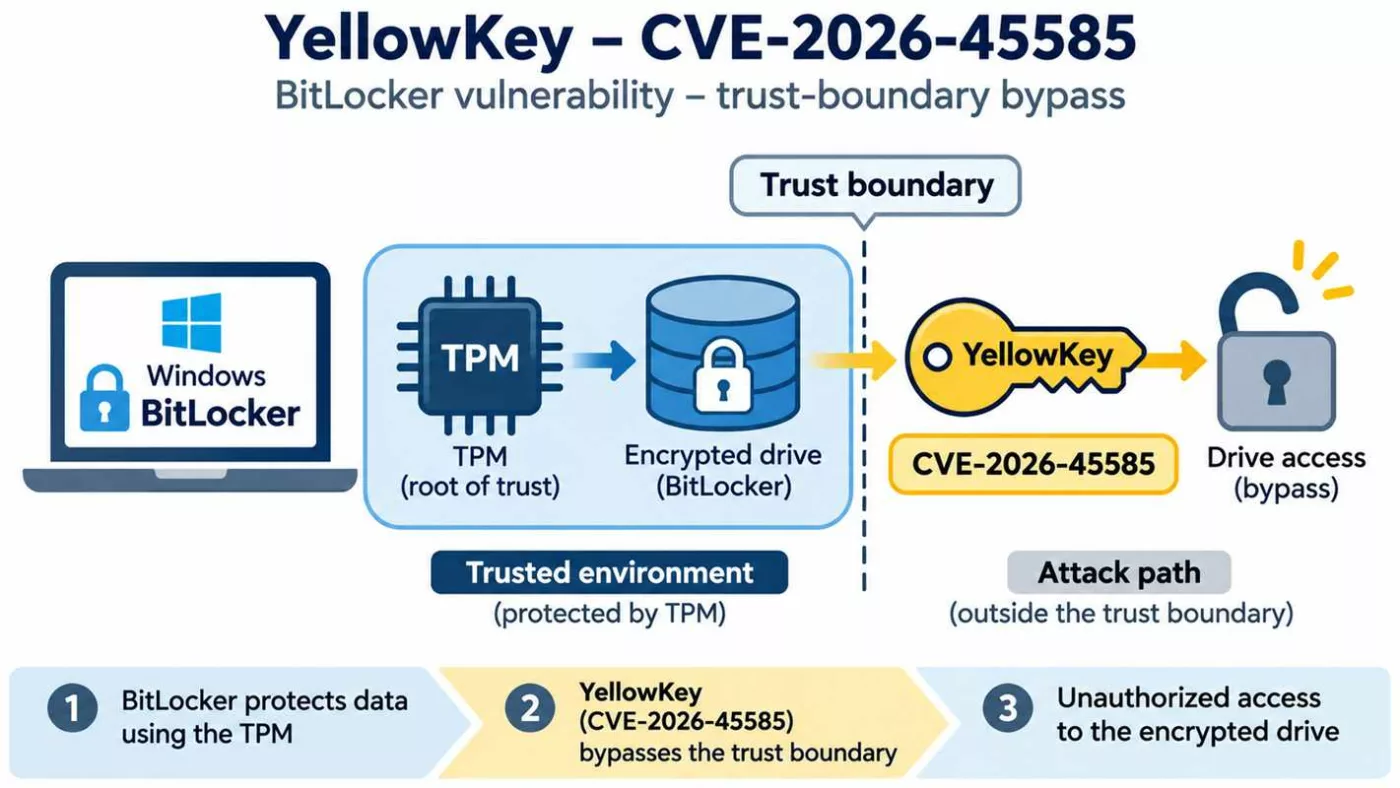
YellowKey CVE-2026-45585 vulnerability diagram showing a Windows BitLocker TPM protection trust-boundary bypass and unauthorized encrypted drive access.
YellowKey CVE-2026-45585: conceptual illustration of a BitLocker trust-boundary bypass enabling unauthorised access to encrypted data without breaking the AES encryption algorithm.

Microsoft published the YellowKey record on May 19, 2026 after a public proof of concept became available. The case concerns a security bypass associated with Windows recovery mechanisms. It illustrates why trusted recovery paths must be included in an encryption threat model.

Consult the current vendor advisory for updates and mitigation details. Microsoft identifies TPM + PIN as a mitigation for the documented scenario; claims of alternative variants should not be treated as established without reproducible evidence. A vulnerability alone does not establish intentional backdoor design.

Official CVE record · Microsoft advisory

Practical hardware-based mitigation: PassCypher NFC HSM, capable of generating secrets of up to 512 bits, can facilitate TPM + PIN adoption through independent hardware-based credential storage and automated input using EviKeyboard with InputStick or proprietary end-to-end encrypted EviBLE HID technology. See sovereign pre-boot authentication and YellowKey mitigation.

Historical context: The reference first published on 10 February 2024 is integrated into the thematic chapters below. Its 2025 recovery-guide revision is retained through the historical incident and configuration guidance. BitLocker also protects removable media and virtual drives; secure disposal depends on effective encryption and key custody.

3. BitLocker encryption architecture and trust boundaries

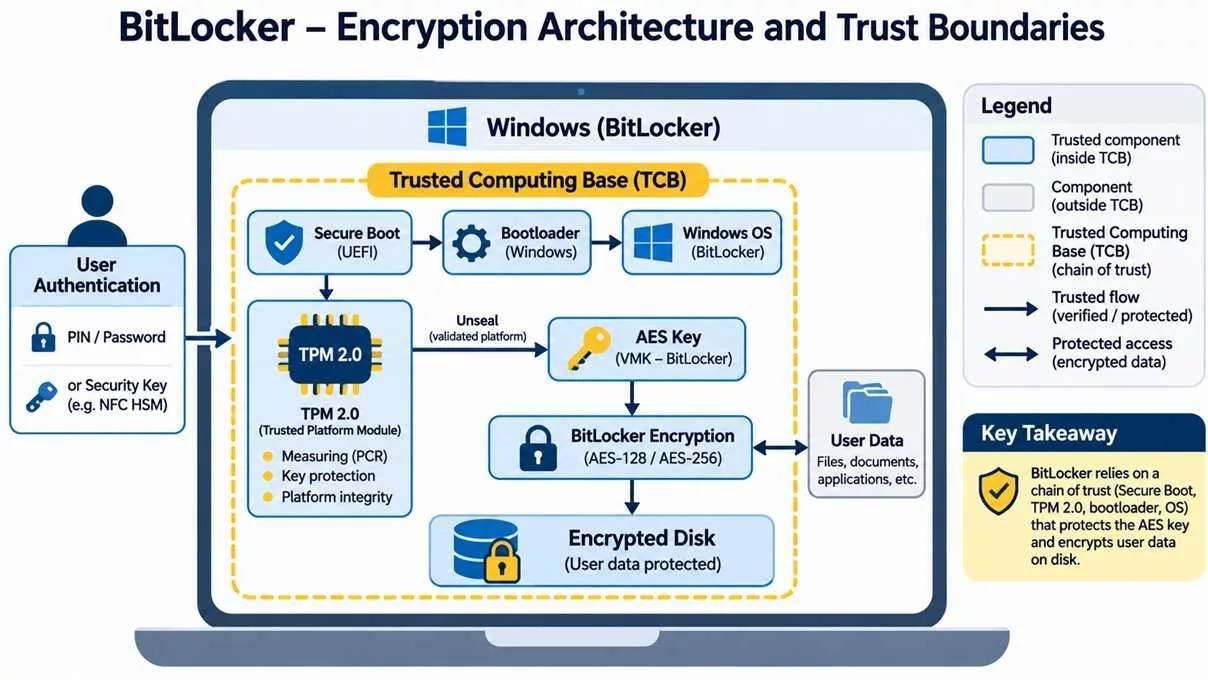
BitLocker encryption architecture diagram showing TPM 2.0, Secure Boot, Windows bootloader, AES-256 disk encryption and trusted computing boundaries.
BitLocker encryption architecture and trust boundaries: TPM 2.0, UEFI Secure Boot, Windows authentication, cryptographic key protection and AES-128/256 disk encryption. The diagram is conceptual; the VMK protects the FVEK, and external NFC HSMs are not native BitLocker protectors.

Architecturally, BitLocker encrypts volumes using AES, including XTS-AES configurations. The Full Volume Encryption Key (FVEK) encrypts volume data; the Volume Master Key (VMK) protects the FVEK. Key protectors govern access to the VMK. A TPM can bind key release to platform measurements and additional authentication conditions.

TPM 2.0 is not a general-purpose RAM protection mechanism. After unlocking, cryptographic material may be available in host memory. Secure Boot authenticates boot components; measured boot records measurements. These functions are complementary, not interchangeable.

Platform measurements + configured authentication
                 ↓
       Key protector authorisation
                 ↓
         Volume Master Key (VMK)
                 ↓
      Full Volume Encryption Key (FVEK)
                 ↓
          Encrypted volume data

This simplified diagram represents the normal unlocking path, not every recovery or protector configuration.

4. Physical attacks, TPM and forensic risks

TPM 1.2 and TPM 2.0 also support cryptographic identity and signature operations. Biometric authentication may use TPM-backed credentials, but this does not mean that biometric templates or all disk keys reside inside the TPM.

TPM 1.2 and TPM 2.0 provide protected key operations, random number generation and signatures. The latter extends algorithm support and authorisation capabilities; neither directly controls host RAM. Platform compatibility and implementation quality remain important.

4.1 Cold boot and memory remanence

Physical controls include locks, safes and secure storage. Hardware and software acquisition tools may be costly or difficult to obtain, although some attacks use inexpensive equipment. These practical constraints are not guarantees of confidentiality.

Residual RAM contents can expose active encryption material on susceptible devices. TPM anti-dictionary protections do not prevent extraction of keys already present in memory. Prefer complete shutdown before loss of physical control and evaluate platform-specific memory protections.

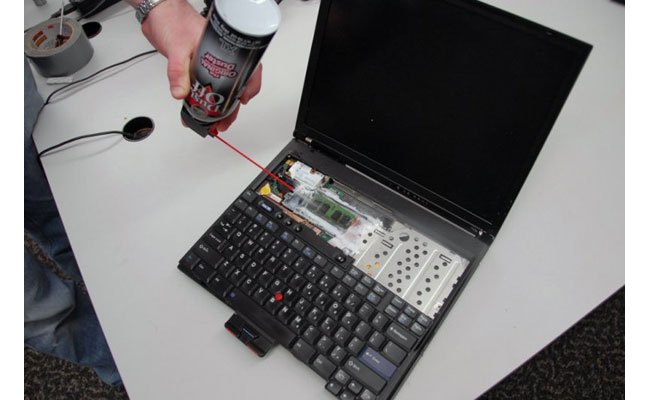
Cold boot attack illustration
Historical illustration: memory remanence and physical access.


Cold Boot research demonstrated that residual DRAM contents decay over time and that cooling can prolong retention on susceptible hardware. Live RAM analysis is a related but distinct forensic technique. Capacity to recover usable keys depends on memory state, equipment and platform protections. Firmware-supported Memory Overwrite Request (MOR) can reduce exposure; neither a startup PIN nor TPM lockout invalidates keys already recovered.

Scientific reference: Halderman et al. (2008).


4.2 DMA attacks

DMA-capable peripherals can threaten host memory on vulnerable systems. Enable Kernel DMA Protection where supported and restrict untrusted peripherals.

Thunderclap DMA attack diagram
Historical illustration: Thunderclap and DMA attack surfaces.

Thunderclap (2019) examined IOMMU isolation across Windows, Linux and macOS. FireWire, Thunderbolt and external PCIe require appropriate port and DMA policies; PCILeech is a historical example of a memory acquisition tool. Encrypting external storage protects its contents, not the host against malicious DMA. See Thunderclap research.

4.3 TPM communication and faulTPM

Published research has demonstrated interception of discrete TPM communications on selected systems and attacks against specific firmware TPM implementations. These findings do not imply that every TPM is vulnerable. The Raspberry Pi Pico demonstration discussed in the original article illustrates the importance of hardware-specific qualification.

Discrete TPM buses, SRTM and firmware TPMs

TPM-only mode allows normal unattended unlocking. Historically, discrete TPM bus interception using inexpensive hardware has illustrated why physical access matters. Stacksmashing’s Raspberry Pi Pico demonstration used a susceptible laptop and Dislocker; it is distinct from the Bus Pirate, a multiprotocol electronic interface supporting SPI, I2C, UART, 1-wire, 2-wire, 3-wire and HD44780 LCD interfaces. Results must not be generalised to every TPM or bus.

Separately, SRTM power-state and measurement attacks and AMD faulTPM research challenge different trust assumptions. Historical references to Intel and Dell platforms require model-specific evidence. Physical isolation, tamper-evident seals, protected bus design (including hardware-specific SPI access controls or firewalls where available), firmware updates and appropriate pre-boot authentication reduce selected risks. Intel CSME and remote attestation may contribute to platform integrity assessment, but are not universal countermeasures.

4.4 TPM implementation defects

CVE-2023-1017 and CVE-2023-1018 concern memory-boundary defects in TPM implementations, not inherently physical fault injection. Consult the hardware vendor for affected firmware and fixes.

Historical reports also identified affected Lenovo systems with Nuvoton TPM implementations. Verify the actual firmware and vendor advisory rather than assuming that all devices share the defects or that BitLocker keys can always be extracted.

4.5 Hardware debugging and fault injection

Hardware debug interfaces such as Intel DCI and fault injection can create additional attack surfaces under specific platform conditions. Disable unauthorised debugging and assess firmware protections. No universal BitLocker decryption capability is established by these attack categories.


Fault injection explores voltage, temperature, radiation and electrical glitching effects on hardware. In contrast, Intel DCI debugging can expose live memory on suitably configured platforms, potentially including the VMK. On a suitably exposed platform, CPU halt and debug-based memory acquisition may enable forensic decryption without the Windows login password or recovery password; this remains configuration-dependent. These are distinct from TPM command-parser defects. Fault-resistant hardware and restricted debug access are relevant controls; remote attestation can report selected measurements but cannot establish immunity.

5. How to fix BitLocker Recovery Mode after a Windows update

Windows updates, firmware changes and changes to measured boot state can trigger recovery. The July 2024 update incident remains a useful historical example. Do not assume a particular PCR change is the cause on every device.

Historical case: July 2024 recovery incident

KB5040442 was associated in the historical article with unexpected recovery prompts. The original explanation attributed this to PCR4, but that causal attribution is unverified. Firmware, bootloader and hardware changes can alter measured state. Review release notes, prepare recovery backups and avoid removing PCR measurements simply to suppress prompts. The incident illustrates the importance of update preparation and vendor communication.

Recovery procedure

  1. Record the recovery key identifier shown on screen.
  2. Retrieve the matching 48-digit recovery password from your authorised backup or organisation.
  3. Enter it on the trusted recovery screen.
  4. After booting, verify Windows update status and BitLocker protection.
  5. If recovery repeats, consult the device vendor or IT administrator before changing firmware, TPM or PCR settings.

Do not clear the TPM, remove protectors or weaken PCR policy merely to suppress recovery prompts. If you cannot recover the credentials, there is no supported universal method to decrypt an intact protected volume.

Microsoft account recovery keys (if backed up to that account).

6. Secure configuration and verification

Consider hardware and software compatibility before deployment. In addition, choose used-space-only or full-volume encryption according to whether previously stored data may remain in unused sectors. For existing devices, assess residual data before selecting the faster option.

Use a supported Windows edition and servicing channel. Full BitLocker management is available on supported Pro, Enterprise and Education editions; qualifying Home devices may offer Device Encryption. Select encryption and protector policies before deployment, preserve recovery credentials and use TPM + PIN where physical risks justify it.


Activation and encryption choices

Check TPM status in Windows Security or TPM management. If required, consult the manufacturer before enabling TPM in UEFI (entry keys can include F2, F12, Del or Esc) or updating firmware. Choose supported protectors for the volume type: TPM + PIN, startup key, password or recovery protector as applicable. Certificate-based protectors have specialised removable-drive uses.

Choose AES-CBC or XTS-AES according to compatibility requirements; XTS-AES is preferred for modern fixed volumes. Evaluate AES-128 versus AES-256, hardware acceleration and performance. Open Manage BitLocker in Control Panel, select the volume, back up recovery credentials and follow the activation wizard. Encryption duration varies with volume size and data.

Verification commands

Run these read-only commands from an elevated PowerShell session:

Get-BitLockerVolume
Get-Tpm
Confirm-SecureBootUEFI
reagentc /info
winver

Verify that protection is on, identify protector types, check the installed Windows version and confirm WinRE status. Avoid publishing recovery passwords or identifying key material in diagnostic logs.

7. Freemindtronic — independent cryptographic protection

Externalizing credential storage and separately encrypting sensitive data introduces additional trust boundaries. EviPass NFC HSM and PassCypher can complement credential management. EviCypher NFC HSM and DataShielder provide a separate encryption approach. EviKeyboard BLE provides a complementary credential input mechanism.

These technologies are not patches for BitLocker CVEs. External storage of secrets does not itself guarantee that credentials entered into a compromised host remain confidential. Independently encrypted files can remain protected after BitLocker is bypassed if their keys and plaintext are not accessible to the attacker.


PassCypher NFC HSM, EviPass, EviKeyboard and EviBLE

The original account describes password-free contactless credential management and smartphone-assisted remote input into BIOS or disk-startup fields, where supported by the host. The historical USB HID analysis distinguishes the USB controller, chipset, processor and TPM; input buffers along this path may expose secrets. Product-specific transport and pairing properties require verification for the deployed version.

Contactless credential storage and smartphone-assisted input can reduce reliance on locally stored secrets. EviKeyboard BLE can deliver supported pre-boot credentials through USB HID where firmware accepts the keyboard. The historical article describes AES-128 CBC for its BLE transport; this product-specific claim requires version-specific verification. Host USB buffers, chipset and input processing may still expose credentials in memory. Physical acquisition requires suitable access and equipment, while memory volatility can limit recovery.

PassCypher’s historical features include sandboxed URL checks, anti-typosquatting, password integrity checks and Browser-in-the-Browser (BTIB) phishing protections. These reduce selected risks but cannot eliminate deception. High-entropy generated passwords must comply with the actual protector’s length and character restrictions; a generated secret exceeding 256 bits does not make a BitLocker PIN a 256-bit key.

High-entropy secret generation: up to 512 bits

PassCypher NFC HSM can generate cryptographic secrets of up to 512 bits, exceeding the nominal key length of AES-256. A uniformly random 512-bit secret has a theoretical search space of 2512 possibilities, compared with 2256 for a 256-bit key.

This generation capacity enables users to create highly unpredictable authentication secrets without relying on human memory or predictable password construction.

However, BitLocker imposes its own authentication format, length and character restrictions. PassCypher can generate secrets adapted to these constraints, including complex enhanced startup PINs. The effective entropy depends on the accepted character set, secret length and generation method.

This capability does not transform AES-256 into AES-512 or provide BitLocker with 512-bit encryption strength.

External hardware-based BitLocker credential management

PassCypher NFC HSM enables independent hardware-based custody of BitLocker startup PINs and recovery passwords. Consequently, users can manage these sensitive credentials outside the computer they protect, without requiring memorisation of complex authentication secrets.

Freemindtronic provides two complementary credential delivery approaches:

  • EviKeyboard with InputStick: smartphone-assisted credential input through an external USB HID keyboard emulator, including supported BIOS, UEFI and BitLocker pre-boot environments.
  • EviBLE HID: Freemindtronic’s proprietary end-to-end encrypted Bluetooth Low Energy secure keyboard emulation technology for credential delivery through compatible endpoints.

These approaches must be distinguished from native operating system Bluetooth keyboard pairing. Pre-boot operation requires a compatible receiving interface recognised by the target firmware and BitLocker environment.

The 48-digit BitLocker recovery password can also be managed independently within the NFC HSM. Its native format and cryptographic properties remain defined by Microsoft.

Mitigating YellowKey through sovereign pre-boot authentication

Microsoft identifies TPM + PIN as a mitigation against the documented YellowKey vulnerability (CVE-2026-45585).

By combining external hardware-based secret management with automated credential input, PassCypher NFC HSM, EviKeyboard and EviBLE can facilitate the adoption of stronger pre-boot authentication without the inconvenience of memorising complex PINs.

Cryptographic sovereignty and defence in depth. Rather than replacing BitLocker or its trusted platform module, Freemindtronic’s technologies introduce an independent hardware-based credential custody boundary. This approach supports stronger authentication configurations while maintaining user control over externally managed secrets.

The mitigation against YellowKey derives from the TPM + PIN configuration documented by Microsoft, rather than from an increase in AES key length.

The effectiveness of this architecture against CVE-2026-97015 and CVE-2026-119832 remains subject to specific technical qualification. External credential custody and encrypted transmission do not prevent every attack against a compromised host or recovery environment. Applicable Microsoft security updates remain essential.

DataShielder and EviCypher

The historical design describes AES-256 independent data encryption, randomly generated and segmented keys, external HSM/NFC HSM custody and transient operational key destruction, including HSM PGP contexts. These mechanisms can reduce exposure to TPM bus interception and fault injection when the independent trust boundary remains intact. Key erasure effectiveness and plaintext exposure require implementation-specific assessment; no near-zero recovery probability is established here.

Post-quantum algorithms do not inherently resolve memory corruption, access control defects or insecure key release.

Historical timeline of BitLocker security (2006–2026)

BitLocker emerged with Windows Vista in 2006–2007. Since then, its threat model has evolved from disk theft towards hardware, firmware, recovery and identity attacks. The following selected milestones distinguish product evolution from security research.

Period Milestone Security significance
2006–2007 Windows Vista Initial BitLocker deployment.
2008 Halderman et al. — Lest We Remember: Cold Boot Attacks on Encryption Keys (2008) Memory remanence challenges data-at-rest assumptions.
2009 Windows 7 / BitLocker To Go Removable storage protection.
2012–2013 Windows 8 / 8.1 UEFI Secure Boot and wider device encryption.
2015 Windows 10 version 1511 XTS-AES support.
2018–2019 Meijer and van Gastel — Self-encrypting deception, IEEE S&P 2019 SSD firmware becomes a critical trust dependency.
2021 Windows 11 TPM 2.0 baseline on supported hardware.
2022–2023 BlackLotus and TPM research Boot trust and hardware implementation risks.
2024 Freemindtronic reference; July recovery incident; BitPixie research Operational recovery and downgrade exposure.
2025 BitUnlocker Recovery-path trust defects.
2026 YellowKey; academic survey; Secure Boot CA transition; November CVEs Continuing evolution of attack surfaces.

Further reading: Microsoft — BitLocker overview and Kenchaiah et al. — The Hardware Isolation Gap, Electronics 15(9), 1959 (6 May 2026). This is a selected chronology, not an exhaustive CVE register.

BitUnlocker (2025): Windows Recovery Environment vulnerabilities

Microsoft researchers Netanel Ben Simon and Alon Leviev presented BitUnlocker at Black Hat USA 2025 and DEF CON 33. Their findings concern the conditions under which recovery software can access a protected volume. Consequently, a trusted recovery environment must be evaluated as part of the security boundary.

CVE Affected trust decision
CVE-2025-48800 Authorisation of scheduled recovery operations
CVE-2025-48003 Trust verification of recovery applications
CVE-2025-48804 Integrity verification of recovery boot images
CVE-2025-48818 Boot configuration and recovery decryption authorisation

Mitigation and relevance to YellowKey

All four discoveries received fixes in July 2025. Moreover, Microsoft recommends TPM + PIN and secure boot-component version enforcement (REVISE). YellowKey is a later disclosure involving recovery trust; however, common attack surfaces do not establish a shared root cause. Source: Microsoft STORM — BitUnlocker (13 August 2025).

BlackLotus, BitPixie and BitLocker downgrade attacks

Administrative UEFI passwords and restriction of legacy boot options can complement revocation policy. However, they do not replace supported security updates or validated recovery media.

BlackLotus and UEFI bootkits

BlackLotus illustrates how a vulnerable signed boot component can undermine Secure Boot. CVE-2022-21894 concerns a Secure Boot bypass, whereas CVE-2023-24932 underlies subsequent revocation guidance. Neither is a mathematical attack against AES. See Microsoft — BlackLotus investigation guidance (2023).

BitPixie and REVISE

BitPixie research highlighted risks from older vulnerable boot components in configurations that still trust them. In particular, installing a newer boot manager does not necessarily revoke an older signed version. Therefore, version enforcement and revocation are distinct from ordinary patch installation. See MSRC — CVE-2023-21563 and Microsoft KB5025885 — Secure Boot revocation guidance.

Historical CVE-2023-21563 analysis highlights physical access, vulnerable boot components and potential key exposure on affected Windows configurations. Apply applicable revocations, restrict legacy boot paths and secure UEFI administration. Validate recovery media before enforcement; remote attestation can supplement integrity monitoring.

Evil Maid attacks

An unattended device can be altered before its owner returns. For example, a compromised boot path could attempt to capture later authentication input. Secure Boot, measured boot, physical custody and tamper evidence reduce selected risks. However, none alone guarantees integrity against every physical adversary.

Secure Boot certificate expiration and BitLocker in 2026

Microsoft is transitioning from its 2011 Secure Boot certificate hierarchy to replacement certificates issued in 2023. This transition affects boot trust rather than AES encryption keys.

Legacy certificate Expiration period
Microsoft Corporation KEK CA 2011 June 2026
Microsoft UEFI CA 2011 June 2026
Microsoft Windows Production PCA 2011 October 2026

Operational continuity and recovery

Expiration does not automatically decrypt a volume or prevent a previously working machine from booting. Nevertheless, systems that fail to receive updated trust material may lose access to future boot protections. Administrators should inventory firmware compatibility, recovery credentials, Secure Boot trust databases and revocation status. Before deploying revocations, test recovery media and maintain a supported recovery path.

Official guidance: Microsoft — Secure Boot certificate expiration and CA updates and Microsoft KB5025885 — Secure Boot revocation guidance.

Scientific research: the hardware isolation gap in BitLocker forensics

The review The Hardware Isolation Gap: A Systematic Survey of BitLocker Forensics in the TPM 2.0 Era, published on 6 May 2026 in Electronics, examines research from 2006 to 2025. It provides a useful synthesis of changing forensic access opportunities as BitLocker became more closely integrated with platform hardware.

How to interpret forensic evidence

Compare the device state, TPM implementation, protector, firmware, attacker access and evidence-acquisition method before generalising any result. In particular, reported success rates in a research corpus are not universal probabilities for real-world devices. Furthermore, a survey is not an independent reproduction of each experiment, and its historical coverage predates subsequent 2026 disclosures.

Reference: Kenchaiah et al. — The Hardware Isolation Gap, Electronics 15(9), 1959 (6 May 2026).

Forensic preservation

In authorised investigations, preserve chain of custody and document the initial power state, encryption status, evidence handling and every state change. A running system and a powered-off encrypted device present different evidentiary risks. Avoid uncontrolled changes that could destroy volatile evidence or trigger recovery.

Self-encrypting SSDs, TCG Opal and Microsoft eDrive

Self-encrypting drives (SEDs) perform cryptographic operations in storage hardware. TCG Opal defines storage security management capabilities, while Microsoft eDrive historically enabled compatible hardware encryption integration. However, a hardware encryption claim does not establish the security of firmware or authentication.

Research disclosed in 2018 and published at IEEE Security and Privacy in 2019 identified serious defects in selected commercial SSDs. The findings also challenged historical BitLocker configurations that delegated encryption to the drive. See Meijer and van Gastel — Self-encrypting deception, IEEE S&P 2019.

Software versus hardware encryption

Mode Trust dependency Verification
Software BitLocker Windows cryptographic implementation and host key handling Check reported encryption method and policy.
Hardware encryption SSD firmware, access enforcement and drive lifecycle Check model, firmware and vendor advisories.

Microsoft subsequently advised reviewing hardware encryption policy. Changing a policy does not necessarily migrate an existing encrypted volume. Therefore, plan any supported migration with backups and recovery validation. See Microsoft ADV180028 — self-encrypting drives.


Credential theft and social engineering

Impersonation of Microsoft or technical support can induce a user to disclose a recovery password or credential. Verify requests independently, train users and report suspicious activity. TPM lockout limits applicable authentication attempts, not disclosure of valid credentials.

BitLocker recovery key sovereignty and lifecycle management

Recovery passwords can also be printed or saved in a protected file or encrypted external drive. The historical article mentioned Azure Key Vault as a possible custom custody service; it is not a standard native BitLocker recovery escrow destination. Any such integration requires separate access controls and recovery validation.

The 48-digit recovery password constitutes an alternative access mechanism. Accordingly, its custody can be as important as the choice of AES key length. Device Encryption may automatically escrow recovery information under supported account or organisational configurations.

Custody model Benefits Risks
Microsoft account Convenient account-based recovery Account compromise or loss of access.
Microsoft Entra ID / AD DS Managed organisational recovery Privileged administrator access and directory compromise.
Offline controlled backup Independent custody Loss, theft or insufficient redundancy.
Separate application encryption Independent confidentiality boundary Additional key lifecycle and plaintext exposure risks.

Offline options include a protected file, removable medium or printed copy. An organisation may separately manage protected escrow through a key-management service such as Azure Key Vault, subject to its own integration and access controls; this is not presented as a native BitLocker backup destination. Separate application encryption is an additional boundary, not a recovery-password custody model.

Recovery lifecycle

Maintain an inventory of recovery identifiers without publishing secrets. Additionally, restrict retrieval, log authorised access, validate backups and rotate exposed recovery protectors through supported procedures. Separate recovery credentials from the device they protect. For organisations, document delegation, revocation and disaster recovery. See Microsoft — BitLocker recovery process.

BitLocker sleep, hibernation and shutdown security

Physical risk changes with the power state. For example, locking the Windows desktop does not relock the system volume. Likewise, sleep or Modern Standby can retain sensitive material in memory.

State Security consideration
Running / locked Volume normally remains unlocked.
Sleep / Modern Standby RAM may retain active keys.
Hibernation Memory state is saved to storage; protection depends on configuration and resume authentication.
Full shutdown Active keys normally cease to be available, subject to residual memory and platform-specific risks.
Fast Startup Hybrid shutdown differs from a full shutdown.

For sensitive travel or unattended equipment, favour a validated shutdown or appropriately protected hibernation policy. Furthermore, assess DMA protection and pre-boot authentication according to the actual platform. Source: Microsoft — BitLocker countermeasures.

BitCracker, GPU password guessing and TPM anti-hammering

GPU acceleration can reduce the cost of testing guesses against certain password-protected encryption metadata. BitCracker is a research example of this attack class. However, password guessing is not equivalent to brute-forcing the full AES key space, and feasibility depends on protector type, entropy and derivation costs. See BitCracker research project.

TPM anti-hammering constrains applicable hardware authorisation attempts. In contrast, offline guessing against extractable password-protected material can have different constraints. Therefore, use suitable high-entropy credentials and do not equate a startup PIN with a disk encryption key. Artificial intelligence may prioritise likely guesses, but it does not eliminate cryptographic search complexity.

Post-quantum security: AES-128, AES-256 and TPM algorithms

Grover’s algorithm provides a theoretical quadratic advantage for ideal unstructured search. Thus, AES-256 offers a larger nominal security margin against quantum key search than AES-128. However, logical circuit depth, error correction and physical resources prevent interpreting this as a practical present-day attack.

Shor’s algorithm instead concerns mathematical problems underlying RSA and elliptic-curve cryptography. Consequently, consider signatures, attestation and key establishment separately from symmetric volume encryption. TPM 2.0 is not inherently a post-quantum specification.

Limits of post-quantum protection

XTS-AES protects storage confidentiality but is not a general authenticated-encryption construction. Moreover, replacing public-key algorithms with PQC cannot repair unsafe recovery authorisation, memory corruption or credential theft. References: NIST FIPS 197 — AES, NIST SP 800-38E — XTS-AES and NIST — Post-Quantum Cryptography.

Permanent BitLocker attack taxonomy and countermeasure matrix

The table separates attack targets from countermeasures. These measures reduce specific risks rather than guaranteeing immunity. No demonstrated mathematical AES break is implied by the listed practical attacks.

Attack family Target / prerequisite Defensive focus
Cold boot / RAM analysis Residual or live memory Power-state policy and physical custody
DMA / Thunderclap Accessible memory via peripherals IOMMU, DMA policy and port control
TPM bus interception Exposed discrete TPM communications Pre-boot authentication and platform assessment
faulTPM Specific firmware TPM implementation Vendor updates and hardware assessment
Fault injection / Intel DCI Physical hardware or debug interface Disable unauthorised debug; hardware assurance
BlackLotus / BitPixie Boot integrity or rollback Revocation and secure version enforcement
BitUnlocker / YellowKey Recovery trust Supported updates, WinRE and protector policy
Evil Maid Unattended device Custody, boot integrity and tamper evidence
Phishing / recovery theft User or escrowed credentials Access governance and education
SSD firmware defects Delegated storage encryption Firmware assurance and software mode assessment
GPU guessing Weak password protector Entropy and protector selection
Quantum search Theoretical cryptographic search Algorithm agility and security margin

Editorial change log and evidence policy

10 February 2024: initial publication, as recorded by the author. 2024–2025: historical revisions preserved in the supplied corpus. 16 November 2026: updated vulnerability review, historical timeline, forensic literature, boot trust, recovery sovereignty, SSD security and quantum analysis.

Historical material has been consolidated into the relevant thematic chapters; outdated technical claims are qualified in context. The reference distinguishes vendor advisories, research reports and editorial analysis. It does not represent a complete vulnerability inventory or independent experimental qualification.

8. Limits, evidence and scope of validity

The November vulnerability descriptions do not establish the exact exploit path, VMK extraction, TPM compromise or the ability to bypass a startup PIN. CVSS ratings describe standardised impact and prerequisites; physical exposure must be evaluated in context.

This publication does not claim independent reproduction of the 2026 vulnerabilities, universal resistance of complementary products, or certification of any device configuration.

9. Conclusion

Overall, BitLocker remains a useful defence for data at rest. Its security must be evaluated across the complete authorisation and recovery chain. Maintaining supported software, securing pre-boot authentication and recovery credentials, and applying independent encryption where justified provide complementary layers of protection.

Breaking an encryption algorithm is not necessary when the mechanism that authorizes decryption can be compromised.

11. Technical glossary

AESDefinition
Advanced Encryption Standard.
XTS-AESDefinition
Storage encryption mode designed for data units on disks.
TPMDefinition
Trusted Platform Module: protected cryptographic operations and platform measurements.
PCRDefinition
Platform Configuration Register: records measured state.
VMKDefinition
Volume Master Key: protects the FVEK.
FVEKDefinition
Full Volume Encryption Key: encrypts volume data.
WinREDefinition
Windows Recovery Environment.
DMADefinition
Direct Memory Access.
CVSSDefinition
Common Vulnerability Scoring System.
HSMDefinition
Hardware Security Module.
PQCDefinition
Post-quantum cryptography.
TCBDefinition
Trusted Computing Base: components on which a security property depends.
REVISEDefinition
Secure version enforcement for critical boot components.
DBXDefinition
UEFI Secure Boot forbidden signature database.
SEDDefinition
Self-encrypting drive.
IOMMUDefinition
Input/output memory management unit, used to constrain DMA.
SRTMDefinition
Static Root of Trust for Measurement.
SVNDefinition
Security version number used in rollback prevention.
EscrowDefinition
Controlled custody of recovery information.
GroverDefinition
Quantum algorithm providing a theoretical quadratic search advantage.

12. Frequently asked questions about BitLocker security

CVE-2026-97015 and CVE-2026-119832 are physical security bypass vulnerabilities disclosed November 10.

No cryptographic break of AES is established by these disclosures.

CVE-2026-45585 is a publicly disclosed security bypass. Consult the Microsoft advisory.

Generally no. Apply security updates and verify protection instead.

No. It mitigates selected pre-boot risks.

Yes, provided independent keys and plaintext remain inaccessible to the attacker.

BitLocker is an encryption feature included in Microsoft Windows. It protects your data by encrypting the entire disk, making the protected volume unreadable without valid unlocking material. See the architecture chapter for TPM and key protectors.

BitLocker can encrypt internal hard drives, external USB drives (using BitLocker To Go), and even virtual hard drives (VHD). It is a versatile solution for securing various types of storage.

Eligible Windows Home devices may support Device Encryption.

Performance varies with workload and hardware. AES-NI acceleration can reduce overhead.

To activate BitLocker on Windows 11, go to Settings > Privacy & Security > Device Encryption. If the option isn’t available, search for Manage BitLocker in the Control Panel. Follow the instructions to enable BitLocker on the desired drive.

To deactivate BitLocker, navigate to Settings > Privacy & Security > Device Encryption > Manage BitLocker. Select the drive you want to decrypt and choose Turn off BitLocker. Keep in mind that this process will decrypt your data and may take some time.

Automatic encryption depends on device eligibility and setup/account conditions.

BitLocker may request a recovery key if a Windows update changes the system configuration or boot files. To prevent this, ensure that you save your recovery key securely and update your firmware and drivers.

You can retrieve your BitLocker recovery key from:

Your Microsoft account (if backed up there)

A USB flash drive (if you saved it there)

A printed copy you stored securely

Your organisation’s IT department if using a company-managed device

There is no supported universal recovery bypass; vulnerabilities can nevertheless bypass protection in specific configurations.

Ensure you have the correct recovery key. If the drive is inaccessible, you may use BitLocker repair tools like the repair-bde command in Windows to attempt data recovery.

BIOS updates or hardware changes can trigger BitLocker recovery mode. Ensure you have your recovery key before making such changes. Afterward, re-enable BitLocker to restore normal functionality.

BitLocker primarily uses AES (Advanced Encryption Standard) with 128-bit or 256-bit key lengths, depending on your configuration. AES-256 offers stronger encryption for highly sensitive data.

BitLocker protects data from unauthorised access but does not prevent malware infections. Use antivirus software alongside BitLocker for comprehensive protection.

Yes, BitLocker supports multi-factor authentication by combining a TPM with a PIN or a startup key on a USB drive.

Encryption supports compliance but does not by itself establish GDPR compliance.

BitLocker encrypts data using AES, which prevents unauthorised access even if the physical drive is removed. With a TPM and PIN, the encryption key remains secure.

Yes, BitLocker can be used without a TPM by enabling the “Allow BitLocker without a compatible TPM” policy and using a password or USB startup key for authentication.

No, BitLocker is a Windows-exclusive feature. However, tools like Dislocker can be used on Linux or Mac to access BitLocker-encrypted drives.

To use BitLocker, you need:

A compatible version of Windows (Pro, Enterprise, or Education)

A TPM 1.2 or 2.0 chip (optional)

A modern processor with encryption acceleration for optimal performance

Yes, BitLocker To Go is specifically designed to encrypt external drives like USB sticks and portable hard drives.

Recent vulnerabilities include:

CVE-2023-1017 and CVE-2023-1018 affecting TPM 2.0

Risks from physical attacks like Cold Boot or Bus Pirate attacks

Ensure regular firmware updates and use multi-factor authentication to mitigate these risks.

If no valid protector remains available, there is no supported universal recovery method. Maintain independent, verified backups.

Updates for these vulnerabilities include TPM firmware patches that address buffer overflow risks. Regularly updating your TPM firmware ensures protection against these and other emerging threats.

Updating your TPM firmware helps mitigate recent vulnerabilities like CVE-2023-1017 and CVE-2023-1018, ensuring your device maintains optimal security against physical and software-based attacks.

External credential storage does not guarantee that input is never exposed on a compromised host.

The historical product description specifies AES-256 credential encryption and NFC-enabled access. Protection after device loss depends on the deployed pairing, authentication and key custody controls. See the product analysis.

Yes, PassCypher is designed to work seamlessly with tools like DataShielder and EviCypher, creating a comprehensive security ecosystem for protecting sensitive data.

DataShielder provides a separate AES-256 encryption layer under independent key custody. See the architectural analysis and limitations.

Independent keys and plaintext may still be exposed during active processing depending on implementation.

Yes, DataShielder supports encryption for external drives, adding an additional layer of security to portable storage devices encrypted with BitLocker.

Yes. An older trusted boot component may restore a vulnerable path unless applicable revocations and version enforcement are deployed.
Not automatically. Nevertheless, outdated trust material can restrict future boot security updates.
No. Its security depends on the actual drive firmware and authentication implementation.
Not necessarily. A locked session usually leaves the operating system volume unlocked.
No practical quantum break is established here. AES-256 offers a greater theoretical search margin; public-key migration is a separate issue.
The authorised owner or organisation should select a custody model, restrict access and validate recovery backups.

How the attack against Microsoft Exchange on December 13, 2023 exposed thousands of email accounts

Digital shield by Freemindtronic repelling cyberattack against Microsoft Exchange

How to protect yourself from the attack against Microsoft Exchange?

The attack against Microsoft Exchange was a serious security breach in 2023. Thousands of organizations worldwide were hacked by cybercriminals who exploited vulnerabilities in Microsoft’s email servers. How did this happen? What were the consequences? How did Microsoft react? And most importantly, how can you protect your data and communications? Read our comprehensive analysis and discover Freemindtronic’s technology solutions.

Cyberattack against Microsoft: discover the potential dangers of stalkerware spyware, one of the attack vectors used by hackers. Stay informed by browsing our constantly updated topics.

[bws_pdfprint display=’print’]Cyberattack against Microsoft: How to Protect Yourself from Stalkerware, a book by Jacques Gascuel, the innovator behind advanced sensitive data security and safety systems, provides invaluable knowledge on how data encryption and decryption can prevent email compromise and other threats.

How the attack against Microsoft Exchange on December 13, 2023 exposed thousands of email accounts

On December 13, 2023, Microsoft was the target of a sophisticated attack by a hacker group called Lapsus$. This attack exploited another vulnerability in Microsoft Exchange, known as CVE-2023-23415, which allowed the attackers to execute remote code on the email servers using the ICMP protocol. The attackers were able to access the email accounts of more than 10,000 Microsoft employees, some of whom were working on sensitive projects such as the development of GTA VI or the launch of Windows 12. The attackers also published part of the stolen data on a website called DarkBeam, where they sold more than 750 million fraudulent Microsoft accounts. Microsoft reacted quickly by releasing a security patch on December 15, 2023, and collaborating with the authorities to arrest the perpetrators of the attack. One of the members of the Lapsus$ group, an Albanian hacker named Kurtaj, was arrested on December 20, 2023, thanks to the cooperation between the American and European intelligence services1234.

What were the objectives and consequences of the attack?

The attack against Microsoft Exchange affected more than 20,000 email servers worldwide, belonging to businesses, institutions and organizations from different sectors. These servers were vulnerable because they used outdated versions of the software, which no longer received security updates. The attack exploited a critical vulnerability known as ProxyLogon (CVE-2023-23415), allowing the attackers to execute remote code on the servers and access the email accounts. Despite the efforts to solve the problem, many vulnerable servers remained active, exposing the email accounts of about 30,000 high-level employees, including executives and engineers. The attackers were able to steal confidential information, such as internal projects, development plans, trade secrets or source codes.

What were the objectives of the attack?

The attack was attributed to Lapsus$, a hacker group linked to Russia. According to Microsoft, the group’s main objective was to gain access to sensitive information from various targets, such as government agencies, think tanks, NGOs, law firms, medical institutions, etc. The group also aimed to compromise the security and reputation of Microsoft, one of the leading technology companies in the world. The attack was part of a larger campaign that also involved the SolarWinds hack, which affected thousands of organizations in 2020.

What were the impacts of the attack?

The attack had serious impacts on the victims, both in terms of data loss and reputation damage. The data stolen by the attackers included personal and professional information, such as names, addresses, phone numbers, email addresses, passwords, bank details, credit card numbers, health records, etc. The attackers also leaked some of the data on the DarkBeam website, where they offered to sell the data to the highest bidder. This exposed the victims to potential identity theft, fraud, blackmail, extortion, or other cybercrimes. The attack also damaged the reputation of Microsoft and its customers, who were seen as vulnerable and unreliable by their partners, clients, and users. The attack also raised questions about the security and privacy of email communication, which is widely used in the digital world.

What were the consequences of the attack?

The attack had several consequences for Microsoft and its customers, who had to take urgent measures to mitigate the damage and prevent further attacks. Microsoft had to release a security patch for the vulnerability, and urge its customers to update their software as soon as possible. Microsoft also had to investigate the origin and extent of the attack, and cooperate with the authorities to identify and arrest the attackers. Microsoft also had to provide support and assistance to its customers, who had to deal with the aftermath of the attack. The customers had to check their email accounts for any signs of compromise, and change their passwords and security settings. They also had to notify their contacts, partners, and clients about the breach, and reassure them about the security of their data. They also had to monitor their online activities and accounts for any suspicious or fraudulent transactions. The attack also forced Microsoft and its customers to review and improve their security policies and practices, and adopt new solutions and technologies to protect their data and communication.

How did the attack succeed despite Microsoft’s defenses?

The attack was sophisticated and stealthy, using several techniques to bypass Microsoft’s defenses. First, the attackers exploited a zero-day vulnerability, which means that it was unknown to Microsoft and the public until it was discovered and reported. Second, the attackers used a proxy tool to disguise their origin and avoid detection. Third, the attackers used web shells to maintain persistent access to the servers and execute commands remotely. Fourth, the attackers used encryption and obfuscation to hide their malicious code and data. Fifth, the attackers targeted specific servers and accounts, rather than launching a massive attack that would have raised more suspicion.

What are the communication vulnerabilities exploited by the attack?

The attack exploited several communication vulnerabilities, such as:

  • Targeted phishing: The attackers sent fake emails to the victims, pretending to be from legitimate sources, such as Microsoft, their bank, or their employer. The emails contained malicious links or attachments, that led the victims to compromised websites or downloaded malware on their devices. The attackers then used the malware to access the email servers and accounts.
  • SolarWinds exploitation: The attackers also used the SolarWinds hack, which was a massive cyberattack that compromised the software company SolarWinds and its customers, including Microsoft. The attackers inserted a backdoor in the SolarWinds software, which allowed them to access the networks and systems of the customers who installed the software. The attackers then used the backdoor to access the email servers and accounts.
  • Brute force attack: The attackers also used a brute force attack, which is a trial-and-error method to guess the passwords or encryption keys of the email accounts. The attackers used automated tools to generate and test a large number of possible combinations, until they found the right one. The attackers then used the passwords or keys to access the email accounts.
  • SQL injection: The attackers also used a SQL injection, which is a technique to insert malicious SQL commands into a web application that interacts with a database. The attackers used the SQL commands to manipulate the database, and access or modify the data stored in it. The attackers then used the data to access the email accounts.

Why did the detection and defense systems of Microsoft Exchange not work?

The detection and defense systems of Microsoft Exchange did not work because the attackers used advanced techniques to evade them. For example, the attackers used a proxy tool to hide their IP address and location, and avoid being traced or blocked by firewalls or antivirus software. The attackers also used web shells to create a backdoor on the servers, and execute commands remotely, without being noticed by the system administrators or the security software. The attackers also used encryption and obfuscation to conceal their malicious code and data, and prevent them from being analyzed or detected by the security software. The attackers also used zero-day vulnerability, which was not known or patched by Microsoft, and therefore not protected by the security software.

How did Microsoft react to the attack?

Microsoft reacted to the attack by taking several actions, such as:

The main actions of Microsoft

  • Releasing a security patch: Microsoft released a security patch for the vulnerability exploited by the attack, and urged its customers to update their software as soon as possible. The patch fixed the vulnerability and prevented further attacks.
  • Investigating the attack: Microsoft investigated the origin and extent of the attack, and collected evidence and information about the attackers and their methods. Microsoft also cooperated with the authorities and other organizations to identify and arrest the attackers.
  • Providing support and assistance: Microsoft provided support and assistance to its customers, who were affected by the attack. Microsoft offered guidance and tools to help the customers check their email accounts for any signs of compromise, and change their passwords and security settings. Microsoft also offered free credit monitoring and identity theft protection services to the customers, who had their personal and financial data stolen by the attackers.

Microsoft also released patches for the vulnerabilities exploited by the attack

Microsoft also released patches for the other vulnerabilities exploited by the attack, such as the SolarWinds vulnerability, the brute force vulnerability, and the SQL injection vulnerability. Microsoft also improved its detection and defense systems, and added new features and functions to its software, to enhance the security and privacy of email communication.

What are the lessons to be learned from the attack?

The attack was a wake-up call for Microsoft and its customers, who had to learn from their mistakes and improve their security practices. Some of the lessons to be learned from the attack are:

Email security

Email is one of the most widely used communication tools in the digital world, but also one of the most vulnerable to cyberattacks. Therefore, it is essential to ensure the security and privacy of email communication, by applying some best practices, such as:

  • Using strong and unique passwords for each email account, and changing them regularly.
  • Using multi-factor authentication (MFA) to verify the identity of the email users, and prevent unauthorized access.
  • Using encryption to protect the content and attachments of the email messages, and prevent them from being read or modified by third parties.
  • Using digital signatures to verify the authenticity and integrity of the email messages, and prevent them from being spoofed or tampered with.
  • Using spam filters and antivirus software to block and remove malicious emails, and avoid clicking on suspicious links or attachments.
  • Using secure email providers and platforms, that comply with the latest security standards and regulations, and offer features such as end-to-end encryption, zero-knowledge encryption, or self-destructing messages.

Multi-factor authentication

Multi-factor authentication (MFA) is a security method that requires the user to provide two or more pieces of evidence to prove their identity, before accessing a system or a service. The pieces of evidence can be something the user knows (such as a password or a PIN), something the user has (such as a smartphone or a token), or something the user is (such as a fingerprint or a face scan). MFA can prevent unauthorized access to email accounts, even if the password is compromised, by adding an extra layer of security. Therefore, it is recommended to enable MFA for all email accounts, and use reliable and secure methods, such as biometric authentication, one-time passwords, or push notifications.

Principle of least privilege

The principle of least privilege (POLP) is a security concept that states that each user or system should have the minimum level of access or permissions required to perform their tasks, and nothing more. POLP can reduce the risk of data breaches, by limiting the exposure and impact of a potential attack. Therefore, it is advisable to apply POLP to email accounts, and assign different roles and privileges to different users, depending on their needs and responsibilities. For example, only authorized users should have access to sensitive or confidential information, and only administrators should have access to system settings or configuration.

Software update

Software update is a process that involves installing the latest versions or patches of the software, to fix bugs, improve performance, or add new features. Software update is crucial for email security, as it can prevent the exploitation of vulnerabilities that could allow attackers to access or compromise the email servers or accounts. Therefore, it is important to update the software regularly, and install the security patches as soon as they are available. It is also important to update the software of the devices that are used to access the email accounts, such as computers or smartphones, and use the latest versions of the browsers or the applications.

System monitoring

System monitoring is a process that involves observing and analyzing the activity and performance of the system, to detect and resolve any issues or anomalies. System monitoring is vital for email security, as it can help to identify and stop any potential attacks, before they cause any damage or disruption. Therefore, it is essential to monitor the email servers and accounts, and use tools and techniques, such as logs, alerts, reports, or audits, to collect and analyze the data. It is also essential to monitor the email traffic and behavior, and use tools and techniques, such as firewalls, intrusion detection systems, or anomaly detection systems, to filter and block any malicious or suspicious activity.

User awareness

User awareness is a state of knowledge and understanding of the users, regarding the security risks and threats that they may face, and the best practices and policies that they should follow, to protect themselves and the system. User awareness is key for email security, as it can prevent many human errors or mistakes, that could compromise the email accounts or expose the data. Therefore, it is important to educate and train the email users, and provide them with the necessary information and guidance, to help them recognize and avoid any phishing, malware, or social engineering attacks, that could target their email accounts.

What are the best practices to strengthen information security?

Information security is the practice of protecting the confidentiality, integrity, and availability of the information, from unauthorized or malicious access, use, modification, or destruction. Information security is essential for email communication, as it can ensure the protection and privacy of the data and messages that are exchanged. Some of the best practices to strengthen information security are:

  • Adopt the Zero Trust model: The Zero Trust model is a security approach that assumes that no user or system can be trusted by default, and that each request or transaction must be verified and authorized, before granting access or permission. The Zero Trust model can enhance information security, by reducing the attack surface and preventing the lateral movement of the attackers, within the system.
  • Use advanced protection solutions: Advanced protection solutions are security solutions that use artificial intelligence, machine learning, or other technologies, to detect and respond to the most sophisticated and complex cyberattacks, that could target the email accounts or data. Some of these solutions are endpoint detection and response (EDR), identity and access management (IAM), or data encryption solutions.
  • Hire cybersecurity experts: Cybersecurity experts are professionals who have the skills and knowledge to design, implement, and maintain the security of the system and the information, and to prevent, detect, and respond to any cyberattacks, that could affect the email accounts or data. Cybersecurity experts can help to strengthen information security, by providing advice, guidance, and support, to the email users and administrators.

How can Freemindtronic technology help to fight against this type of attack?

Freemindtronic offers innovative and effective technology solutions such as EviCypher NFC HSM and EviPass NFC HSM and EviOTP NFC HSM and other PGP HSMs. They can help businesses to fight against this type of attack based on Zero Day and other threats. Their technology is embedded in products such as DataShielder NFC HSM and DataShielder HSM PGP and DataShielder Defense or PassCypher NFC HSM or PassCypher HSM PGP. These products provide security and communication features for data, email and password management and offline OTP secret keys.

  • DataShielder NFC HSM is a portable device that allows to encrypt and decrypt data and communication on a computer or on an Android NFC smartphone. It uses a contactless hardware security module (HSM) that generates and stores encryption keys securely and segmented. It protects the keys that encrypt contactless communication. This has the effect of effectively fighting against all types of communication vulnerabilities, since the messages and attachments will remain encrypted even if they are corrupted. This function regardless of where the attack comes from, internal or external to the company. It is a counter-espionage solution. It also offers other features, such as password management, 2FA – OTP (TOTP and HOTP) secret keys. In addition, DataShielder works offline, without server and without database. It has a configurable multi-authentication system, strong authentication and secure key sharing.
  • DataShielder HSM PGP is an application that transforms all types of physical storage media (USB key, S, SSD, KeyChain / KeyStore) connected or not connected into HSM. It has the same features as its NFC HSM version. However, it also uses standard AES-256 and RSA 4096 algorithms, as well as OpenPGP algorithms. It uses its HSMs to manage and store PGP keys securely. In the same way, it protects email against phishing and other email threats. It also offers other features, such as digital signature, identity verification or secure key sharing.
  • DataShielder Defense is a dual-use platform for civilian and military use that offers many functions including all those previously mentioned. It also works in real time without server, without database from any type of HSM including NFC. It also has functions to add trust criteria to fight against identity theft. It protects data and communication against cyberattacks and data breaches.

In summary

To safeguard against the Microsoft Exchange attack, prioritize security updates and patches. Embrace Freemindtronic’s innovative solutions for enhanced protection. Stay vigilant against phishing and employ robust authentication methods. Opt for encryption to shield communications. Engage cybersecurity experts for advanced defense strategies. By adopting these measures, you can fortify your defenses against cyber threats and ensure your data’s safety.

Ivanti Zero-Day Flaws: Comprehensive Guide to Secure Your Systems Now

Digital representation of Ivanti Zero-Day Flaws threatening cybersecurity in a futuristic cityscape

Ivanti Patches Two Critical Zero-Day Vulnerabilities, One Under Active Attack

Ivanti, a leader in endpoint and network management solutions, has patched two critical zero-day vulnerabilities, one of which was actively exploited by cybercriminals. Learn more about these vulnerabilities and how to protect your organization.

This sentence is under a slider that shows similar topics on the zero day.

[bws_pdfprint display=’print’]The Ivanti zero-day flaws, written by Jacques Gascuel, inventor of cybersecurity solutions, of cyber-safety of sensitive data and of counter-espionage, deal with the subject of the Ivanti Zero Day 2024 vulnerabilities.

What are Zero-Day Flaws and Why are They Dangerous?

A zero-day flaw is a previously unknown vulnerability in software that hackers can exploit before the vendor becomes aware and devises a patch. These vulnerabilities are particularly perilous because there is no existing defense against their exploitation. Cybercriminals can use zero-day flaws to launch sophisticated cyberattacks, leading to unauthorized data access, system damage, and widespread security breaches.

Ivanti’s Two Zero-Day Vulnerabilities: CVE-2024-21888 and CVE-2024-21893

Ivanti’s announcement highlights two specific vulnerabilities:

  • CVE-2024-21888: This is a critical privilege escalation vulnerability found in the web components of Ivanti Connect Secure and Policy Secure (versions 9.x, 22.x). It allows malicious users to gain administrator privileges, thereby obtaining the ability to alter system configurations, access restricted data, and potentially introduce further malicious code into the network infrastructure.
  • CVE-2024-21893: Identified as a server-side request forgery (SSRF) flaw within the SAML component of Ivanti Connect Secure, Policy Secure (versions 9.x, 22.x), and Ivanti Neurons for ZTA, this vulnerability enables attackers to bypass authentication mechanisms to access restricted resources. This flaw is particularly concerning due to its active exploitation, which suggests a targeted approach by cybercriminals to leverage this vulnerability for malicious purposes.

Ivanti has acknowledged the targeted exploitation of CVE-2024-21893 and expressed concerns over the potential for increased malicious activities following the public disclosure of these vulnerabilities.

How to Protect Your Organization from Ivanti’s Zero-Day Flaws

In response to the discovery of these vulnerabilities, Ivanti has taken swift action by releasing patches for the affected products, including specific versions of Connect Secure and ZTA. The company strongly advises a precautionary factory reset of devices before applying the patches to eliminate any lingering threats from the system. Additionally, Ivanti recommends importing a mitigation file named “mitigation.release.20240126.5.xml” as a temporary countermeasure against these vulnerabilities.

To safeguard against these vulnerabilities, organizations are urged to apply Ivanti’s patches immediately, conduct a factory reset of devices prior to patching, and adopt a proactive cybersecurity posture. This includes regular software updates, comprehensive user education on cybersecurity best practices, and the implementation of robust security measures such as firewalls, intrusion detection systems, and regular security audits.

The Impact of Ivanti’s Zero-Day Flaws on the Cybersecurity Landscape

Since the beginning of 2024, the cybersecurity community has witnessed the disclosure of six zero-day vulnerabilities within Ivanti’s product lineup, with half of them being actively exploited. A study conducted by Volexity found that more than 1,700 Ivanti devices have been compromised worldwide, including nearly 100 in France. These attacks have affected organizations from all sectors, including government agencies, Fortune 500 companies and cloud service providers .

CISA Issues Emergency Directive for Federal Agencies

The US Cybersecurity and Infrastructure Security Agency (CISA) issued an emergency directive. It requires all federal agencies to apply Ivanti’s patches and mitigations, and report any compromise to the CISA. This directive is important because it shows the urgency and the severity of the situation, and its implications for the national and international security.

Mandiant Identifies Bypass Technique and Webshell Deployment

Mandiant, a cybersecurity firm, has identified a technique that bypasses the mitigation file and allows the deployment of a custom webshell named BUSHWALK. This webshell works by injecting malicious code into the legitimate web pages of Ivanti devices, and allows the attackers to execute commands and access files on the compromised systems. Mandiant has provided a detailed description of how this webshell works, how to detect it, and how to remove it. Mandiant has also clarified that this technique is distinct from the mass exploitation that followed the disclosure of the vulnerabilities.

UNC5221: The Threat Group Behind the Targeted Exploitation

Mandiant has also attributed the exploitation of the Ivanti zero-day flaws to a threat group named UNC5221, suspected to be linked to China. This group has targeted organizations from various sectors, including government agencies, Fortune 500 companies and cloud service providers . Mandiant has also revealed the tools and the malware used by this group, such as BUSHWALK, BLOODHOUND, CHOPSTICK and SLIGHTPULSE. These tools and malware are designed to perform reconnaissance, lateral movement, credential theft and data exfiltration on the compromised networks.

The Number of Victims and the Potential Consequences

According to the latest reports from Volexity and Mandiant, more than 1,700 Ivanti devices have been compromised worldwide, including nearly 100 in France. The sectors most affected by these intrusions include government, finance, healthcare, education, and technology. The potential consequences of these intrusions include unauthorized data access, system encryption by ransomware, installation of backdoors for persistent access, and execution of malicious code. Such incidents can lead to significant financial losses, reputational damage, operational disruptions, and legal implications for the affected organizations.

EviCypher and EviPass: Innovative Technologies to Protect Yourself from the Zero-Day Flaws

Facing the threat of the Ivanti zero-day flaws, there are innovative solutions to protect yourself effectively. These are the EviCypher and EviPass technologies, developed by Freemindtronic, a company specialized in pocket cybersecurity.

EviCypher is a NFC device that allows you to encrypt and decrypt messages securely and anonymously. You just need to slide your EviCypher card behind your smartphone for the message to be encrypted or decrypted. The system uses individual encryption keys, stored offline, in a non-volatile and physically secure memory. Thus, even if the message is intercepted by an attacker who exploits an Ivanti zero-day flaw, he will not be able to read it without the corresponding key.

EviPass is a mobile application that allows you to manage your passwords and credentials securely and conveniently. You just need to scan your EviPass card with your smartphone to access your online accounts. The application uses an OpenPGP encryption algorithm, based on public and private keys. The private keys are stored offline, in a non-volatile and physically secure memory. Thus, even if an attacker manages to access a compromised Ivanti device, he will not be able to steal the passwords and credentials without the EviPass card.

These two solutions offer a high level of security, based on the principle of “Air Gap”, which consists of creating a physical and digital barrier between the data and the attackers. They are also easy to use, without requiring any specific knowledge in cybersecurity. They are compatible with all digital communication systems, including those that use Ivanti products. They are protected by international patents, and manufactured in Andorra by Freemindtronic.

EviPass NFC NFC and EviPass HSM PGP: Freemindtronic’s Technologies for Password Management

EviPass NFC NFC and EviPass HSM PGP are two technologies developed by Freemindtronic for password management. EviPass NFC NFC is a technology that uses NFC cards to store and access passwords and credentials. EviPass HSM PGP is a technology that uses hardware security modules (HSM) to store and access passwords and credentials using the OpenPGP encryption algorithm. Both technologies are integrated into the EviPass mobile application, which allows users to manage their passwords and credentials securely and conveniently.

EviCypher NFC HSM and EviCypher HSM PGP: Freemindtronic’s Technologies for Message Encryption

EviCypher NFC HSM and EviCypher HSM PGP are two technologies developed by Freemindtronic for message encryption. EviCypher NFC HSM is a technology that uses NFC cards and hardware security modules (HSM) to encrypt and decrypt messages. EviCypher HSM PGP is a technology that uses hardware security modules (HSM) to encrypt and decrypt messages using the OpenPGP encryption algorithm. Both technologies are integrated into the EviCypher NFC device, which allows users to encrypt and decrypt messages securely and anonymously.

PassCypher and DataShielder: Freemindtronic’s Products that Incorporate EviCypher and EviPass Technologies

PassCypher and DataShielder are two products designed and manufactured by Freemindtronic that incorporate the EviCypher and EviPass technologies. PassCypher is a NFC device that connects to your smartphone or computer and allows you to access your online accounts using the EviPass technology. DataShielder is a NFC device that connects to your smartphone or computer and allows you to encrypt and decrypt messages using the EviCypher technology. With these products, you can benefit from the EviCypher and EviPass technology to protect your passwords, credentials and messages.

To learn more about these solutions, you can visit the Freemindtronic website or the Codeur blog, which present the features and benefits of EviCypher and EviPass.

Conclusion

In conclusion, the Ivanti zero-day flaws are dangerous vulnerabilities that can compromise the security and confidentiality of the users’ data. It is therefore important to protect yourself effectively against these flaws, by applying the patches provided by Ivanti, following the cybersecurity recommendations, and using innovative solutions like EviCypher and EviPass, developed by Freemindtronic. These solutions are integrated into innovative products, designed and manufactured in Andorra. Don’t wait any longer to protect yourself from the Ivanti zero-day flaws, and discover the EviCypher and EviPass solutions from Freemindtronic. What are your impressions on these products? Let us know in the comments below.

How to protect yourself from stalkerware on any phone

Woman holding a smartphone with a padlock icon on the screen, promoting protection from stalkerware.

How to Protect Yourself from Stalkerware

How to protect yourself from stalkerware: In today’s digital landscape, being mindful of stalkerware’s escalating threat is crucial. Take proactive measures to safeguard your privacy. Stalkerware, a malware type, lets unauthorized individuals stealthily monitor and control your smartphone.

To learn more about the potential dangers of stalkerware spyware.” Stay informed by browsing our constantly updated topics

[bws_pdfprint display=’print’]How to Protect Yourself from Stalkerware written by Jacques Gascuel, the innovator behind advanced sensitive data security and safety systems, provides priceless knowledge on the topic of data encryption and decryption. Are you prepared to enhance your comprehension of data protection?

What is Stalkerware and Why is it Dangerous?

Stalkerware, including known programs like FlexiSpy, mSpy, and Spyera, tracks your location and accesses calls, messages, and photos. These programs can secretly activate your camera or microphone. To counter these invasions, safeguard your digital privacy from stalkerware. Physical access or being tricked into clicking malicious links; often in phishing emails, leads to stalkerware installation.

Who Uses Stalkerware?

Furthermore, abusive partners, stalkers, employers, or governments often use stalkerware. They exploit tools like FlexiSpy or Spyera to gain unauthorized access to personal information, track whereabouts, or monitor online activities.

How to Detect and Remove Stalkerware from Your Phone

To detect stalkerware, check for unusual apps or files. Monitor your phone bill for spikes in data usage or unexpected charges. Be cautious about what you click on, and keep your phone and apps updated. Consider well-known antivirus or security apps like Malwarebytes; Kaspersky Internet Security for added protection.

Signs of Stalkerware Infection

To detect stalkerware, you can follow these steps:

  • Check for unusual apps or files: If you notice any unfamiliar apps or files on your phone, it could be a sign that stalkerware is installed. Be sure to check the permissions for any apps you don’t recognize and uninstall any that seem suspicious.
  • Monitor your phone bill: Unusual spikes in data usage or unexpected charges could signal stalkerware installation. Contact your phone carrier to investigate.
  • Be cautious about what you click on: Don’t click on links or open attachments from unknown senders, as these could be used to install stalkerware on your phone.
  • Keep your phone and apps updated: Make sure your phone’s operating system and apps are up to date with the latest security patches. These updates often include fixes for vulnerabilities that could be exploited by stalkerware or other malware.
  • Use a reputable antivirus or security app: Antivirus and security apps can help to detect and remove stalkerware, as well as protect you from other types of malware.

In case you suspect the presence of stalkerware on your phone, you may attempt to remove it using one of the aforementioned methods. However, if you are not comfortable doing this yourself, you can take your phone to a professional for help.

Steps to Remove Stalkerware

  • Backup your data first
  • Perform a factory reset on your device
  • Change all your passwords post-reset

Protecting Sensitive Data from Stalkerware

Fortifying Sensitive Data with Freemindtronic’s Solutions

In the battle against stalkerware, safeguarding your sensitive data is paramount. Freemindtronic, an innovative Andorran cybersecurity company, offers cutting-edge solutions that not only protect your privacy but also fortify your data against prying eyes. Leveraging contactless encryption through an NFC hardware security module (HSM) and other secure storage media, these solutions make your secrets virtually inaccessible to tracking software.

EviCypher NFC HSM This module secures encryption keys from an externalized source, ensuring the protection of data on NFC devices. Its robust security shields against stalkerware and other cyber threats.

EviCypher HSM OpenPGP: Versatile and adaptable, it creates an HSM across various storage types, supporting keychains, keystores, SD, and USB OTG keys. Compliant with encryption standards and the OpenPGP encryption standard, it safeguards a wide array of sensitive data, including emails, documents, and photos.

EviPass: A hardware password manager that securely stores your passwords within a tamper-proof device, making it exceedingly difficult, if not impossible, for tracking software to pilfer your passwords from an NFC HSM or HSM PGP.

EviOTP: This OTP token manager, housed within an NFC HSM or HSM PGP, generates one-time passwords (TOTP or HOTP) for two-factor authentication. This additional layer of physical security thwarts token exploitation, fortifying the protection of your online accounts.

Seamless Integration Across Product Lines

Freemindtronic solutions provide an additional layer of defense against spyware and seamlessly integrate into various products.

Integration of Password Manager Technology

For instance, EviPasse HSM HSP, an advanced password manager technology, integrates seamlessly into the PassCypher HSM PGP product. It ensures the security of identification and authentication secrets in computer systems.

Enhanced NFC Security

Similarly, EviPass NFC HSM technology seamlessly embeds into the PassCypher NFC HSM product, securing NFC Android phones via NFC HSM.

Strengthening Authentication Security

Moreover, PassCypher NFC HSM takes it a step further by incorporating EviOTP technology to bolster the security of 2FA double authentication tokens on phones and computers.

Data Encryption Without Contact

EviCypher NFC HSM technology plays a vital role as an encryption key manager in DataShielder NFC HSM products. It enables users to encrypt sensitive email, SMS, MMS, and RCS data without contact. This offers effective protection against spyware like Stalkerware. Users physically outsource secrets from their phones or computers, ensuring data security against cyber threats.

Cornerstone of Data Security

As for EviCypher HSM PGP technology, it serves as the cornerstone of the DataShielder HSM PGP product on computer systems. It is also compatible with DataShielder NFC HSM. This simultaneous security ensures sensitive information on both phones and computers.

Comprehensive Security Suite

Finally, for ultimate versatility and mobility, DataShielder Defense, designed for civil and military use, encompasses these technologies and many others. This comprehensive suite strengthens data protection against physical and software espionage, identity theft, corruption of sensitive data, illicit extraction of secrets, and other threats. Thanks to its interoperability and backward compatibility, it works on all existing computer and telephone systems, with or without NFC.

How to Prevent Stalkerware from Infecting Your Phone

To prevent stalkerware from infecting your phone, you can follow these steps:

  • Be cautious about who has access to your phone: Don’t let people borrow your phone or have physical access to it if you don’t trust them.
  • Use strong passwords and security settings: Use a strong password, PIN, or biometric authentication to lock your phone and enable features like Find My Device or Find My iPhone in case your phone is lost or stolen.
  • Be careful what you click on: Be cautious of links or attachments that come from unknown or suspicious sources. Only download apps or files from trusted or official sources.
  • Keep your phone and apps updated: Make sure your phone’s operating system and apps are up to date with the latest security patches. These updates often include fixes for vulnerabilities that could be exploited by stalkerware or other malware.
  • Install a reputable antivirus or security app: Antivirus and security apps can help to protect your phone from stalkerware and other types of malware.

Consequently, following these steps helps protect against stalkerware.

If you suspect that you may have stalkerware installed on your device, look for these signs:

  • Sudden battery drain or overheating
  • Device turning on or off by itself or behaving strangely
  • Unusual spikes in data usage or unexpected charges on your phone bill
  • Unrecognized apps or files appearing on your device
  • Strange or unwanted messages, calls, or emails from unknown numbers or addresses
  • A sense that someone knows too much about your activities, location, or conversations

Detecting and Eliminating Stalkerware

Suspecting stalkerware’s presence calls for swift action to safeguard your privacy and security. Implement these steps:

  • Rely on Reputable Antivirus or Security Apps: Utilize antivirus or security apps like Malwarebytes, Kaspersky Internet Security, or Avast Mobile Security to detect and remove stalkerware.

  • Unmask Anomalous Apps or Files: If unfamiliar apps or files appear, suspect stalkerware’s presence. Scrutinize permissions for unrecognizable apps and uninstall those deemed suspicious.

  • Monitor Phone Bill for Unusual Activity: Detecting spikes in data usage or unexpected charges on your phone bill might indicate stalkerware. Investigate with your phone carrier.

  • Practice Caution with Clicks: Avoid clicking on links or opening attachments from unknown senders, as these might harbor stalkerware.

  • Stay Updated: Regularly update your device’s operating system and apps. Updates often include security patches that shield you from stalkerware.

  • Empower Yourself and Others: Educate yourself about stalkerware

Prevention is Crucial

To safeguard against stalkerware, focus on prevention. Here are some key tips:

  • Be cautious about who has access to your device: Don’t let people borrow your device or have physical access to it if you don’t trust them.
  • Use strong passwords and security settings: Use a strong password, PIN, or biometric authentication to lock your device and enable features like Find My Device or Find My iPhone in case your device is lost or stolen.
  • Be careful what you click on: Be cautious of links or attachments that come from unknown or suspicious sources. Only download apps or files from trusted or official sources.
  • Keep your device and apps updated: Make sure your device and all of your apps are up to date with the latest security patches and updates. This will help to protect against vulnerabilities that could be exploited by stalkerware or other malware.
  • Install a reputable antivirus or security app: Antivirus and security apps can help to detect and remove stalkerware, as well as protect you from other types of malware.

Resources for Stalkerware Victims

  • The Coalition Against Stalkerware: https://stopstalkerware.org/: The Coalition Against Stalkerware is an international organization that works to combat stalkerware. The coalition provides resources for victims of stalkerware, as well as advocates for stronger laws and regulations to protect people from stalkerware.
  • The National Network to End Domestic Violence: https://www.thehotline.org/: The National Network to End Domestic Violence is a US-based organization that provides resources for victims of domestic violence, including information on stalkerware. The organization also has a hotline that victims can call for support.
  • The Cyber Civil Rights Initiative: https://cybercivilrights.org/: The Cyber Civil Rights Initiative is a US-based organization that works to protect people from online abuse, including stalkerware. The organization provides resources for victims of online abuse, as well as advocates for stronger laws and regulations to protect people from online abuse.

Latest Research

In recent years, researchers have discovered several new methods for using stalkerware. For example, a new variant of stalkerware called Cerberus is capable of infecting devices over Bluetooth. Cerberus can then be used to track the victim’s location, record their calls and conversations, and even take photos and videos of them without their knowledge.

New Laws and Regulations

Subsequently, governments worldwide are enacting new laws. For example, the European Union has adopted a new directive that criminalizes the use of stalkerware in the EU. The United States has also taken steps to combat stalkerware, such as creating a new task force to investigate the use of stalkerware.

New Resources Available for Stalkerware Victims

In addition to the steps you can take to protect yourself from stalkerware, there are also a number of resources available to help victims of stalkerware. These resources offer support, advice, and legal assistance.

Stalkerware Survivors Share Stories of Trauma and Resilience

Sarah, a victim of stalking by her ex-boyfriend, shares her story:

I discovered the stalkerware only after noticing unusual patterns like battery drain and phone restarts. My ex-boyfriend was tracking my location, reading my messages, and even listening to my phone calls, causing me fear and distress. After reporting the stalkerware to the company’s IT department, they removed it and took action against my former partner.

John, a victim of workplace surveillance, reveals his experience:

My boss installed stalkerware to monitor my work hours, emails, and phone calls, making me feel controlled and distrustful. Discovering the stalkerware led me to report it to the company’s IT department, which removed it and disciplined my boss. While still employed, I’m now more cautious about who I trust.

Maria, a victim of government surveillance, describes her ordeal:

Similarly, the government tracked my activities using stalkerware.Seeking help from a human rights organization, I filed a complaint, received legal assistance, and had the stalkerware removed. Continuing my fight for justice, I’m now empowered to speak up.

How to Protect Yourself from Stalkerware: A Summary

Stalkerware is a serious threat to privacy and safety. By being aware of the risks and taking steps to protect yourself, you can help to prevent yourself from becoming a victim.

Here are some additional tips to help you stay safe from stalkerware:

  • Be aware of the latest stalkerware trends: Stalkerware developers are constantly finding new ways to infect devices. It’s important to stay up-to-date on the latest trends so that you can protect yourself.
  • Talk to your friends and family about stalkerware: The more people who are aware of the risks, the less likely it is that you will become a victim.
  • Support legislation to combat stalkerware: There are a number of laws and regulations being proposed to combat stalkerware. By supporting these laws, you can help make using stalkerware more difficult.

Follow these guidelines to effectively protect yourself from stalkerware and potential harm.

Terrapin attack: How to Protect Yourself from this New Threat to SSH Security

SSH handshake with Terrapin attack and EviKey NFC HSM

Terrapin Attack: How to Protect Your SSH Security

The Terrapin attack is a serious vulnerability in the SSH protocol that can be used to downgrade the security of your SSH connections. This can allow attackers to gain access to your sensitive data. In this article, we will explain what the Terrapin attack is, how it works, and how you can protect yourself from it.

Terrapin attack: CVE-2023-48795 SSH security vulnerability articles for in-depth threat reviews and solutions. Stay informed by clicking on our scrolling topics.

[bws_pdfprint display=’print’]Shield Your SSH Security from the Sneaky Terrapin Attack written by Jacques Gascuel, inventor of sensitive data safety and security systems. Are you safeguarding your SSH connections? Stay vigilant against the Terrapin attack, a stealthy vulnerability that can compromise your SSH security and expose your sensitive data.

Protect Yourself from the Terrapin Attack: Shield Your SSH Security with Proven Strategies

SSH is a widely used protocol for secure communication over the internet. It allows you to remotely access and control servers, transfer files, and encrypt data. However, SSH is not immune to attacks, and a recent vulnerability OpenSSH before 9.6 (CVE-2023-48795) has exposed a serious flaw in the protocol itself. This flaw, dubbed the Terrapin attack, can downgrade the security of SSH connections by truncating cryptographic information. In this article, we will explain what the Terrapin attack is, how it works, and how you can protect yourself from it.

Why you should care about the Terrapin attack

The Terrapin attack is not just a theoretical threat. It is a real and dangerous attack that can compromise the security of your SSH connections and expose your sensitive data. The consequences of a successful Terrapin attack can be severe, such as:

  • Data breaches: The attacker can access your confidential information, such as passwords, keys, files, or commands, and use them for malicious purposes.
  • Financial losses: The attacker can cause damage to your systems, services, or assets, and demand ransom or extort money from you.
  • Reputation damage: The attacker can leak your data to the public or to your competitors, and harm your credibility or trustworthiness.

Therefore, it is important to be aware of the Terrapin attack and take the necessary measures to prevent it. In the following sections, we will show you how the Terrapin attack works, how to protect yourself from it, and how to use PassCypher HSM PGP and EviKey NFC HSM to enhance the security of your SSH keys.

A prefix truncation attack on the SSH protocol

The Terrapin attack is a prefix truncation attack that targets the SSH protocol. It exploits a deficiency in the protocol specification, namely not resetting sequence numbers and not authenticating certain parts of the handshake transcript. By carefully adjusting the sequence numbers during the handshake, an attacker can remove an arbitrary amount of messages sent by the client or server at the beginning of the secure channel without the client or server noticing it.

This manipulation allows the attacker to perform several malicious actions, such as:

  • Downgrade the connection’s security by forcing it to use less secure client authentication algorithms
  • Bypass the keystroke timing obfuscation feature in OpenSSH, which may allow the attacker to brute-force SSH passwords by inspecting the network packets
  • Exploit vulnerabilities in SSH implementations, such as AsyncSSH, which may allow the attacker to sign a victim’s client into another account without the victim noticing

To pull off a Terrapin attack, the attacker must already be able to intercept and modify the data sent from the client or server to the remote peer. This makes the attack more feasible to be performed on the local network.

Unveiling the SSH Handshake: Exposing the Terrapin Attack’s Weakness

The SSH Handshake Process

The SSH handshake is a crucial process that establishes a secure channel between a client and server. It consists of the following steps:

  1. TCP connection establishment: The client initiates a TCP connection to the server.
  2. Protocol version exchange: The client and server exchange their protocol versions and agree on a common one. Then, the algorithm negotiation takes place.
  3. Algorithm negotiation: The client and server exchange lists of supported algorithms for key exchange, encryption, MAC, and compression. Then, they select the first matching algorithm.
  4. Key exchange: The client and server use the agreed-upon key exchange algorithm to generate a shared secret key. They also exchange and verify each other’s public keys. Then, the service request is sent.
  5. Service request: The client requests a service from the server, such as ssh-userauth or ssh-connection. Then, the client authenticates itself to the server using a supported method, such as password, public key, or keyboard-interactive.
  6. User authentication: The client authenticates itself to the server using a supported method, such as password, public key, or keyboard-interactive. Then, the channel request is sent.
  7. Channel request: The client requests a channel from the server, such as a shell, a command, or a subsystem. Thus, encrypted communication is enabled.

The Terrapin Attack

The Terrapin attack exploits a vulnerability in the SSH handshake by manipulating the sequence numbers and removing specific messages without compromising the secure channel integrity. This stealthy attack is difficult to detect because it doesn’t alter the overall structure or cryptographic integrity of the handshake.

For example, the attacker can eliminate the service request message sent by the client, which contains the list of supported client authentication methods. This forces the server to resort to the default method, typically password-based authentication. The attacker can then employ keystroke timing analysis to crack the password.

Alternatively, the attacker can target the algorithm negotiation message sent by the server, which lists the supported server authentication algorithms. By removing this message, the attacker forces the client to use the default algorithm, usually ssh-rsa. This opens the door for the attacker to forge a fake public key for the server and deceive the client into accepting it.

To illustrate the process of a Terrapin attack, we have created the following diagram:

Hackers exploit OAuth2 flaw to bypass 2FA on google accounts google account security flaw

As you can see, the diagram shows the steps from the interception of the communication by the attacker to the injection of malicious packets. It also highlights the stealthiness and the difficulty of detection of the attack.

Summery

The Terrapin attack is a serious threat to SSH security. By understanding how it works, you can take steps to protect yourself from it. Here are some tips:

  1. Make sure your SSH server is up to date with the latest security patches.
  2. Use strong passwords or public key authentication.
  3. Enable SSH key fingerprint verification.

How to protect yourself from the Terrapin attack: Best practices and tools

The Terrapin attack is a serious threat to SSH security, and it affects many SSH client and server implementations, such as OpenSSH, PuTTY, FileZilla, and more. Here are some steps you can take to protect yourself from it:

  • Update your SSH client and server to the latest versions. Many vendors have released patches that fix the vulnerability or introduce a strict key exchange option that prevents the attack. You can check if your SSH software is vulnerable by using the Terrapin vulnerability scanner.
  • Use strong passwords and public key authentication. Avoid using weak or default passwords that can be easily guessed by the attacker. Use public key authentication instead of password authentication, and make sure your public keys are verified and trusted.
  • Use secure encryption modes. Avoid using vulnerable encryption modes, such as ChaCha20-Poly1305 or AES-CBC with default MACs. Use encryption modes that use authenticated encryption with associated data (AEAD), such as AES-GCM or Chacha20-Poly1305@openssh.com.
  • Use a VPN or a firewall. If possible, use a VPN or a firewall to encrypt and protect your SSH traffic from being intercepted and modified by the attacker. This will also prevent the attacker from performing other types of attacks, such as DNS spoofing or TCP hijacking.
  • Implement a strict security policy on your local networks. Limit the access to your SSH servers to authorized users and devices, and monitor the network activity for any anomalies or intrusions.

How to use PassCypher HSM PGP and EviKey NFC HSM to protect your SSH keys: A secure and convenient solution

A good way to enhance the security of your SSH keys is to use PassCypher HSM PGP and EviKey NFC HSM. These are products from PassCypher), a company specialized in data security. They offer a secure and convenient solution for generating and storing your SSH keys.

PassCypher HSM PGP is a system that embeds a SSH key generator, allowing you to choose the type of algorithm – RSA (2048, 3072, 4096) or ECDSA (256,384, 521), and ED25519. The private key is generated and stored in a secure location, making it inaccessible to attackers.

EviKey NFC HSM is a contactless USB drive that integrates with PassCypher HSM PGP. It provides an additional layer of security and convenience for users who can easily unlock their private SSH key with their smartphone.

To show how PassCypher HSM PGP and EviKey NFC HSM can protect your SSH keys from the Terrapin attack, we have created the following diagram:

SSH handshake process with Terrapin attack illustration
This image illustrates the Terrapin attack, a stealthy attack that exploits a vulnerability in the SSH handshake. The attacker can manipulate the sequence numbers and remove specific messages without compromising the secure channel integrity. This can lead to a variety of security risks, including password cracking and man-in-the-middle attacks.

As you can see, the diagram shows how this solution effectively protects your SSH keys from the Terrapin attack. It also shows the benefits of using a contactless USB drive, such as:

  • Enhanced security: The private key is physically externalized and protected with a contactless authentication mechanism.
  • Convenience: Easy unlocking with a smartphone.
  • Ease of use: No additional software required.
  • Industrial-grade security: Equivalent to SL4 according to the standard IEC 62443-3-3.

Safeguarding Your SSH Keys with a Contactless USB Drive: A Comprehensive Guide

If you’re seeking a comprehensive guide to securely store your SSH keys using a contactless USB drive, look no further than this detailed resource: [Link to the article ([https://freemindtronic.com/how-to-create-an-ssh-key-and-use-a-nfc-hsm-usb-drive-to-store-it-securely/])]

This guide meticulously walks you through the process of:

  1. Generating an SSH key pair leveraging PassCypher HSM PGP
  2. Protecting the private SSH key within the EviKey NFC HSM USB drive
  3. Unlocking the private SSH key employing your smartphone
  4. Establishing a secure connection to an SSH server using the EviKey NFC HSM USB drive

Alongside step-by-step instructions, the guide also includes illustrative screenshots. By adhering to these guidelines, you’ll effectively safeguard and conveniently manage your SSH keys using a contactless USB drive.

Statistics on the Terrapin attack: Facts and figures

Statistics on the Terrapin attack: Facts and figures

The Terrapin attack is a serious cybersecurity threat that affects SSH connections. We have collected some statistics from various sources to show you the scale and impact of this attack. Here are some key facts and figures:

  • The Shadowserver Foundation reports that nearly 11 million SSH servers exposed on the internet are vulnerable to the Terrapin attack. This is about 52% of all IPv4 and IPv6 addresses scanned by their monitoring system.
  • The most affected countries are the United States (3.3 million), China (1.3 million), Germany (1 million), Russia (704,000), Singapore (392,000), Japan (383,000), and France (379,000).
  • The Terrapin attack affects many SSH client and server implementations, such as OpenSSH, PuTTY, FileZilla, Dropbear, libssh, and more. You can see the complete list of known affected implementations here).
  • You can prevent the Terrapin attack by updating your SSH software to the latest version, using secure encryption modes, and enabling strict key exchange. You can also use the Terrapin vulnerability scanner, available on GitHub, to check your SSH client or server for vulnerability.
  • A team of researchers from the Horst Görtz Institute for IT Security at Ruhr University Bochum in Germany discovered and disclosed the Terrapin attack. They published a detailed paper and a website with the technical details and the implications of the attack. Conclusion: How to stay safe from the Terrapin attack

The Terrapin attack is a serious threat to SSH security. It lets hackers break into SSH servers by exploiting a vulnerability in the protocol. To protect yourself effectively, you need to do the following:

  • Update your SSH software to the latest version
  • Use two-factor authentication
  • Store your SSH keys securely
  • Use PassCypher HSM PGP and EviKey NFC HSM

Conclusion: How to stay safe from the Terrapin attack

The Terrapin attack is a serious threat to SSH security. It allows hackers to break into SSH servers by exploiting a vulnerability in the protocol. To protect yourself effectively, you need to update your SSH software, use two-factor authentication, store your SSH keys securely, and use PassCypher HSM PGP and EviKey NFC HSM. If you found this article useful, please feel free to share it with your contacts or leave us a comment.

Kismet iPhone: How to protect your device from the most sophisticated spying attack?

[bws_pdfprint display=’print’]Kismet iPhone and Pegasus written by Jacques Gascuel, inventor of sensitive data safety and security systems, for Freemindtronic. This article may be updated on this subject.

Kismet iPhone and Pegasus: a deadly combo

Hackers can use Kismet iPhone to install Pegasus spyware on your iPhone. This spyware can access your data, activity, and conversations.

Kismet iPhone: How to protect your device from the most sophisticated spying attack using Pegasus spyware

Do you own an iPhone? Do you think it is safe and private? You might be wrong. Hackers have created a clever attack called Kismet iPhone that can infect your device with Pegasus, the world’s most powerful spyware, without you noticing. This spyware can steal your personal data, track your activity, and listen to your conversations. In this article, we will tell you how Kismet iPhone works, who is behind it, and how you can protect yourself from it.

What is Kismet iPhone?

Kismet iPhone is the name of the attack that hackers use to install Pegasus, the spyware, on iPhones. Kismet iPhone uses a technique called “watering hole”. It consists of infecting websites visited by the targeted users. These websites contain malicious code that detects if the user has an iPhone and which model. If so, the malicious code redirects the browser to a server that exploits zero-day flaws in iOS and Safari. These flaws allow to install Pegasus without the user noticing. Pegasus then runs in the background and communicates with a command and control server.

What is Pegasus?

Pegasus is the name of the spyware that Kismet iPhone installs on iPhones. Pegasus is one of the most powerful spyware in the world, developed by NSO Group, an Israeli company that sells spyware to governments and intelligence agencies. Pegasus can access almost everything on the infected iPhone, such as messages, photos, contacts, location, calls, passwords and even conversations near the microphone. Pegasus can also activate the camera and the microphone remotely, and record the screen. Pegasus can bypass encryption and security features of apps like WhatsApp, Signal, Telegram, and others.

Who is behind Kismet iPhone and Pegasus?

Kismet iPhone and Pegasus are the work of NSO Group, an Israeli company that sells spyware to governments and intelligence agencies. NSO Group claims that its products are only used for legitimate purposes, such as fighting terrorism and crime. However, investigations have revealed that NSO Group has also targeted journalists, activists, lawyers, politicians and dissidents, violating their privacy and rights. NSO Group has been accused of being involved in the murder of Jamal Khashoggi, a Saudi journalist, and the hacking of Jeff Bezos, the founder of Amazon.

Examples of victims of Kismet iPhone and Pegasus

According to a report by Citizen Lab, a research group at the University of Toronto, Kismet iPhone and Pegasus have been used to spy on at least nine Bahraini activists between June 2020 and February 2021. The activists were members of the Bahrain Center for Human Rights, the Bahrain Institute for Rights and Democracy, and the European Center for Constitutional and Human Rights. They received text messages containing malicious links that attempted to infect their iPhones with Pegasus.

Another report by Amnesty International and Forbidden Stories, a non-profit media organization, revealed that Kismet iPhone and Pegasus have been used to target more than 50,000 phone numbers of people from various countries and professions. Among them were journalists, human rights defenders, lawyers, politicians, business executives, religious leaders, and celebrities. Some of the prominent names on the list were French President Emmanuel Macron, Pakistani Prime Minister Imran Khan, Indian opposition leader Rahul Gandhi, Moroccan journalist Omar Radi, and Mexican journalist Cecilio Pineda Birto.

A third report by The Guardian, a British newspaper, exposed that Kismet iPhone and Pegasus have been used to spy on the civil rights movement in the United States. The report found that at least 15 people who were close to the Black Lives Matter activist DeRay Mckesson had their phones hacked with Pegasus in 2016. The report also found that Alaa Mahajna, a lawyer who represented the family of George Floyd, had his phone hacked with Pegasus in 2020.

These examples show that Kismet iPhone and Pegasus are not only used to spy on criminals and terrorists, but also on innocent people who exercise their rights to freedom of expression, association, and assembly.

How to protect yourself from Kismet iPhone and Pegasus?

To protect yourself from Kismet iPhone and Pegasus, you need to update your iPhone with the latest version of iOS. Apple fixed the zero-day flaws exploited by Kismet iPhone in September 2020, making the attack ineffective. You also need to avoid clicking on suspicious links or visiting unsecured websites, which could be infected by malicious code. You need to use a VPN (virtual private network) to encrypt your internet connection and prevent potential spies from seeing your online activity. You can check if your iPhone has been infected by Pegasus by using a tool developed by Amnesty International, called MVT (Mobile Verification Toolkit).

Sources and downloads

If you want to learn more about the zero-day flaws used by Kismet iPhone and Pegasus, and how Apple fixed them, you can check the following sources:

If you want to check if your iPhone has been infected by Pegasus, you can download the following application:

  • MVT (Mobile Verification Toolkit)MVT (Mobile Verification Toolkit): this open source software allows you to analyze your iPhone and detect traces of Pegasus. It is available for Windows, Mac and Linux, and requires some technical knowledge to use it. You can follow the user guide on the official project site.

Conclusion

Kismet iPhone and Pegasus are two of the most sophisticated and dangerous cyberattacks that target iPhone users. They can compromise your device and your data, without you being aware of it. To protect yourself from these attacks, you need to keep your iPhone updated, be careful with what you click and visit online, and use a VPN. You can also use a tool to detect if your iPhone has been infected by Pegasus. If you want to know more about Pegasus, the most powerful spyware in the world, you can read our dedicated article here: Pegasus: the cost of spying with one of the most powerful spyware in the world

However, you should know that the zero-day risk is always present, and that the economic stakes are huge for the companies that exploit these flaws to spy on their competitors or their adversaries. That is why Freemindtronic has specialized in counter-espionage tecnologiescounter-espionage tecnologies, which allow you to protect your data and your privacy against malicious intrusions. If you are interested in these solutions, you can visit our Freemindtronic website and discover the different technologies of counter espionage.

5Ghoul: 5G NR Attacks on Mobile Devices

5Ghoul: 5G NR Attacks on Mobile Devices
[bws_pdfprint display=’print’]5Ghoul Attacks on Mobile Devices written by Jacques Gascuel, inventor of sensitive data safety and security systems, for Freemindtronic. This article may be updated on this subject.

5Ghoul: A Threat to 5G Security

5G has benefits, but also risks. 5Ghoul is a set of 5G NR flaws that affect Qualcomm and MediaTek modems, used by most 5G devices. 5Ghoul can disrupt or make unusable smartphones, routers and modems 5G. In this article, we will see what 5Ghoul is, how it compares to other 5G attacks, and how to protect yourself with contactless encryption, which uses NFC.

2023 Articles Cardokey Eco-friendly EviSwap NFC NDEF Technology GreenTech

NFC Business Cards with Cardokey free for life: How to Connect without Revealing

2023 Articles Cyberculture EviCore HSM OpenPGP Technology EviCore NFC HSM Browser Extension EviCore NFC HSM Technology Legal information Licences Freemindtronic

Unitary patent system: why some EU countries are not on board

Andorran law

Llei 26/2014 del 30 d’octubre de patents

2026 Crypto Currency Cryptocurrency Digital Security

Ledger Security Breaches from 2017 to 2026: How to Protect Yourself from Hackers

5Ghoul: How Contactless Encryption Can Secure Your 5G Communications from Modem Attacks

5Ghoul is a set of 5G NR vulnerabilities that affect Qualcomm and MediaTek modems. These flaws allow to launch denial-of-service attacks or degrade the quality of the 5G network.

What is 5Ghoul?

5Ghoul is a set of 14 5G NR (New Radio) vulnerabilities, the protocol that governs the communication between 5G devices and base stations (gNB). Among these vulnerabilities, 10 are public and 4 are still confidential. They were discovered by researchers from the Singapore University of Technology and DesignSingapore University of Technology and Design.

The 5Ghoul vulnerabilities exploit implementation errors in Qualcomm and MediaTek modems, which do not comply with the specifications of the 5G NR protocol. They allow an attacker to create a fake base station, which pretends to be a legitimate one, and send malicious messages to 5G devices that connect to it. These messages can cause errors, crashes or infinite loops in the modems, resulting in denial-of-service attacks or degradations of the quality of the 5G network.

Which devices are affected by 5Ghoul?

The researchers tested the 5Ghoul vulnerabilities on 714 models of 5G smartphones from 24 different brands, including Lenovo, Google, TCL, Microsoft, etc. They also tested routers and modems 5G from various manufacturers. They found that the 5Ghoul vulnerabilities affect all 5G devices equipped with Qualcomm and MediaTek modems, which account for more than 90% of the market.

What are the impacts of 5Ghoul?

The impacts of 5Ghoul depend on the vulnerability exploited and the type of device targeted. The researchers classified the 5Ghoul vulnerabilities into three categories, according to their severity:

Level 1 vulnerabilities

Level 1 vulnerabilities are the most severe. They allow to render 5G devices completely unusable, by locking them in a state where they can neither connect nor disconnect from the 5G network. These vulnerabilities require a manual reboot of the devices to be resolved. Among the level 1 vulnerabilities, there is for example the CVE-2023-33043, which causes a crash of the Qualcomm X55/X60 modem by sending an invalid MAC/RLC message.

Level 2 vulnerabilities

Level 2 vulnerabilities are less critical, but still harmful. They allow to degrade the quality of the 5G network, by reducing the throughput, latency or stability of the connection. These vulnerabilities can be resolved by reconnecting to the 5G network. Among the level 2 vulnerabilities, there is for example the CVE-2023-33044, which causes packet loss on the MediaTek T750 modem by sending an invalid RRC message.

Level 3 vulnerabilities

Level 3 vulnerabilities are the least dangerous. They allow to disrupt the normal functioning of 5G devices, by displaying error messages, modifying settings or triggering alerts. These vulnerabilities have no impact on the quality of the 5G network. Among the level 3 vulnerabilities, there is for example the CVE-2023-33045, which causes an error message on the Qualcomm X55/X60 modem by sending an invalid RRC message.

How to protect yourself from 5Ghoul?

The researchers informed the manufacturers of Qualcomm and MediaTek modems of the 5Ghoul vulnerabilities, as well as the 5G network operators and the 5G device manufacturers. They also published a demonstration kit of the 5Ghoul vulnerabilities on GitHub, to raise awareness among the public and the scientific community of the risks of 5G NR.

To protect yourself from 5Ghoul, 5G device users must update their modems with the latest security patches, as soon as they are available. They must also avoid connecting to unreliable or unknown 5G networks, which could be fake base stations. In case of doubt, they can disable 5G and use 4G or Wi-Fi.

How 5Ghoul compares to other 5G attacks?

5Ghoul is not the first security flaw that affects 5G. Other 5G attacks have been discovered in the past, exploiting weaknesses in the protocol or in the equipment. Here are some examples of 5G attacks and their differences with 5Ghoul:

ReVoLTE

ReVoLTE is an attack that allows to listen to voice calls 4G and 5G by exploiting a vulnerability in the encryption of data. This vulnerability is due to the fact that some base stations reuse the same encryption key for multiple communication sessions, which allows an attacker to decrypt the content of the calls by capturing the radio signals.

It is different from 5Ghoul because it does not target the 5G modem, but the encryption of data. ReVoLTE also requires that the attacker be close to the victim and have specialized equipment to intercept the radio signals. ReVoLTE does not cause denial of service or degradation of the network, but it compromises the confidentiality of communications.

ToRPEDO

ToRPEDO is an attack that allows to locate, track or harass mobile phone users 4G and 5G by exploiting a vulnerability in the paging protocol. This protocol is used to notify mobile devices of incoming calls or messages. By sending repeated messages to a phone number, an attacker can trigger paging messages on the network, and thus determine the position or identity of the target device.

It is different from 5Ghoul because it does not target the 5G modem, but the paging protocol. ToRPEDO also requires that the attacker knows the phone number of the victim and has access to the mobile network. ToRPEDO does not cause denial of service or degradation of the network, but it compromises the privacy of users.

IMP4GT

IMP4GT is an attack that allows to degrade the quality of the 5G network by exploiting a vulnerability in the security protocol. This protocol is used to authenticate and encrypt the communications between 5G devices and base stations. By modifying the messages exchanged between the two parties, an attacker can mislead the network and the device on the level of security required, and thus reduce the throughput or latency of the connection.

It is different from 5Ghoul because it does not target the 5G modem, but the security protocol. IMP4GT also requires that the attacker be close to the base station and have equipment capable of modifying the messages. IMP4GT does not cause denial of service or crash of the modem, but it degrades the quality of the network.

SS7

SS7 is a set of signaling protocols used by mobile operators to establish and manage calls and messages between different networks. SS7 has existed since the 1970s and has not evolved much since, making it vulnerable to hacking attacks. By exploiting the flaws of SS7, an attacker can intercept SMS and voice calls, locate and track users, bypass two-factor authentication, or subscribe subscribers to paid services without their consent.

It is different from 5Ghoul because it does not target the 5G modem, but the signaling protocol. SS7 affects all types of mobile networks, including 5G, because it still uses SS7 for some functions, such as mobility management or compatibility with 2G and 3G networks. SS7 requires that the attacker has access to the signaling network, which is not easy to obtain, but not impossible. SS7 does not cause denial of service or crash of the modem, but it compromises the confidentiality and integrity of communications.

How and why to encrypt SMS, MMS and RCS without contact?

Contactless encryption is a method of protecting mobile communications that uses NFC (Near Field Communication) technology to establish a secure connection between two devices. NFC is a wireless communication protocol that allows to exchange data by bringing two compatible devices within a few centimeters of each other.

Contactless encryption relies on the use of an external device called NFC HSM (Hardware Security Module), which is a hardware security module that stores and manages encryption keys. The NFC HSM comes in the form of a card, a keychain or a bracelet, that the user must bring close to his phone to activate the encryption. The NFC HSM communicates with the phone via NFC and transmits the encryption key needed to secure the messages.

The technologies EviCore NFC HSM and EviCypher NFC HSM are examples of contactless encryption solutions developed by the Andorran company Freemindtronic. EviCore NFC HSM is a hardware security module that allows to encrypt SMS, MMS and RCS (Rich Communication Services) end-to-end, meaning that only the recipients can read the messages. EviCypher NFC HSM is a hardware security module that allows to encrypt multimedia files (photos, videos, audio, etc.) and share them via SMS, MMS or RCS.

Contactless encryption has several advantages over conventional encryption of mobile communications:

It offers a higher level of security, because the encryption key is not stored on the phone, but on the NFC HSM, which is more difficult to hack or steal.

It is compatible with all types of mobile networks, including 5G, because it does not depend on the communication protocol used, but on NFC.

It is easy to use, because it is enough to bring the NFC HSM close to the phone to activate the encryption, without having to install a specific application or create an account.

It is transparent, because it does not change the appearance or functioning of the messages, which remain accessible from the native application of the phone.

Statistics on 5Ghoul

How widespread are 5Ghouls? What are the trends and impacts of these flaws? Some statistics on 5Ghoul, based on sources and data that are a priori reliable.

5Ghoul: a threat to 5G devices

5Ghoul is a set of 5G NR vulnerabilities that affect Qualcomm and MediaTek modems, which are used by most 5G devices on the market. According to the researchers who discovered 5Ghoul, these vulnerabilities can cause denial-of-service attacks or network degradations.

  • How many 5G devices are affected by 5Ghoul? According to a report by Counterpoint Research, Qualcomm and MediaTek accounted for 79% of the global smartphone chipset market in Q3 2020. Qualcomm had a 39% share, while MediaTek had a 40% share. Assuming that all Qualcomm and MediaTek chipsets are vulnerable to 5Ghoul, this means that nearly 8 out of 10 smartphones are potentially at risk.
  • How many 5G NR vulnerabilities are known? According to the CVE (Common Vulnerabilities and Exposures) database. There are 16 CVE entries related to 5G NR as of April 2021. Four of them are ZeroDay vulnerabilities that have not been publicly disclosed nor fixed by the manufacturers. These vulnerabilities are classified as level 1 or 2, meaning that they can cause denial-of-service attacks or network degradations.
  • How many 5G attacks have been reported? According to the SANS Internet Storm Center, there have been no reports of 5Ghoul attacks in the wild as of April 2021. However, this does not mean that 5Ghoul is not exploited by malicious actors. The researchers who discovered 5Ghoul have developed a proof-of-concept tool called 5Ghoul-Scanner, which can detect and exploit 5Ghoul vulnerabilities. They have also released a video demonstration of 5Ghoul attacks.

Conclusion

5Ghoul is a security flaw that affects 5G modems from Qualcomm and MediaTek, which are used by most 5G devices on the market. 5Ghoul allows an attacker to disrupt the functioning of smartphones, routers and modems 5G, or even make them unusable. 5Ghoul stands out from other 5G attacks known, such as ReVoLTE, ToRPEDO, IMP4GT or SS7, by the fact that it targets the 5G modem, that it does not require secret information or specialized equipment, and that it causes denial-of-service attacks or degradations of the network. To protect yourself from 5Ghoul, 5G device users must update their modems with the latest security patches, and avoid connecting to unreliable or unknown 5G networks.