Tag Archives: brute force attacks

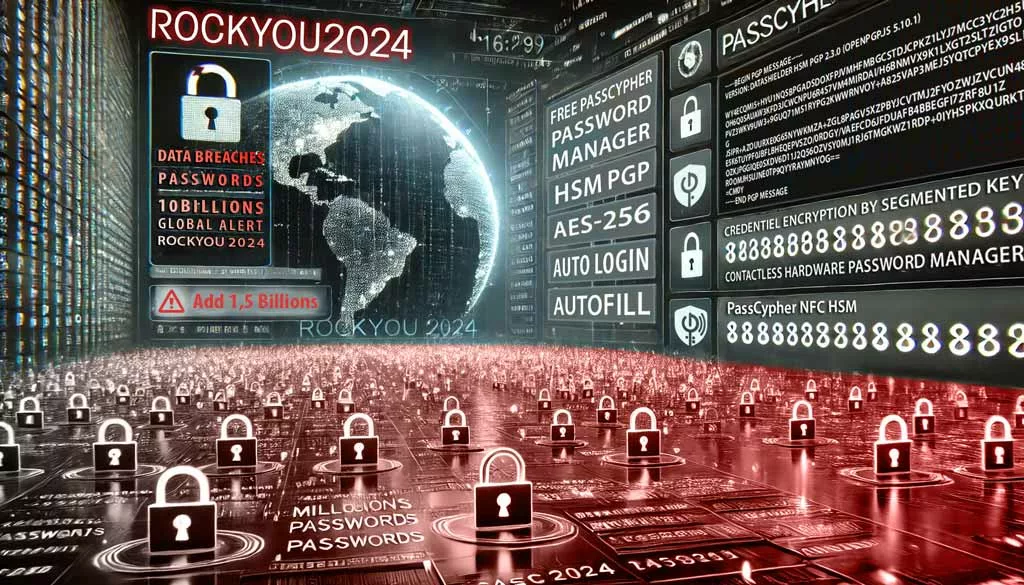
RockYou2024: 10 Billion Reasons to Use Free PassCypher

RockYou2024 data breach with millions of passwords streaming on a dark screen, foreground displaying advanced cybersecurity measures and protective shields.

RockYou2024 Exposed: Why You Need PassCypher Now

RockYou2024 has exposed 10 billion passwords, revealing the urgent need for robust security. PassCypher, a free password manager, offers the ultimate protection to keep your data safe.

2025 Cyber Doctrine Cyberculture

Uncodified UK constitution & digital sovereignty

2025 Cyberculture Cybersecurity Digital Security EviLink

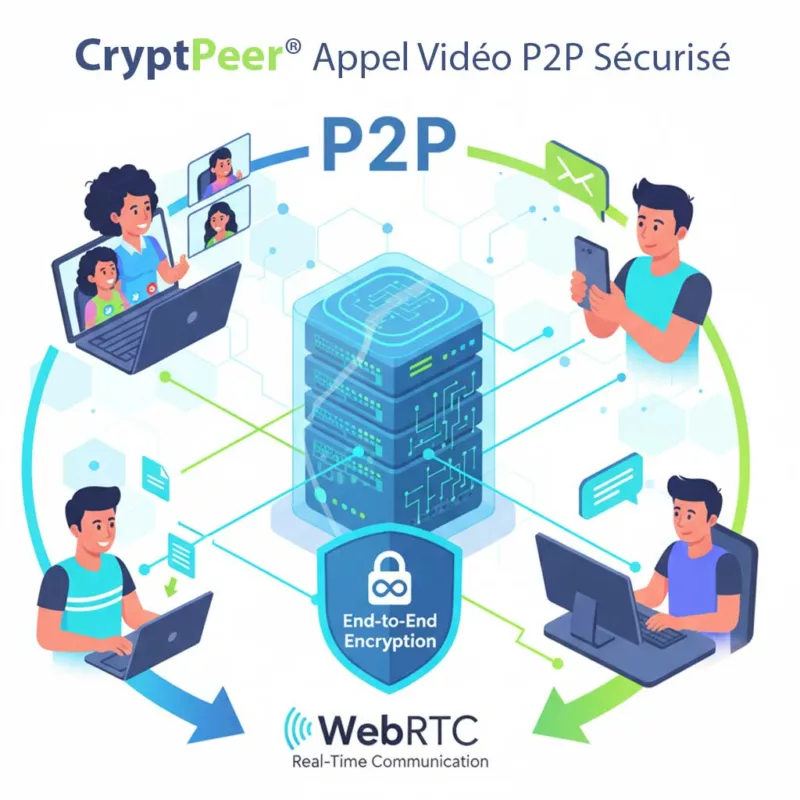
CryptPeer messagerie P2P WebRTC : appels directs chiffrés de bout en bout

2025 Cyber Doctrine Cyberculture

Souveraineté individuelle numérique : fondements et tensions globales

2025 Cyberculture

Louvre Security Weaknesses — ANSSI Audit Fallout

Stay informed with our posts dedicated to Cyberculture to track its evolution through our regularly updated topics.

[bws_pdfprint display=’print’]Discover our comprehensive article about the RockYou2024 data leak, authored by Jacques Gascuel, a pioneer in cybersecurity solutions. Learn about the extensive measures PassCypher is taking to protect your data. Stay informed and secure by subscribing to our regular updates.

RockYou2024: A Cybersecurity Earthquake

The RockYou2024 data leak has shaken the very foundations of global cybersecurity. This unprecedented leak, revealing nearly 10 billion unique passwords, highlights the fragility of computer security systems and the ease with which personal data can be compromised. The story of RockYou began in 2009 when an initial leak exposed the passwords of millions of social network users. Since then, the snowball effect has continued, incorporating data from more recent leaks. Between 2021 and 2024, an additional 1.5 billion new passwords joined the database.

The Scope of the Leak

Hackers have disclosed the passwords in RockYou2024 on specialized forums, which represents a major risk of cyberattacks. Cybercriminals can exploit this information to conduct brute force attacks, access personal and professional accounts, and perpetrate fraud.

The Online Community’s Response

Services like “Have I Been Pwned” quickly integrated RockYou2024 data, enabling users to check if hackers compromised their credentials. This integration allowed users to take proactive measures to secure affected accounts.

The Importance of Password Security

The RockYou2024 leak underscores the vital importance of creating strong, unique, and complex passwords. Security experts recommend passwords of at least 12 characters, combining letters, numbers, and symbols to maximize entropy and reduce decryption risks.

PassCypher: The Answer to RockYou2024

PassCypher HSM PGP Free

PassCypher HSM PGP Free offers an autonomous password management solution that requires no server, no database, no identification, and no master password. It provides end-to-end protection with AES 256 CBC PGP encryption and is available for free in 13 languages, making security accessible to everyone.

Anti-Phishing and Typosquatting Protection

PassCypher HSM PGP Free incorporates advanced anti-phishing features, typosquatting protection, and man-in-the-browser (BITB) attack protection. It ensures secure navigation and real-time URL verification. Additionally, it performs real-time automatic checks of compromised passwords via Pwned, offering proactive security against the use of already compromised passwords.

PassCypher HSM PGP with Segmented Key

For those seeking even more advanced and fully automated security, PassCypher HSM PGP with Segmented Key offers patented granular encryption, providing post-quantum security to counter future threats. With a one-click auto-connection system that takes less than a second without any further intervention on your part, this solution also benefits from anti-phishing systems and real-time corruption control of passwords and identifiers.

PassCypher NFC HSM

PassCypher NFC HSM acts as a contactless hardware password manager that works with Android NFC smartphones. It allows contactless auto-connection via an NFC HSM and offers a gateway between PassCypher NFC HSM and PassCypher HSM PGP for auto-connection on a computer. Additionally, PassCypher NFC HSM manages 2FA TOTP secret keys, optimizing online account security even if passwords and identifiers are compromised.

Intelligent Features of PassCypher HSM PGP

PassCypher HSM PGP includes an intelligent system that facilitates auto-filling when changing passwords. By generating a new password beforehand, users can replace the old one with a single click. Moreover, a corruption warning alerts users if hackers compromise their credentials, making the password replacement process safer and easier.

Paid Solutions from PassCypher

PassCypher’s paid solutions, such as PassCypher HSM PGP with PassCypher Engine license, offer additional benefits like storage path management for keys and data. They also include NFC HSM button selection for containers on NFC HSM via a paired Android phone and the ability to download licenses for external storage and restoration. These solutions are ideal for both civilian and military use, offering serverless and database-free security for optimal protection against phishing threats and cyberattacks.

Detailed Technical Analysis

Credential Stuffing

Attackers use credential stuffing to take advantage of previously compromised username and password combinations. They automate the process of attempting these credentials on various websites and services. Since many users reuse passwords across different platforms, this method can be alarmingly effective. By leveraging bots and scripts, hackers can test thousands of credentials in a short time, gaining unauthorized access to numerous accounts.

To counteract credential stuffing, it’s crucial to use complex and unique passwords for each account. A complex password typically includes a mix of upper and lower case letters, numbers, and special characters. This increases the entropy, or randomness, making it much harder for automated attacks to succeed.

Historical Context of Data Breaches Leading to RockYou2024

  • 2009: RockYou – The original breach exposed millions of social network users’ passwords.
  • 2012: LinkedIn – Over 6 million passwords leaked online, exposing a major social networking site’s security vulnerabilities.
  • 2013: Adobe – This breach affected approximately 38 million users, compromising a significant amount of user data and passwords.
  • 2016: MySpace – Around 360 million user accounts were compromised in this massive data breach.
  • 2021: RockYou2021 – The largest compilation of passwords to date, containing over 8.4 billion entries, built from multiple previous data leaks.

These breaches cumulatively contributed to the vast dataset found in RockYou2024. Each incident added more credentials to the pool of compromised data, illustrating the evolving and persistent threat of cybersecurity breaches.

Conclusion

PassCypher HSM PGP Free provides a robust and comprehensive response to the increased risks posed by data leaks like RockYou2024. With its advanced features and free availability, it represents a logical and pertinent solution for strengthening the security of our digital lives. There is no financial excuse for not securing our passwords.

BitLocker Security: Safeguarding Against Cyberattacks

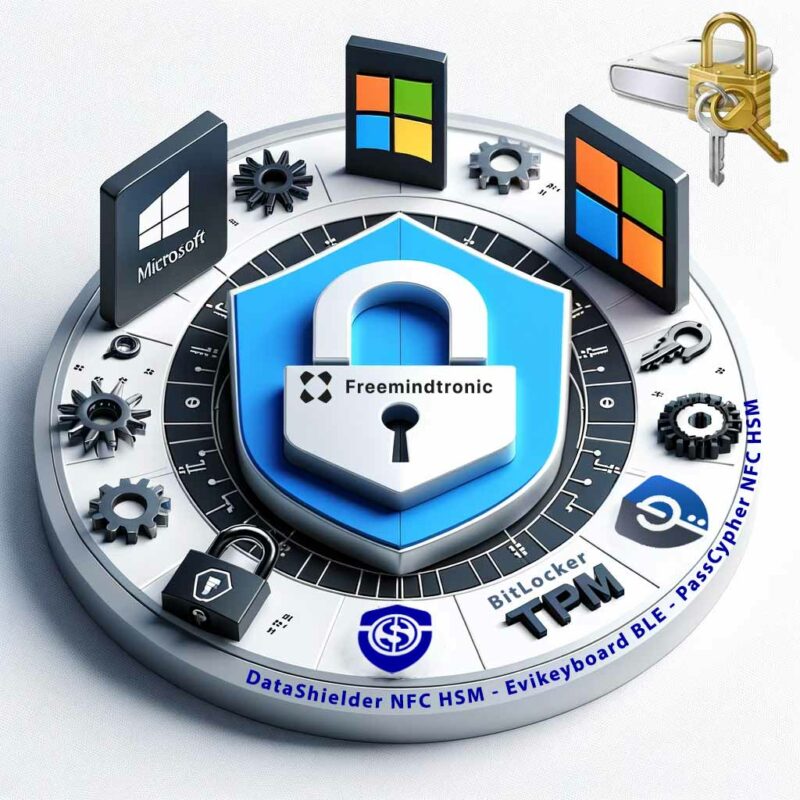
A visual representation of BitLocker Security featuring a central lock icon surrounded by elements representing Microsoft, TPM, and Windows security settings.

BitLocker Security — Windows encryption, recovery mode, TPM 2.0, physical attacks and cryptographic sovereignty — November 2026.

© 2026 Jacques Gascuel — Freemindtronic®. All rights reserved. Original editorial analysis and scientific positioning. Third-party research and vulnerability disclosures remain attributed to their respective authors.

BitLocker Security: Historical Reference, Vulnerabilities, TPM Attacks and Encryption (2006–2026)

[bws_pdfprint display=’print’]

BitLocker Security — express summary

At the volume level, BitLocker protects Windows data using AES encryption. Its effectiveness, however, depends on the complete chain of trust governing access to cryptographic keys, from the TPM and boot environment to recovery procedures and system memory.

On November 10, 2026, Microsoft disclosed two additional physical security bypass vulnerabilities: CVE-2026-97015 (CVSS 6.8) and CVE-2026-119832 (CVSS 5.9). These disclosures follow the public YellowKey vulnerability (CVE-2026-45585) in May 2026.

None of these disclosures establishes a mathematical break of AES. This guide explains the distinction between encryption strength and operational security, how to recover access after Windows updates, and how independent encryption and external secret management can complement BitLocker.

Immediate action: install applicable security updates, verify protection status and recovery credentials, and assess pre-boot authentication according to your physical threat model.

Reading parameters

Initial publication: February 10, 2024
Last updated: November 16, 2026
Language: EN
Complexity: Intermediate / expert
Editorial type: Living historical, scientific and technical cybersecurity reference
Main topic: BitLocker security
Secondary topics: TPM 2.0, WinRE, Secure Boot, recovery keys, physical attacks, AES and independent encryption.
Author: Jacques Gascuel, inventor and founder of Freemindtronic®.

Publication status

Documentary security analysis, not an independent laboratory qualification or product certification. Vulnerability ratings are attributed to their published records. No unpublished exploit or proprietary implementation is disclosed.

Editorial transparency — FM-AI-2025-11-SMD5 V1.1. This article distinguishes vendor disclosures, published scientific research, architectural analysis and editorial recommendations. AI-assisted technical illustrations are conceptual representations subject to human verification and validation. Their intellectual property rights, attribution and conditions of use are governed by the applicable provisions of the Freemindtronic AI Transparency Declaration.

Executive summary

Full-volume encryption reduces exposure when a device is lost, stolen or powered off. It does not guarantee confidentiality after the volume has been unlocked. The November 2026 disclosures reinforce the importance of evaluating authorisation, recovery, hardware trust and memory exposure separately.

Key points

  • Physical access is a prerequisite for the two newly disclosed November CVEs.
  • TPM + PIN reduces selected pre-boot risks but is not universal protection.
  • Recovery credentials must be protected independently.
  • Separately encrypted files may remain protected after a volume encryption bypass.

1. Latest BitLocker vulnerabilities — November 2026

The following selected disclosures are attributed to Microsoft. The scores are CVSS 3.1 base scores, not a universal assessment of organisational risk.

CVE Published CVSS 3.1 Weakness Access Privileges
CVE-2026-97015 10 Nov 2026 6.8 / Medium Heap memory overflow (CWE-122) Physical None
CVE-2026-119832 10 Nov 2026 5.9 / Medium Improper permissions Physical Low
CVE-2026-45585 (YellowKey) 19 May 2026 See advisory Security bypass Physical See advisory

Both November records describe low-complexity physical attacks without user interaction. CISA assessments dated November 10–11 recorded no known exploitation at that time; this is not proof that exploitation has never occurred.

Historical disclosures from 2022 and 2024

The original reference discussed CVE-2022-41099 and CVE-2024-38058. The historical text dated the disclosures to November 2022 and January 2024 and described manual administrative mitigation. Its associations with KB5012170 and KB5024487, respectively, and its historical release-date claims remain unverified. Consult MSRC for the actual affected products and applicable fixes; these legacy associations are not patch instructions.

Selected Windows version thresholds

Windows version CVE-2026-97015 CVE-2026-119832
11 26H2 26300.9711 26300.9974
11 26H1 28000.3231 28000.3501
11 25H2 26200.9711 26200.9974
11 24H2 26100.9711 26100.9974
11 23H2 22631.7652 22631.7711
10 22H2 19045.7807 19045.7846
10 21H2 19044.7807 19044.7846

Selected fixed-version thresholds from the vulnerability records, not a complete product or KB list. Verify applicable updates and servicing eligibility with Microsoft.

2. YellowKey — CVE-2026-45585

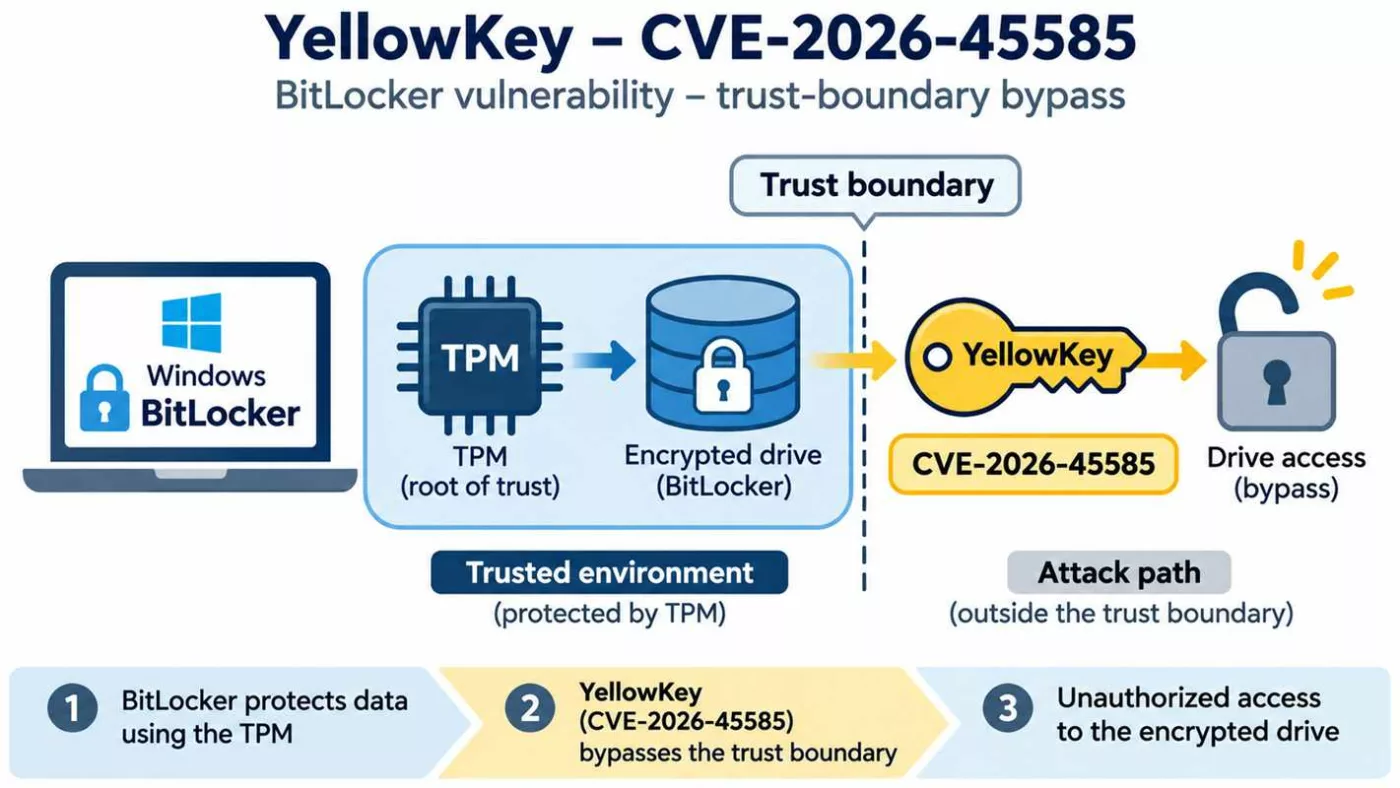
YellowKey CVE-2026-45585 vulnerability diagram showing a Windows BitLocker TPM protection trust-boundary bypass and unauthorized encrypted drive access.
YellowKey CVE-2026-45585: conceptual illustration of a BitLocker trust-boundary bypass enabling unauthorised access to encrypted data without breaking the AES encryption algorithm.

Microsoft published the YellowKey record on May 19, 2026 after a public proof of concept became available. The case concerns a security bypass associated with Windows recovery mechanisms. It illustrates why trusted recovery paths must be included in an encryption threat model.

Consult the current vendor advisory for updates and mitigation details. Microsoft identifies TPM + PIN as a mitigation for the documented scenario; claims of alternative variants should not be treated as established without reproducible evidence. A vulnerability alone does not establish intentional backdoor design.

Official CVE record · Microsoft advisory

Practical hardware-based mitigation: PassCypher NFC HSM, capable of generating secrets of up to 512 bits, can facilitate TPM + PIN adoption through independent hardware-based credential storage and automated input using EviKeyboard with InputStick or proprietary end-to-end encrypted EviBLE HID technology. See sovereign pre-boot authentication and YellowKey mitigation.

Historical context: The reference first published on 10 February 2024 is integrated into the thematic chapters below. Its 2025 recovery-guide revision is retained through the historical incident and configuration guidance. BitLocker also protects removable media and virtual drives; secure disposal depends on effective encryption and key custody.

3. BitLocker encryption architecture and trust boundaries

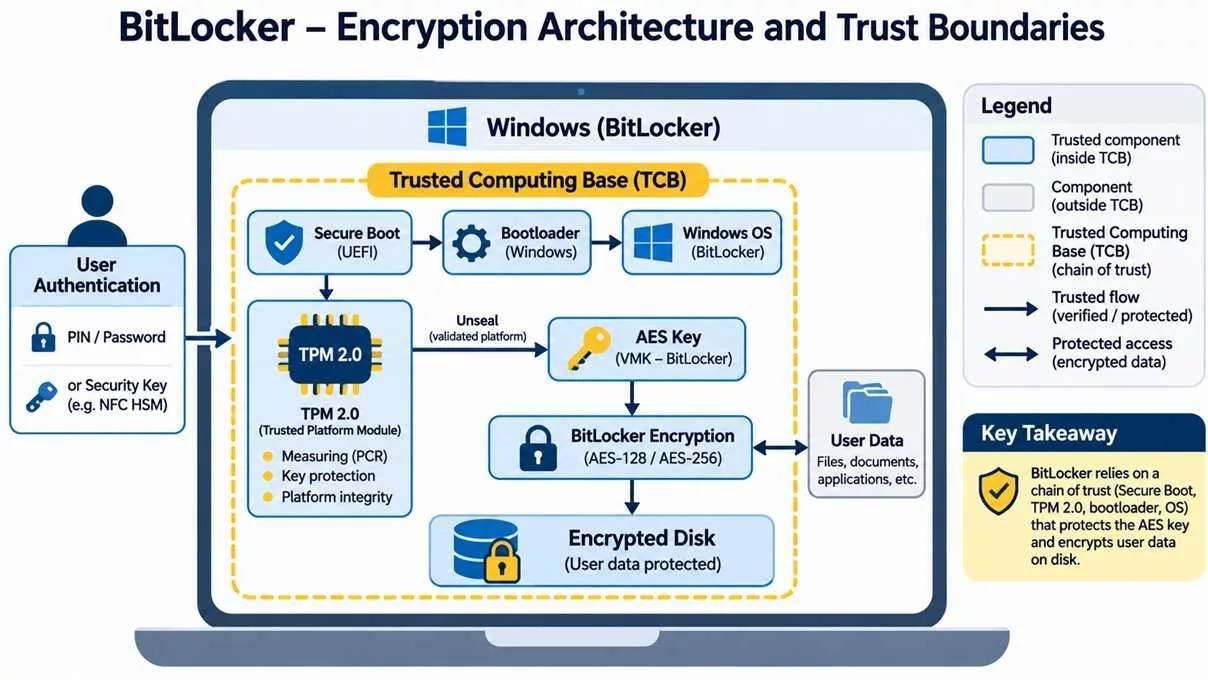
BitLocker encryption architecture diagram showing TPM 2.0, Secure Boot, Windows bootloader, AES-256 disk encryption and trusted computing boundaries.
BitLocker encryption architecture and trust boundaries: TPM 2.0, UEFI Secure Boot, Windows authentication, cryptographic key protection and AES-128/256 disk encryption. The diagram is conceptual; the VMK protects the FVEK, and external NFC HSMs are not native BitLocker protectors.

Architecturally, BitLocker encrypts volumes using AES, including XTS-AES configurations. The Full Volume Encryption Key (FVEK) encrypts volume data; the Volume Master Key (VMK) protects the FVEK. Key protectors govern access to the VMK. A TPM can bind key release to platform measurements and additional authentication conditions.

TPM 2.0 is not a general-purpose RAM protection mechanism. After unlocking, cryptographic material may be available in host memory. Secure Boot authenticates boot components; measured boot records measurements. These functions are complementary, not interchangeable.

Platform measurements + configured authentication
                 ↓
       Key protector authorisation
                 ↓
         Volume Master Key (VMK)
                 ↓
      Full Volume Encryption Key (FVEK)
                 ↓
          Encrypted volume data

This simplified diagram represents the normal unlocking path, not every recovery or protector configuration.

4. Physical attacks, TPM and forensic risks

TPM 1.2 and TPM 2.0 also support cryptographic identity and signature operations. Biometric authentication may use TPM-backed credentials, but this does not mean that biometric templates or all disk keys reside inside the TPM.

TPM 1.2 and TPM 2.0 provide protected key operations, random number generation and signatures. The latter extends algorithm support and authorisation capabilities; neither directly controls host RAM. Platform compatibility and implementation quality remain important.

4.1 Cold boot and memory remanence

Physical controls include locks, safes and secure storage. Hardware and software acquisition tools may be costly or difficult to obtain, although some attacks use inexpensive equipment. These practical constraints are not guarantees of confidentiality.

Residual RAM contents can expose active encryption material on susceptible devices. TPM anti-dictionary protections do not prevent extraction of keys already present in memory. Prefer complete shutdown before loss of physical control and evaluate platform-specific memory protections.

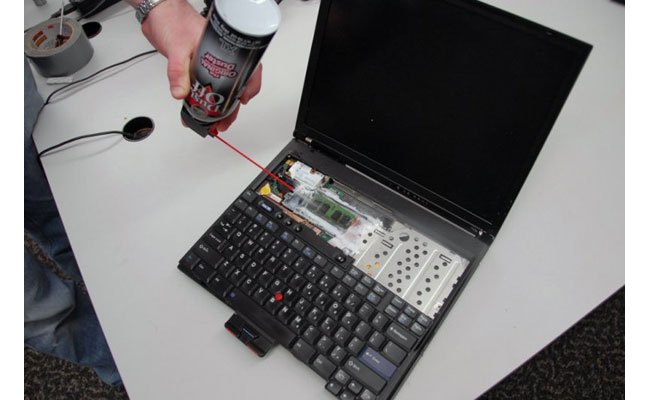
Cold boot attack illustration
Historical illustration: memory remanence and physical access.


Cold Boot research demonstrated that residual DRAM contents decay over time and that cooling can prolong retention on susceptible hardware. Live RAM analysis is a related but distinct forensic technique. Capacity to recover usable keys depends on memory state, equipment and platform protections. Firmware-supported Memory Overwrite Request (MOR) can reduce exposure; neither a startup PIN nor TPM lockout invalidates keys already recovered.

Scientific reference: Halderman et al. (2008).


4.2 DMA attacks

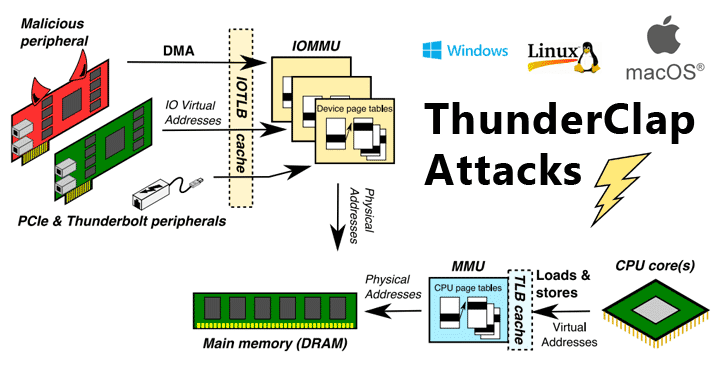
DMA-capable peripherals can threaten host memory on vulnerable systems. Enable Kernel DMA Protection where supported and restrict untrusted peripherals.

Thunderclap DMA attack diagram
Historical illustration: Thunderclap and DMA attack surfaces.

Thunderclap (2019) examined IOMMU isolation across Windows, Linux and macOS. FireWire, Thunderbolt and external PCIe require appropriate port and DMA policies; PCILeech is a historical example of a memory acquisition tool. Encrypting external storage protects its contents, not the host against malicious DMA. See Thunderclap research.

4.3 TPM communication and faulTPM

Published research has demonstrated interception of discrete TPM communications on selected systems and attacks against specific firmware TPM implementations. These findings do not imply that every TPM is vulnerable. The Raspberry Pi Pico demonstration discussed in the original article illustrates the importance of hardware-specific qualification.

Discrete TPM buses, SRTM and firmware TPMs

TPM-only mode allows normal unattended unlocking. Historically, discrete TPM bus interception using inexpensive hardware has illustrated why physical access matters. Stacksmashing’s Raspberry Pi Pico demonstration used a susceptible laptop and Dislocker; it is distinct from the Bus Pirate, a multiprotocol electronic interface supporting SPI, I2C, UART, 1-wire, 2-wire, 3-wire and HD44780 LCD interfaces. Results must not be generalised to every TPM or bus.

Separately, SRTM power-state and measurement attacks and AMD faulTPM research challenge different trust assumptions. Historical references to Intel and Dell platforms require model-specific evidence. Physical isolation, tamper-evident seals, protected bus design (including hardware-specific SPI access controls or firewalls where available), firmware updates and appropriate pre-boot authentication reduce selected risks. Intel CSME and remote attestation may contribute to platform integrity assessment, but are not universal countermeasures.

4.4 TPM implementation defects

CVE-2023-1017 and CVE-2023-1018 concern memory-boundary defects in TPM implementations, not inherently physical fault injection. Consult the hardware vendor for affected firmware and fixes.

Historical reports also identified affected Lenovo systems with Nuvoton TPM implementations. Verify the actual firmware and vendor advisory rather than assuming that all devices share the defects or that BitLocker keys can always be extracted.

4.5 Hardware debugging and fault injection

Hardware debug interfaces such as Intel DCI and fault injection can create additional attack surfaces under specific platform conditions. Disable unauthorised debugging and assess firmware protections. No universal BitLocker decryption capability is established by these attack categories.


Fault injection explores voltage, temperature, radiation and electrical glitching effects on hardware. In contrast, Intel DCI debugging can expose live memory on suitably configured platforms, potentially including the VMK. On a suitably exposed platform, CPU halt and debug-based memory acquisition may enable forensic decryption without the Windows login password or recovery password; this remains configuration-dependent. These are distinct from TPM command-parser defects. Fault-resistant hardware and restricted debug access are relevant controls; remote attestation can report selected measurements but cannot establish immunity.

5. How to fix BitLocker Recovery Mode after a Windows update

Windows updates, firmware changes and changes to measured boot state can trigger recovery. The July 2024 update incident remains a useful historical example. Do not assume a particular PCR change is the cause on every device.

Historical case: July 2024 recovery incident

KB5040442 was associated in the historical article with unexpected recovery prompts. The original explanation attributed this to PCR4, but that causal attribution is unverified. Firmware, bootloader and hardware changes can alter measured state. Review release notes, prepare recovery backups and avoid removing PCR measurements simply to suppress prompts. The incident illustrates the importance of update preparation and vendor communication.

Recovery procedure

  1. Record the recovery key identifier shown on screen.
  2. Retrieve the matching 48-digit recovery password from your authorised backup or organisation.
  3. Enter it on the trusted recovery screen.
  4. After booting, verify Windows update status and BitLocker protection.
  5. If recovery repeats, consult the device vendor or IT administrator before changing firmware, TPM or PCR settings.

Do not clear the TPM, remove protectors or weaken PCR policy merely to suppress recovery prompts. If you cannot recover the credentials, there is no supported universal method to decrypt an intact protected volume.

Microsoft account recovery keys (if backed up to that account).

6. Secure configuration and verification

Consider hardware and software compatibility before deployment. In addition, choose used-space-only or full-volume encryption according to whether previously stored data may remain in unused sectors. For existing devices, assess residual data before selecting the faster option.

Use a supported Windows edition and servicing channel. Full BitLocker management is available on supported Pro, Enterprise and Education editions; qualifying Home devices may offer Device Encryption. Select encryption and protector policies before deployment, preserve recovery credentials and use TPM + PIN where physical risks justify it.


Activation and encryption choices

Check TPM status in Windows Security or TPM management. If required, consult the manufacturer before enabling TPM in UEFI (entry keys can include F2, F12, Del or Esc) or updating firmware. Choose supported protectors for the volume type: TPM + PIN, startup key, password or recovery protector as applicable. Certificate-based protectors have specialised removable-drive uses.

Choose AES-CBC or XTS-AES according to compatibility requirements; XTS-AES is preferred for modern fixed volumes. Evaluate AES-128 versus AES-256, hardware acceleration and performance. Open Manage BitLocker in Control Panel, select the volume, back up recovery credentials and follow the activation wizard. Encryption duration varies with volume size and data.

Verification commands

Run these read-only commands from an elevated PowerShell session:

Get-BitLockerVolume
Get-Tpm
Confirm-SecureBootUEFI
reagentc /info
winver

Verify that protection is on, identify protector types, check the installed Windows version and confirm WinRE status. Avoid publishing recovery passwords or identifying key material in diagnostic logs.

7. Freemindtronic — independent cryptographic protection

Externalizing credential storage and separately encrypting sensitive data introduces additional trust boundaries. EviPass NFC HSM and PassCypher can complement credential management. EviCypher NFC HSM and DataShielder provide a separate encryption approach. EviKeyboard BLE provides a complementary credential input mechanism.

These technologies are not patches for BitLocker CVEs. External storage of secrets does not itself guarantee that credentials entered into a compromised host remain confidential. Independently encrypted files can remain protected after BitLocker is bypassed if their keys and plaintext are not accessible to the attacker.


PassCypher NFC HSM, EviPass, EviKeyboard and EviBLE

The original account describes password-free contactless credential management and smartphone-assisted remote input into BIOS or disk-startup fields, where supported by the host. The historical USB HID analysis distinguishes the USB controller, chipset, processor and TPM; input buffers along this path may expose secrets. Product-specific transport and pairing properties require verification for the deployed version.

Contactless credential storage and smartphone-assisted input can reduce reliance on locally stored secrets. EviKeyboard BLE can deliver supported pre-boot credentials through USB HID where firmware accepts the keyboard. The historical article describes AES-128 CBC for its BLE transport; this product-specific claim requires version-specific verification. Host USB buffers, chipset and input processing may still expose credentials in memory. Physical acquisition requires suitable access and equipment, while memory volatility can limit recovery.

PassCypher’s historical features include sandboxed URL checks, anti-typosquatting, password integrity checks and Browser-in-the-Browser (BTIB) phishing protections. These reduce selected risks but cannot eliminate deception. High-entropy generated passwords must comply with the actual protector’s length and character restrictions; a generated secret exceeding 256 bits does not make a BitLocker PIN a 256-bit key.

High-entropy secret generation: up to 512 bits

PassCypher NFC HSM can generate cryptographic secrets of up to 512 bits, exceeding the nominal key length of AES-256. A uniformly random 512-bit secret has a theoretical search space of 2512 possibilities, compared with 2256 for a 256-bit key.

This generation capacity enables users to create highly unpredictable authentication secrets without relying on human memory or predictable password construction.

However, BitLocker imposes its own authentication format, length and character restrictions. PassCypher can generate secrets adapted to these constraints, including complex enhanced startup PINs. The effective entropy depends on the accepted character set, secret length and generation method.

This capability does not transform AES-256 into AES-512 or provide BitLocker with 512-bit encryption strength.

External hardware-based BitLocker credential management

PassCypher NFC HSM enables independent hardware-based custody of BitLocker startup PINs and recovery passwords. Consequently, users can manage these sensitive credentials outside the computer they protect, without requiring memorisation of complex authentication secrets.

Freemindtronic provides two complementary credential delivery approaches:

  • EviKeyboard with InputStick: smartphone-assisted credential input through an external USB HID keyboard emulator, including supported BIOS, UEFI and BitLocker pre-boot environments.
  • EviBLE HID: Freemindtronic’s proprietary end-to-end encrypted Bluetooth Low Energy secure keyboard emulation technology for credential delivery through compatible endpoints.

These approaches must be distinguished from native operating system Bluetooth keyboard pairing. Pre-boot operation requires a compatible receiving interface recognised by the target firmware and BitLocker environment.

The 48-digit BitLocker recovery password can also be managed independently within the NFC HSM. Its native format and cryptographic properties remain defined by Microsoft.

Mitigating YellowKey through sovereign pre-boot authentication

Microsoft identifies TPM + PIN as a mitigation against the documented YellowKey vulnerability (CVE-2026-45585).

By combining external hardware-based secret management with automated credential input, PassCypher NFC HSM, EviKeyboard and EviBLE can facilitate the adoption of stronger pre-boot authentication without the inconvenience of memorising complex PINs.

Cryptographic sovereignty and defence in depth. Rather than replacing BitLocker or its trusted platform module, Freemindtronic’s technologies introduce an independent hardware-based credential custody boundary. This approach supports stronger authentication configurations while maintaining user control over externally managed secrets.

The mitigation against YellowKey derives from the TPM + PIN configuration documented by Microsoft, rather than from an increase in AES key length.

The effectiveness of this architecture against CVE-2026-97015 and CVE-2026-119832 remains subject to specific technical qualification. External credential custody and encrypted transmission do not prevent every attack against a compromised host or recovery environment. Applicable Microsoft security updates remain essential.

DataShielder and EviCypher

The historical design describes AES-256 independent data encryption, randomly generated and segmented keys, external HSM/NFC HSM custody and transient operational key destruction, including HSM PGP contexts. These mechanisms can reduce exposure to TPM bus interception and fault injection when the independent trust boundary remains intact. Key erasure effectiveness and plaintext exposure require implementation-specific assessment; no near-zero recovery probability is established here.

Post-quantum algorithms do not inherently resolve memory corruption, access control defects or insecure key release.

Historical timeline of BitLocker security (2006–2026)

BitLocker emerged with Windows Vista in 2006–2007. Since then, its threat model has evolved from disk theft towards hardware, firmware, recovery and identity attacks. The following selected milestones distinguish product evolution from security research.

Period Milestone Security significance
2006–2007 Windows Vista Initial BitLocker deployment.
2008 Halderman et al. — Lest We Remember: Cold Boot Attacks on Encryption Keys (2008) Memory remanence challenges data-at-rest assumptions.
2009 Windows 7 / BitLocker To Go Removable storage protection.
2012–2013 Windows 8 / 8.1 UEFI Secure Boot and wider device encryption.
2015 Windows 10 version 1511 XTS-AES support.
2018–2019 Meijer and van Gastel — Self-encrypting deception, IEEE S&P 2019 SSD firmware becomes a critical trust dependency.
2021 Windows 11 TPM 2.0 baseline on supported hardware.
2022–2023 BlackLotus and TPM research Boot trust and hardware implementation risks.
2024 Freemindtronic reference; July recovery incident; BitPixie research Operational recovery and downgrade exposure.
2025 BitUnlocker Recovery-path trust defects.
2026 YellowKey; academic survey; Secure Boot CA transition; November CVEs Continuing evolution of attack surfaces.

Further reading: Microsoft — BitLocker overview and Kenchaiah et al. — The Hardware Isolation Gap, Electronics 15(9), 1959 (6 May 2026). This is a selected chronology, not an exhaustive CVE register.

BitUnlocker (2025): Windows Recovery Environment vulnerabilities

Microsoft researchers Netanel Ben Simon and Alon Leviev presented BitUnlocker at Black Hat USA 2025 and DEF CON 33. Their findings concern the conditions under which recovery software can access a protected volume. Consequently, a trusted recovery environment must be evaluated as part of the security boundary.

CVE Affected trust decision
CVE-2025-48800 Authorisation of scheduled recovery operations
CVE-2025-48003 Trust verification of recovery applications
CVE-2025-48804 Integrity verification of recovery boot images
CVE-2025-48818 Boot configuration and recovery decryption authorisation

Mitigation and relevance to YellowKey

All four discoveries received fixes in July 2025. Moreover, Microsoft recommends TPM + PIN and secure boot-component version enforcement (REVISE). YellowKey is a later disclosure involving recovery trust; however, common attack surfaces do not establish a shared root cause. Source: Microsoft STORM — BitUnlocker (13 August 2025).

BlackLotus, BitPixie and BitLocker downgrade attacks

Administrative UEFI passwords and restriction of legacy boot options can complement revocation policy. However, they do not replace supported security updates or validated recovery media.

BlackLotus and UEFI bootkits

BlackLotus illustrates how a vulnerable signed boot component can undermine Secure Boot. CVE-2022-21894 concerns a Secure Boot bypass, whereas CVE-2023-24932 underlies subsequent revocation guidance. Neither is a mathematical attack against AES. See Microsoft — BlackLotus investigation guidance (2023).

BitPixie and REVISE

BitPixie research highlighted risks from older vulnerable boot components in configurations that still trust them. In particular, installing a newer boot manager does not necessarily revoke an older signed version. Therefore, version enforcement and revocation are distinct from ordinary patch installation. See MSRC — CVE-2023-21563 and Microsoft KB5025885 — Secure Boot revocation guidance.

Historical CVE-2023-21563 analysis highlights physical access, vulnerable boot components and potential key exposure on affected Windows configurations. Apply applicable revocations, restrict legacy boot paths and secure UEFI administration. Validate recovery media before enforcement; remote attestation can supplement integrity monitoring.

Evil Maid attacks

An unattended device can be altered before its owner returns. For example, a compromised boot path could attempt to capture later authentication input. Secure Boot, measured boot, physical custody and tamper evidence reduce selected risks. However, none alone guarantees integrity against every physical adversary.

Secure Boot certificate expiration and BitLocker in 2026

Microsoft is transitioning from its 2011 Secure Boot certificate hierarchy to replacement certificates issued in 2023. This transition affects boot trust rather than AES encryption keys.

Legacy certificate Expiration period
Microsoft Corporation KEK CA 2011 June 2026
Microsoft UEFI CA 2011 June 2026
Microsoft Windows Production PCA 2011 October 2026

Operational continuity and recovery

Expiration does not automatically decrypt a volume or prevent a previously working machine from booting. Nevertheless, systems that fail to receive updated trust material may lose access to future boot protections. Administrators should inventory firmware compatibility, recovery credentials, Secure Boot trust databases and revocation status. Before deploying revocations, test recovery media and maintain a supported recovery path.

Official guidance: Microsoft — Secure Boot certificate expiration and CA updates and Microsoft KB5025885 — Secure Boot revocation guidance.

Scientific research: the hardware isolation gap in BitLocker forensics

The review The Hardware Isolation Gap: A Systematic Survey of BitLocker Forensics in the TPM 2.0 Era, published on 6 May 2026 in Electronics, examines research from 2006 to 2025. It provides a useful synthesis of changing forensic access opportunities as BitLocker became more closely integrated with platform hardware.

How to interpret forensic evidence

Compare the device state, TPM implementation, protector, firmware, attacker access and evidence-acquisition method before generalising any result. In particular, reported success rates in a research corpus are not universal probabilities for real-world devices. Furthermore, a survey is not an independent reproduction of each experiment, and its historical coverage predates subsequent 2026 disclosures.

Reference: Kenchaiah et al. — The Hardware Isolation Gap, Electronics 15(9), 1959 (6 May 2026).

Forensic preservation

In authorised investigations, preserve chain of custody and document the initial power state, encryption status, evidence handling and every state change. A running system and a powered-off encrypted device present different evidentiary risks. Avoid uncontrolled changes that could destroy volatile evidence or trigger recovery.

Self-encrypting SSDs, TCG Opal and Microsoft eDrive

Self-encrypting drives (SEDs) perform cryptographic operations in storage hardware. TCG Opal defines storage security management capabilities, while Microsoft eDrive historically enabled compatible hardware encryption integration. However, a hardware encryption claim does not establish the security of firmware or authentication.

Research disclosed in 2018 and published at IEEE Security and Privacy in 2019 identified serious defects in selected commercial SSDs. The findings also challenged historical BitLocker configurations that delegated encryption to the drive. See Meijer and van Gastel — Self-encrypting deception, IEEE S&P 2019.

Software versus hardware encryption

Mode Trust dependency Verification
Software BitLocker Windows cryptographic implementation and host key handling Check reported encryption method and policy.
Hardware encryption SSD firmware, access enforcement and drive lifecycle Check model, firmware and vendor advisories.

Microsoft subsequently advised reviewing hardware encryption policy. Changing a policy does not necessarily migrate an existing encrypted volume. Therefore, plan any supported migration with backups and recovery validation. See Microsoft ADV180028 — self-encrypting drives.


Credential theft and social engineering

Impersonation of Microsoft or technical support can induce a user to disclose a recovery password or credential. Verify requests independently, train users and report suspicious activity. TPM lockout limits applicable authentication attempts, not disclosure of valid credentials.

BitLocker recovery key sovereignty and lifecycle management

Recovery passwords can also be printed or saved in a protected file or encrypted external drive. The historical article mentioned Azure Key Vault as a possible custom custody service; it is not a standard native BitLocker recovery escrow destination. Any such integration requires separate access controls and recovery validation.

The 48-digit recovery password constitutes an alternative access mechanism. Accordingly, its custody can be as important as the choice of AES key length. Device Encryption may automatically escrow recovery information under supported account or organisational configurations.

Custody model Benefits Risks
Microsoft account Convenient account-based recovery Account compromise or loss of access.
Microsoft Entra ID / AD DS Managed organisational recovery Privileged administrator access and directory compromise.
Offline controlled backup Independent custody Loss, theft or insufficient redundancy.
Separate application encryption Independent confidentiality boundary Additional key lifecycle and plaintext exposure risks.

Offline options include a protected file, removable medium or printed copy. An organisation may separately manage protected escrow through a key-management service such as Azure Key Vault, subject to its own integration and access controls; this is not presented as a native BitLocker backup destination. Separate application encryption is an additional boundary, not a recovery-password custody model.

Recovery lifecycle

Maintain an inventory of recovery identifiers without publishing secrets. Additionally, restrict retrieval, log authorised access, validate backups and rotate exposed recovery protectors through supported procedures. Separate recovery credentials from the device they protect. For organisations, document delegation, revocation and disaster recovery. See Microsoft — BitLocker recovery process.

BitLocker sleep, hibernation and shutdown security

Physical risk changes with the power state. For example, locking the Windows desktop does not relock the system volume. Likewise, sleep or Modern Standby can retain sensitive material in memory.

State Security consideration
Running / locked Volume normally remains unlocked.
Sleep / Modern Standby RAM may retain active keys.
Hibernation Memory state is saved to storage; protection depends on configuration and resume authentication.
Full shutdown Active keys normally cease to be available, subject to residual memory and platform-specific risks.
Fast Startup Hybrid shutdown differs from a full shutdown.

For sensitive travel or unattended equipment, favour a validated shutdown or appropriately protected hibernation policy. Furthermore, assess DMA protection and pre-boot authentication according to the actual platform. Source: Microsoft — BitLocker countermeasures.

BitCracker, GPU password guessing and TPM anti-hammering

GPU acceleration can reduce the cost of testing guesses against certain password-protected encryption metadata. BitCracker is a research example of this attack class. However, password guessing is not equivalent to brute-forcing the full AES key space, and feasibility depends on protector type, entropy and derivation costs. See BitCracker research project.

TPM anti-hammering constrains applicable hardware authorisation attempts. In contrast, offline guessing against extractable password-protected material can have different constraints. Therefore, use suitable high-entropy credentials and do not equate a startup PIN with a disk encryption key. Artificial intelligence may prioritise likely guesses, but it does not eliminate cryptographic search complexity.

Post-quantum security: AES-128, AES-256 and TPM algorithms

Grover’s algorithm provides a theoretical quadratic advantage for ideal unstructured search. Thus, AES-256 offers a larger nominal security margin against quantum key search than AES-128. However, logical circuit depth, error correction and physical resources prevent interpreting this as a practical present-day attack.

Shor’s algorithm instead concerns mathematical problems underlying RSA and elliptic-curve cryptography. Consequently, consider signatures, attestation and key establishment separately from symmetric volume encryption. TPM 2.0 is not inherently a post-quantum specification.

Limits of post-quantum protection

XTS-AES protects storage confidentiality but is not a general authenticated-encryption construction. Moreover, replacing public-key algorithms with PQC cannot repair unsafe recovery authorisation, memory corruption or credential theft. References: NIST FIPS 197 — AES, NIST SP 800-38E — XTS-AES and NIST — Post-Quantum Cryptography.

Permanent BitLocker attack taxonomy and countermeasure matrix

The table separates attack targets from countermeasures. These measures reduce specific risks rather than guaranteeing immunity. No demonstrated mathematical AES break is implied by the listed practical attacks.

Attack family Target / prerequisite Defensive focus
Cold boot / RAM analysis Residual or live memory Power-state policy and physical custody
DMA / Thunderclap Accessible memory via peripherals IOMMU, DMA policy and port control
TPM bus interception Exposed discrete TPM communications Pre-boot authentication and platform assessment
faulTPM Specific firmware TPM implementation Vendor updates and hardware assessment
Fault injection / Intel DCI Physical hardware or debug interface Disable unauthorised debug; hardware assurance
BlackLotus / BitPixie Boot integrity or rollback Revocation and secure version enforcement
BitUnlocker / YellowKey Recovery trust Supported updates, WinRE and protector policy
Evil Maid Unattended device Custody, boot integrity and tamper evidence
Phishing / recovery theft User or escrowed credentials Access governance and education
SSD firmware defects Delegated storage encryption Firmware assurance and software mode assessment
GPU guessing Weak password protector Entropy and protector selection
Quantum search Theoretical cryptographic search Algorithm agility and security margin

Editorial change log and evidence policy

10 February 2024: initial publication, as recorded by the author. 2024–2025: historical revisions preserved in the supplied corpus. 16 November 2026: updated vulnerability review, historical timeline, forensic literature, boot trust, recovery sovereignty, SSD security and quantum analysis.

Historical material has been consolidated into the relevant thematic chapters; outdated technical claims are qualified in context. The reference distinguishes vendor advisories, research reports and editorial analysis. It does not represent a complete vulnerability inventory or independent experimental qualification.

8. Limits, evidence and scope of validity

The November vulnerability descriptions do not establish the exact exploit path, VMK extraction, TPM compromise or the ability to bypass a startup PIN. CVSS ratings describe standardised impact and prerequisites; physical exposure must be evaluated in context.

This publication does not claim independent reproduction of the 2026 vulnerabilities, universal resistance of complementary products, or certification of any device configuration.

9. Conclusion

Overall, BitLocker remains a useful defence for data at rest. Its security must be evaluated across the complete authorisation and recovery chain. Maintaining supported software, securing pre-boot authentication and recovery credentials, and applying independent encryption where justified provide complementary layers of protection.

Breaking an encryption algorithm is not necessary when the mechanism that authorizes decryption can be compromised.

11. Technical glossary

AESDefinition
Advanced Encryption Standard.
XTS-AESDefinition
Storage encryption mode designed for data units on disks.
TPMDefinition
Trusted Platform Module: protected cryptographic operations and platform measurements.
PCRDefinition
Platform Configuration Register: records measured state.
VMKDefinition
Volume Master Key: protects the FVEK.
FVEKDefinition
Full Volume Encryption Key: encrypts volume data.
WinREDefinition
Windows Recovery Environment.
DMADefinition
Direct Memory Access.
CVSSDefinition
Common Vulnerability Scoring System.
HSMDefinition
Hardware Security Module.
PQCDefinition
Post-quantum cryptography.
TCBDefinition
Trusted Computing Base: components on which a security property depends.
REVISEDefinition
Secure version enforcement for critical boot components.
DBXDefinition
UEFI Secure Boot forbidden signature database.
SEDDefinition
Self-encrypting drive.
IOMMUDefinition
Input/output memory management unit, used to constrain DMA.
SRTMDefinition
Static Root of Trust for Measurement.
SVNDefinition
Security version number used in rollback prevention.
EscrowDefinition
Controlled custody of recovery information.
GroverDefinition
Quantum algorithm providing a theoretical quadratic search advantage.

12. Frequently asked questions about BitLocker security

CVE-2026-97015 and CVE-2026-119832 are physical security bypass vulnerabilities disclosed November 10.

No cryptographic break of AES is established by these disclosures.

CVE-2026-45585 is a publicly disclosed security bypass. Consult the Microsoft advisory.

Generally no. Apply security updates and verify protection instead.

No. It mitigates selected pre-boot risks.

Yes, provided independent keys and plaintext remain inaccessible to the attacker.

BitLocker is an encryption feature included in Microsoft Windows. It protects your data by encrypting the entire disk, making the protected volume unreadable without valid unlocking material. See the architecture chapter for TPM and key protectors.

BitLocker can encrypt internal hard drives, external USB drives (using BitLocker To Go), and even virtual hard drives (VHD). It is a versatile solution for securing various types of storage.

Eligible Windows Home devices may support Device Encryption.

Performance varies with workload and hardware. AES-NI acceleration can reduce overhead.

To activate BitLocker on Windows 11, go to Settings > Privacy & Security > Device Encryption. If the option isn’t available, search for Manage BitLocker in the Control Panel. Follow the instructions to enable BitLocker on the desired drive.

To deactivate BitLocker, navigate to Settings > Privacy & Security > Device Encryption > Manage BitLocker. Select the drive you want to decrypt and choose Turn off BitLocker. Keep in mind that this process will decrypt your data and may take some time.

Automatic encryption depends on device eligibility and setup/account conditions.

BitLocker may request a recovery key if a Windows update changes the system configuration or boot files. To prevent this, ensure that you save your recovery key securely and update your firmware and drivers.

You can retrieve your BitLocker recovery key from:

Your Microsoft account (if backed up there)

A USB flash drive (if you saved it there)

A printed copy you stored securely

Your organisation’s IT department if using a company-managed device

There is no supported universal recovery bypass; vulnerabilities can nevertheless bypass protection in specific configurations.

Ensure you have the correct recovery key. If the drive is inaccessible, you may use BitLocker repair tools like the repair-bde command in Windows to attempt data recovery.

BIOS updates or hardware changes can trigger BitLocker recovery mode. Ensure you have your recovery key before making such changes. Afterward, re-enable BitLocker to restore normal functionality.

BitLocker primarily uses AES (Advanced Encryption Standard) with 128-bit or 256-bit key lengths, depending on your configuration. AES-256 offers stronger encryption for highly sensitive data.

BitLocker protects data from unauthorised access but does not prevent malware infections. Use antivirus software alongside BitLocker for comprehensive protection.

Yes, BitLocker supports multi-factor authentication by combining a TPM with a PIN or a startup key on a USB drive.

Encryption supports compliance but does not by itself establish GDPR compliance.

BitLocker encrypts data using AES, which prevents unauthorised access even if the physical drive is removed. With a TPM and PIN, the encryption key remains secure.

Yes, BitLocker can be used without a TPM by enabling the “Allow BitLocker without a compatible TPM” policy and using a password or USB startup key for authentication.

No, BitLocker is a Windows-exclusive feature. However, tools like Dislocker can be used on Linux or Mac to access BitLocker-encrypted drives.

To use BitLocker, you need:

A compatible version of Windows (Pro, Enterprise, or Education)

A TPM 1.2 or 2.0 chip (optional)

A modern processor with encryption acceleration for optimal performance

Yes, BitLocker To Go is specifically designed to encrypt external drives like USB sticks and portable hard drives.

Recent vulnerabilities include:

CVE-2023-1017 and CVE-2023-1018 affecting TPM 2.0

Risks from physical attacks like Cold Boot or Bus Pirate attacks

Ensure regular firmware updates and use multi-factor authentication to mitigate these risks.

If no valid protector remains available, there is no supported universal recovery method. Maintain independent, verified backups.

Updates for these vulnerabilities include TPM firmware patches that address buffer overflow risks. Regularly updating your TPM firmware ensures protection against these and other emerging threats.

Updating your TPM firmware helps mitigate recent vulnerabilities like CVE-2023-1017 and CVE-2023-1018, ensuring your device maintains optimal security against physical and software-based attacks.

External credential storage does not guarantee that input is never exposed on a compromised host.

The historical product description specifies AES-256 credential encryption and NFC-enabled access. Protection after device loss depends on the deployed pairing, authentication and key custody controls. See the product analysis.

Yes, PassCypher is designed to work seamlessly with tools like DataShielder and EviCypher, creating a comprehensive security ecosystem for protecting sensitive data.

DataShielder provides a separate AES-256 encryption layer under independent key custody. See the architectural analysis and limitations.

Independent keys and plaintext may still be exposed during active processing depending on implementation.

Yes, DataShielder supports encryption for external drives, adding an additional layer of security to portable storage devices encrypted with BitLocker.

Yes. An older trusted boot component may restore a vulnerable path unless applicable revocations and version enforcement are deployed.
Not automatically. Nevertheless, outdated trust material can restrict future boot security updates.
No. Its security depends on the actual drive firmware and authentication implementation.
Not necessarily. A locked session usually leaves the operating system volume unlocked.
No practical quantum break is established here. AES-256 offers a greater theoretical search margin; public-key migration is a separate issue.
The authorised owner or organisation should select a custody model, restrict access and validate recovery backups.

Brute Force Attacks: What They Are and How to Protect Yourself

Brute Force Attacks Cyber Attack Guide
[bws_pdfprint display=’print’] brute force attacks by Jacques Gascuel: This article will be updated with any new information on the topic.

Everything You Need to Know About Brute-force Attacks

80% of cyberattacks are brute force attacks. This technique tests all combinations to find a system’s password, key, or URL. These attacks threaten the security of your data. How to protect yourself? What tools and practices should be adopted? This article explains.

Brute-force Attacks: A Comprehensive Guide to Understand and Prevent Them

Brute Force: danger and protection 80% of cyberattacks are brute force attacks. This technique tests all combinations to find the password, key, URL or hash of a system. These attacks threaten the security of your data. How to protect yourself? What tools and practices to adopt? This article explains:

  • Brute force types and methods : they vary according to the hackers’ method, the intrusion level and the application domain.
  • Brute force on electronic components : physical or electrical techniques are used to target chips or boards.
  • Brute force on passwords, keys, URLs and hashes : software or network techniques are used to access websites, online accounts, encrypted files, etc.
  • Brute force on phone systems : code or key techniques are used to hack landlines, mobiles or VoIP services.
  • Protection from brute force on devices and domains : encryption, authentication, masking, verification or correction techniques can help you strengthen your security.
  • Resistance evaluation of products or services to brute force : a scoring model based on the attack type and severity can help you assess the risk.

Types and Methods of Brute-force Attacks

There are several types and methods of brute force attacks, depending on the hackers’ method, the level of intrusion, and the domain of application.

Hackers’ Method

Hackers can use different methods to perform brute force attacks, depending on the type of data they want to obtain or modify. Here are the most common ones:

  • Simple brute force attacks: hackers try to guess the password of a user without using software, based on personal information or common passwords. These attacks work against users who have weak and easy-to-guess passwords, such as “password”, “1234567890”, or “qwerty”.
  • Dictionary attacks: hackers use software that tries passwords from a predefined list of common words, such as those from a dictionary or a database. These attacks are faster than simple ones but less effective against complex and random passwords.
  • Hybrid brute force attacks: hackers combine the previous two methods by adding variations to the dictionary words, such as numbers, symbols, or capital letters. These attacks are more sophisticated and can crack more robust passwords but they take more time and resources.
  • Reverse brute force attacks: hackers target the username rather than the password, assuming that the password is easier to guess or obtain by other means. These attacks are useful to access accounts that use the same username on multiple sites or services.
  • Distributed brute force attacks: hackers use multiple computers or devices connected to the Internet to perform brute force attacks simultaneously on the same target. These attacks are more powerful and harder to detect because they distribute the load and avoid security measures such as attempt limits or IP blocks.
  • Non-invasive faster than brute force attacks: hackers exploit weaknesses in the design or implementation of a system to reduce the number of combinations to test to find a secret information. For example, they can use a technique called “side-channel cube attack” to break AES encryption in less than 10 minutes with a laptop.
  • Analogous attacks: hackers use methods similar to brute force attacks but that do not test all possible combinations. For example, they can use a technique called “binary search attack” to guess a PIN code in less than 20 tries by exploiting the system’s response (correct/incorrect).

Level of Intrusion

Brute force attacks can also be classified according to the level of intrusion they involve:

  • Invasive attacks: hackers access physically the system or device they want to hack, using for example a keyboard, a USB stick, or a cable. These attacks are more dangerous because they can bypass software or network protections but they require proximity with the target and a risk of being caught.
  • Non-invasive attacks: hackers do not need to access physically the system or device they want to hack; they do it remotely via Internet or wireless network. These attacks are more discreet and easier to perform but they can be blocked by firewalls, antivirus software or secure protocols.

Domain of Application

Hackers’ objectives and motivations determine the domains where they apply brute force attacks. Here are some examples:

  • The civil domain: Hackers use brute force attacks to access personal or professional accounts such as emails, social networks, online banks or cloud services. They can steal sensitive information, impersonate identities, extort money or harm the reputation of the victims.
  • The defense domain: Hackers compromise national or international security by targeting military, governmental or diplomatic systems with brute force attacks. They can spy, sabotage, destabilize or provoke conflicts between countries.
  • The ethical hacking domain: Hackers test the security of systems or devices with brute force attacks by putting themselves in the attackers’ shoes. They can identify and report flaws, improve protections or train users.
  • The research domain: Hackers advance science and technology by exploring the limits of systems or devices with brute force attacks. They can discover new possibilities, innovate or create new products.

Brute-force Attacks on Electronic Components

Brute force attacks are not limited to passwords or encryption keys. They can also target electronic components that store or process data such as chips or integrated circuit boards. These attacks aim to access encrypted or protected information that is in the hardware using physical or electrical techniques.

Invasive Attacks

Invasive attacks are attacks that require direct access to the hardware and that involve modifying or destroying it. These attacks are often used to reverse engineer or extract data from chips or smart cards. Here are some examples:

  • Decapsulation: this technique consists of removing the outer layer of protection of a chip to expose the silicon and the internal layers. This can be done mechanically or chemically for example with nitric acid.
  • Deprocessing: this technique consists of removing progressively the internal layers of a chip to access the transistors and the connections. This can be done with chemicals lasers or focused ion beams (FIB).
  • Removal of the passivation layer: this technique consists of removing the insulating layer that covers the surface of a chip to allow electrical contact with the bonding wires (the thin connections between the chip and the package).
  • Reverse engineering: this technique consists of analyzing the structure and the functioning of a chip or an integrated circuit board to extract the source code the algorithms or the vulnerabilities.
  • Micro-probing: this technique consists of using micro-probes (metal needles) to connect directly to the internal components of a chip or an integrated circuit board and interfere with the signals or extract data.
  • Instantaneous memory attack: this technique consists of freezing a chip or an integrated circuit board to preserve the data that is in the volatile memory (RAM) after cutting off the power supply. This technique allows bypassing the mechanisms of automatic erasure of sensitive data in case of intrusion attempt.
  • Securing pairing algorithms against physical attacks: this technique consists of protecting pairing algorithms which are used for identity-based encryption against physical attacks that aim to modify the behavior of the hardware. This technique uses mathematical methods to detect and correct errors induced by physical disturbances.

Non-invasive Attacks

Non-invasive attacks are attacks that do not need direct access to the hardware but that use auxiliary or hidden channels to obtain or modify data on chips or integrated circuit boards. These attacks exploit the physical characteristics of the hardware such as power consumption electromagnetic field acoustic noise or temperature. Here are some examples:

  • Side-channel attack: this technique consists of measuring a physical parameter related to the functioning of a chip or an integrated circuit board to deduce information about the operations it performs or the data it processes. For example it is possible to guess an encryption key by analyzing the power consumption of a chip while it encrypts or decrypts a message.
  • Fault injection attack: this technique consists of provoking an error in the functioning of a chip or an integrated circuit board by sending it an abnormal signal such as an electric pulse a light wave or ionizing radiation. This technique allows modifying the behavior of the hardware revealing hidden information or bypassing protections.
  • Software flaw attack: this technique consists of exploiting a vulnerability in the software that controls the functioning of a chip or an integrated circuit board to access or modify sensitive data. For example it is possible to take control of a router by using a flaw in its firmware (the internal software that controls the functioning of the hardware).
  • Hidden channel attack: this technique consists of exploiting information that is not directly related to the functioning of the targeted system such as noise temperature or time. For example it is possible to guess the PIN code of a phone by listening to the sound produced by the keys when entering it.

Brute-force Attacks on Passwords Encryption Keys Hidden URLs and Hashes

Passwords encryption keys hidden URLs and hashes are data that serve to protect access or confidentiality of information on Internet. Hackers can try to guess them using brute force attacks which consist in testing all possible combinations until they find the right one. These attacks can have serious consequences such as identity theft account hijacking message decryption or website hacking.

Attacks on Passwords

Passwords are secret codes that users enter to authenticate on a website or an online service. Hackers can try to guess them using brute force attacks simple dictionary hybrid reverse or distributed as we have seen previously. These attacks can allow hackers to access users’ accounts and steal their personal financial or

professional information. To protect themselves from these attacks, users should choose strong and unique passwords, use a password manager, enable two-factor authentication, and avoid phishing emails.

Attacks on Encryption Keys

Encryption keys are data that are used to encrypt or decrypt messages or files. They can be symmetric (the same key is used for encryption and decryption) or asymmetric (two different keys are used: a public key for encryption and a private key for decryption). Hackers can try to guess them using brute force attacks simple or distributed, by testing all possible combinations until they find the right one. These attacks can allow hackers to read or modify confidential messages or files.

To protect themselves from these attacks, users should choose long and random encryption keys, use secure encryption algorithms, do not disclose or store their encryption keys in insecure places, and use secure protocols to exchange their encryption keys with their correspondents, such as the Diffie-Hellman protocol or the SSL/TLS protocol.

Another type of brute force attack targets the data stored in the volatile memory of devices, such as computers and phones. Volatile memory is a type of memory that loses its content when the power supply is cut off. This makes it vulnerable to brute force attacks that aim to extract sensitive data from it, using physical or software techniques. In this section, we will explain what are brute force attacks on volatile memory, how they work, what are the risks and how to prevent them.

Tools for brute force attacks

There are many tools available for brute force attacks on different protocols or services. Some are used for malicious purposes, others for penetration testing or security audit. Here is a non-exhaustive list of tools for brute force attacks:

  • Hashcat: Hashcat claims to be the world’s fastest and most advanced password recovery tool based on CPU. It supports five unique modes of attack for over 300 optimized hashing algorithms.
  • Flipper Zero: a multifunctional device that allows you to perform brute force attacks on RFID, NFC, Bluetooth systems, etc.
  • Gobuster: a tool written in Go that allows you to perform brute force attacks on web directories, DNS subdomains, S3 buckets or virtual hosts.
  • BruteX: a shell-based tool that allows you to perform brute force attacks on different services such as FTP, SSH, Telnet, RDP, VNC, etc.
  • Dirsearch: a tool written in Python that allows you to perform brute force attacks on web directories and files.
  • Callow: a tool written in C# that allows you to perform brute force attacks on web forms.
  • SSB: a tool written in Perl that allows you to perform brute force attacks on SMTP servers.
  • THC-Hydra: a popular tool that allows you to perform brute force attacks on more than 50 protocols such as HTTP, HTTPS, FTP, SSH, Telnet, SMB, etc.
  • Burp Suite: a suite of tools that allows you to perform penetration testing on web applications, including brute force attacks on web forms or HTTP parameters.
  • Patator: a tool written in Python that allows you to perform modular brute force attacks on different services such as HTTP, FTP, SSH, SMTP, etc.
  • Pydictor: a tool written in Python that allows you to generate custom lists for brute force or dictionary attacks.
  • Ncrack: a tool that allows you to perform fast and flexible brute force attacks on different services such as RDP, SSH, Telnet, HTTP(S), POP3(S), etc.

Brute force attacks on volatile memory: a data security risk

Volatile memory is a type of memory that loses its content when the power supply is cut off. This is the case for the random access memory (RAM) of computers and phones, which temporarily stores data and programs that are running. Volatile memory has an advantage: it erases the traces of computer activity in case of power outage or system shutdown. But it also has a drawback: it can be targeted by brute force attacks aiming to recover the sensitive data it contains.

A brute force attack is a method that consists of testing all possible combinations of a password, an encryption key or an access code, until finding the right one. Brute force attacks can be performed using specialized software, which exploits the computing power of computers or networks of machines. Brute force attacks can take a lot of time, depending on the complexity and length of the password, key or code to guess.

Brute force attacks on volatile memory are attacks that aim to extract data stored in the RAM of a computer or a phone, using physical or software techniques. For example, it is possible to cool down the RAM with liquid nitrogen, which allows to preserve its content for a few minutes after the system shutdown. It is then possible to transfer the RAM to another device, and use a brute force software to decrypt the data it contains. It is also possible to use malicious software that infiltrates the system and accesses the RAM, bypassing software or hardware protections.

Brute force attacks on volatile memory pose a risk for data security, because they can allow hackers to access confidential information, such as passwords, encryption keys, personal or professional data, etc. These information can then be used to compromise other systems or services, or to extort the victims. To protect against these attacks, it is recommended to use passwords or keys that are long and complex enough, to encrypt data stored in the RAM, and to update software and hardware to benefit from the latest security measures.

To sum up, brute force attacks on volatile memory are a serious threat for data security, as they can allow hackers to access confidential information, such as passwords, encryption keys, personal or professional data, etc. These information can then be used to compromise other systems or services, or to extort the victims. To protect against these attacks, it is recommended to use passwords or keys that are long and complex enough, to encrypt data stored in the RAM, and to update software and hardware to benefit from the latest security measures.

Attacks on Hidden URLs

Hidden URLs are web addresses that are hidden or modified to avoid being easily accessible or identifiable. They can be used to protect the privacy or security of a website or an online service. For example, a website may use a hidden URL to prevent being indexed by search engines or targeted by hackers. Hackers can try to guess them using brute force attacks simple or distributed, by testing all possible combinations until they find the right one. These attacks can allow hackers to access hidden or forbidden websites, such as illegal, malicious, or sensitive websites.

To protect themselves from these attacks, users should choose long, complex, and random hidden URLs, do not use predictable or easy-to-guess hidden URLs, do not share or publish their hidden URLs with other people or on other websites, and use encryption or authentication techniques to enhance the security of their hidden URLs.

Attacks on Hashes

Hashes are data that result from applying a mathematical function to a message or a file. They are used to verify the integrity or authenticity of a message or a file, by comparing it to the original hash. They can also be used to store passwords securely, by transforming them into irreversible hashes. Hackers can try to guess them using brute force attacks simple, dictionary, or hybrid, by testing all possible combinations until they find the right hash. These attacks can allow hackers to falsify or reveal messages or files.

To protect themselves from these attacks, users should choose secure hashing functions that do not have collisions (two different messages that produce the same hash) or preimages (a message that produces a given hash), use salting (adding a random data to the message before hashing) or peppering (adding a secret data to the message before hashing) techniques to make hashes more resistant to brute force attacks, do not store or transmit their hashes in insecure places, and use secure protocols to exchange their hashes with their correspondents, such as the HMAC protocol or the SSL/TLS protocol.

Brute-force Attacks on Phone Systems

Phone systems are devices that allow communication by voice or text, such as landlines, mobile phones (smartphones), or VoIP services. Hackers can try to hack them using brute-force attacks that consist of guessing codes or keys. These attacks can allow hackers to access data or services of a phone system, such as contacts, messages, calls, payments, or subscriptions.

Attacks on PIN Codes

PIN codes are secret codes of four digits that are used to unlock a mobile phone or a SIM card. Hackers can try to guess them using brute force attacks simple or analogous by testing all possible combinations until they find the right one. These attacks can allow hackers to access data or services of the mobile phone or the SIM card.

To protect themselves from these attacks users should choose random and unpredictable PIN codes that do not contain numerical sequences easy to guess such as “0000” “1234” or “4321”. They should not write or share their PIN codes with other people. They should activate the function of automatic locking of the mobile phone or the SIM card after a certain number of unsuccessful attempts. They should activate the function of automatic reset of the mobile phone or the SIM card after a certain number of unsuccessful attempts.

Attacks on IMEI Codes

IMEI codes are unique codes of 15 digits that identify a mobile phone. They are used to block a mobile phone in case of theft or loss. Hackers can try to guess them using brute force attacks simple or distributed by testing all possible combinations until they find the right one. These attacks can allow hackers to unlock a stolen or lost mobile phone and use it for malicious purposes such as making fraudulent calls sending unwanted messages or accessing personal data of the owner.

To protect themselves from these attacks users should note their IMEI codes and keep them in a safe place. They should not disclose their IMEI codes to unknown or suspicious people. They should report the loss or theft of their mobile phone to their operator and request the blocking of their IMEI codes. They should use a service of location or remote locking of their mobile phone in case of loss or theft.

Attacks BrutePrint

You will surely be amazed by our discoveries! These systems verify your identity on smartphones and other devices by using the unique patterns of your finger. But is their security level? In this study, we explore the weaknesses of these systems and how various actors, from cybercriminals to sovereign entities, can exploit them. We looked at 25 techniques for corrupting fingerprint authentication systems. We will also introduce an effective dual-use defense solution: DataShielder HSM solutions to protect your secrets and sensitive data even if this biometric authentication system becomes compromised. Click is here for more information Attacks BrutePrint.

Evaluation of Products or Services Resistance to Brute-force Attacks

To evaluate the resistance of products or services to brute force attacks we can use a scoring model based on the type and severity of possible attacks. The scoring model can be as follows:

  • For each product or service we identify the possible types of brute force attacks that can target it such as passwords encryption keys hidden URLs hashes PIN codes or IMEI codes.
  • For each type of brute force attack we assign a score from 1 to 5 according to the severity of the attack. The score can be based on the following criteria: the complexity of the attack the time required to perform the attack the impact of the attack on the confidentiality integrity or availability of the data or service and the likelihood of the attack to succeed.
  • We calculate the average score for each product or service by adding up the scores for each type of brute force attack and dividing by the number of types. The lower the score the more resistant the product or service is to brute force attacks.

For example let’s consider two products: a web application and a smartphone. The possible types of brute force attacks and their scores are as follows:

Type of brute-force attack Web application Smartphone
Passwords 3 2
Encryption keys 4 3
Hidden URLs 2 N/A
Hashes 3 N/A
PIN codes N/A 2
IMEI codes N/A 4

The average score for the web application is (3 + 4 + 2 + 3) / 4 = 3. The average score for the smartphone is (2 + 3 + 2 + 4) / 4 = 2.75. Therefore, according to this scoring model, the smartphone is more resistant to brute force attacks than the web application.

Statistics on brute force attacks

Brute force attacks are common and effective methods used by hackers to access systems protected by passwords or encryption keys. According to the IBM Cost of a Data Breach 2022 report, stolen or compromised credentials are the leading cause of data breaches and cost an average of $4.35 million to businesses worldwide in 2021. Brute force attacks are also increasing with the health crisis, which has encouraged remote work and online services. According to Cloudflare, the number of brute force attacks on RDP and SSH protocols increased by 400% between March and April 2020.

The duration and difficulty of a brute force attack depend on the length and complexity of the password or key to guess. According to Cloudflare, a seven-character password would take, at a rate of 15 million keystrokes per second, 9 minutes to crack. An eight-character password would take 4 hours, a nine-character password would take 8 days, and a ten-character password would take 463 days. It is therefore essential to use passwords or keys that are long and random enough to resist brute force attacks.

Real Cases of Brute-force Attacks

Brute force attacks are not only theoretical methods, but also real threats that have affected various domains, such as finance, health, politics, etc. In this section, we will present some examples of brute force attacks that have taken place in recent years, and show their consequences and lessons.

Brute force attacks on financial institutions

Financial institutions are often targeted by brute force attacks, as they store sensitive data and money. For instance, in 2019, a group of hackers used brute force attacks to access the online banking systems of several banks in Eastern Europe and Central Asia. They stole over $100 million from more than 40,000 accounts. The hackers used a software called Cobalt Strike, which allowed them to remotely control the infected computers and launch brute force attacks on the banks’ servers. They also used a technique called “ATM cash-out”, which enabled them to withdraw money from ATMs without using cards.

This case shows the importance of using strong passwords and encryption keys for online banking systems, as well as updating the software and hardware to prevent malware infections. It also shows the need for monitoring and alerting mechanisms to detect and stop brute force attacks in real time.

Brute force attacks on health systems

Health systems are also vulnerable to brute force attacks, as they store personal and medical data that can be used for identity theft or blackmail. For example, in 2020, a hacker group called Maze used brute force attacks to breach the network of Fresenius, Europe’s largest private hospital operator. They encrypted the data and demanded a ransom for its release. The attack affected the hospital’s operations and patient care, as well as its subsidiaries that produce dialysis products and blood transfusion devices.

This case illustrates the impact of brute force attacks on human lives and health services. It also highlights the need for securing the network and data of health systems, as well as having backup and recovery plans in case of an attack.

Brute force attacks on political systems

Political systems are not immune to brute force attacks, as they can influence the outcome of elections or policies. For instance, in 2016, a hacker group called Fancy Bear used brute force attacks to access the email accounts of several members of the Democratic National Committee (DNC) in the United States. They leaked the emails to WikiLeaks, which published them online. The leaked emails revealed internal conflicts and controversies within the DNC, and damaged the reputation of Hillary Clinton, who was running for president against Donald Trump.

This case demonstrates the power of brute force attacks to manipulate public opinion and interfere with democratic processes. It also underscores the need for protecting the email accounts and communications of political actors, as well as educating the public about cyber threats and misinformation.

How to Prevent Brute-force Attacks

Brute force attacks are a serious threat to the security and privacy of users, systems, and devices. Therefore, it is important to take preventive measures to avoid or mitigate their impact. Here are some general tips to prevent brute force attacks:

  • Use strong and unique passwords, encryption keys, hidden URLs, hashes, PIN codes, and IMEI codes. They should be long, complex, and random, containing letters, numbers, and symbols. They should not be based on personal or predictable information, such as names, dates, or phone numbers.
  • Use secure encryption algorithms and hashing functions. They should not have known or exploitable flaws or weaknesses, such as collisions or preimages. They should have enough entropy (degree of unpredictability) to resist brute force attacks.
  • Use secure protocols and techniques to exchange and store data. They should provide encryption, authentication, verification, correction, masking, or salting features. They should use secure channels and devices to transmit and store data.
  • Use security software and hardware to protect systems and devices. They should include firewalls, antivirus software, sensors, or locks. They should detect and block brute force attacks or trigger self-destruction or data erasure mechanisms.
  • Use ethical hacking and research to test and improve the security of systems and devices. They should identify and report vulnerabilities, flaws, or weaknesses. They should provide solutions, innovations, or products to enhance the security of systems and devices.

In conclusion

In this article, we have explored the topic of brute force attacks, also known as trial-and-error or exhaustive attacks. We have seen that brute force attacks are methods used by hackers to access systems protected by passwords or encryption keys, by testing all possible combinations until finding the right one. We have also seen that there are different types and methods of brute force attacks, depending on the hackers’ method, the level of intrusion, the domain of application and the tools used. We have focused on some specific types of brute force attacks, such as those on electronic components, passwords, encryption keys, hidden URLs, hashes and phone systems. We have also evaluated the resistance of products or services to brute force attacks, by presenting some real cases and some criteria to assess the security level. Finally, we have given some tips on how to prevent brute force attacks, by using long and complex passwords or keys, encrypting data, updating software and hardware, and using security tools.

Brute force attacks are a serious threat for data security and privacy, as they can allow hackers to access confidential information, compromise other systems or services, or extort the victims. Therefore, it is essential to be aware of the risks and the solutions to protect yourself from brute force attacks. If you want to learn more about this topic, you can check the sources that we have cited throughout this article.