Tag Archives: EviKeyboard BLE

Fix BitLocker Access Issues After Faulty Crowdstrike Update

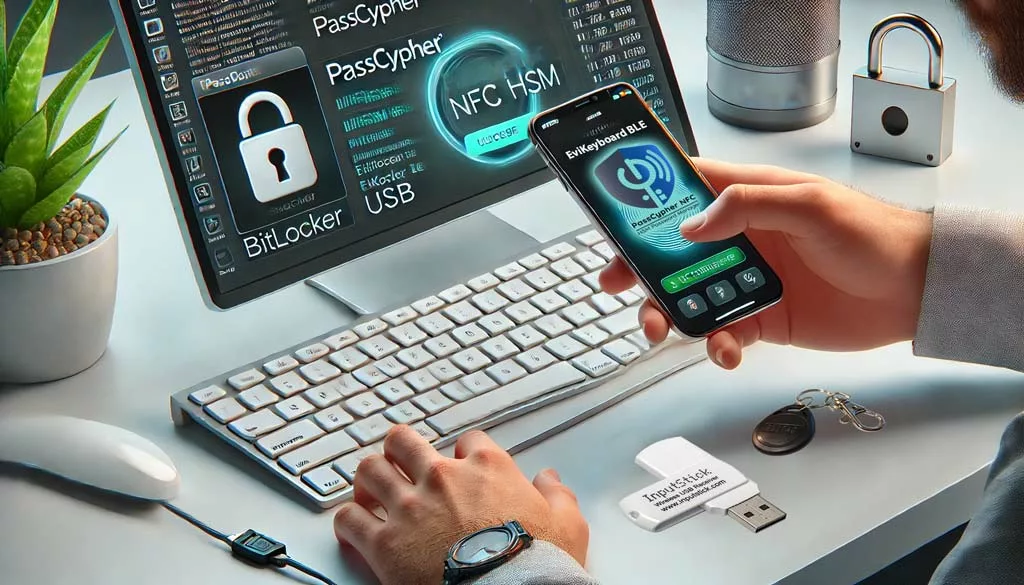
Person using PassCypher NFC HSM and EviKeyboard BLE USB to fix BitLocker access on an encrypted storage device.

Fix BitLocker Access Issues After Faulty Crowdstrike Update: This technical guide explains how to restore access to encrypted drives after the July 2024 CrowdStrike faulty update, remove corrupted system files, and recover data using BitLocker recovery keys.Learn step-by-step methods for troubleshooting Windows blue screen errors, securely unlocking TPM 2.0 protected storage, and avoiding risks linked to Microsoft cloud recovery key storage. Discover sovereign hardware solutions such as PassCypher NFC HSM, EviKeyboard BLE, and DataShielder NFC HSM, which ensure offline, quantum‑resistant protection and guarantee full sovereignty over BitLocker key management.This guide helps you Fix BitLocker Access issues after the faulty CrowdStrike update.

Express Summary — Fix BitLocker Access

⮞ Reading Note

This summary explains how to Fix BitLocker Access quickly provides a quick understanding of how to fix BitLocker access issues after the faulty Crowdstrike update. The advanced sections detail file removal, recovery key usage, sovereign hardware solutions, and Microsoft’s official recovery tool.

⚡ Discovery

The faulty Crowdstrike update in July 2024 caused the largest IT outage in history, crashing over 8.5 million Windows systems worldwide. CrowdStrike published a Preliminary Incident Report and promised a full Root Cause Analysis. In January 2026, Microsoft released an official recovery tool to automate repair.

✦ Immediate Impacts

– Users lost access to encrypted storage devices.
– Recovery required technical steps not obvious to non-experts.
– Sovereign solutions like PassCypher NFC HSM became critical to ensure secure recovery.

⚠ Strategic Message

If recovery keys are stored in the Microsoft cloud, they may be exposed. In January 2026, Microsoft confirmed having provided BitLocker keys to the FBI under warrant in Guam, and receives about 20 legal requests per year. Sovereign hardware solutions provide offline, quantum-resistant protection.

🛑 When Not to Act

– Do not reintroduce sensitive keys into a compromised environment.
– Do not rely solely on software fixes without hardware safeguards.
– Do not confuse quick access restoration with long-term security.

✓ Sovereign Counter-Measure Principle

Risk reduction means moving trust outside the compromised OS: using NFC HSM devices and secure keyboards to manage keys offline.

Reading Parameters

Executive summary reading time: ≈ 4 minutes,
Advanced guide: ≈ 6 minutes,
Full article: ≈ 30–35 minutes,
Publication date: 2026-01-24,
ast update: 2026-01-25,
Complexity level: Intermediate — system recovery & sovereign security,
Technical density: ≈ 60 %,
Main language: EN,
Specificity: Technical guide — BitLocker recovery & Crowdstrike incident,
Accessibility: Optimized for screen readers — anchors & structured tags,
Order of Reading: Express Summary → Advanced Summary → CrowdStrike Incident → Manual Procedures → KB5042429 Tool → Sovereign Solutions → FAQ → Glossary → Strategic Conclusion
Editorial type: Technical security guide,
Issue level: 8.5 / 10 — encrypted data loss risk,
About the author: Freemindtronic, inventor of PassCypher and DataShielder NFC HSM.

Editorial Note

This guide is part of the Technical News section. It extends analysis of the Crowdstrike incident by providing practical recovery steps and highlighting sovereign hardware solutions. It follows Freemindtronic’s AI Transparency Declaration — FM-AI-2025-11-SMD5.
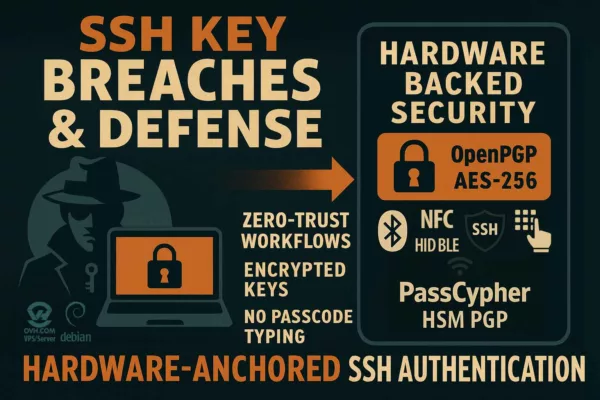
Sovereign SSH Authentication with PassCypher HSM PGP — Zero Key in Clear

SSH Key PassCypher HSM PGP establishes a sovereign SSH authentication chain for zero-trust infrastructures, where [...]

1 Comment

SSH Key PassCypher HSM PGP — Sécuriser l’accès multi-OS à un VPS

SSH Key PassCypher HSM PGP fournit une chaîne souveraine : génération locale de clés SSH [...]

1 Comment

Générateur de mots de passe souverain – PassCypher Secure Passgen WP

Générateur de mots de passe souverain PassCypher Secure Passgen WP pour WordPress — le premier [...]

Quantum computer 6100 qubits ⮞ Historic 2025 breakthrough

A 6,100-qubit neutral-atom array marks a major scaling milestone in quantum computing, raising new strategic [...]

1 Comment

Ordinateur quantique 6100 qubits ⮞ La percée historique 2025

Ordinateur quantique 6100 qubits marque un tournant dans l’histoire de l’informatique, soulevant des défis sans [...]

SSH VPS Sécurisé avec PassCypher HSM

SSH VPS sécurisé avec PassCypher HSM — posture key-only dès le boot via NFC HSM [...]

1 Comment

New Microsoft Uninstallable Recall: Enhanced Security at Its Core

Microsoft’s Revamped Recall System Microsoft recently overhauled its Recall feature, which had faced criticism for security [...]

The chronicles displayed above ↑ belong to the Technical News section.  They extend the analysis of systemic risks revealed by the faulty CrowdStrike update and BitLocker cloud key storage. This complements the present chronicle Fix BitLocker Access Issues After Faulty Crowdstrike Update, highlighting sovereign hardware solutions such as PassCypher NFC HSM, EviKeyboard BLE, and DataShielder NFC HSM. The objective is not to follow the news, but to identify irreversible limits and sovereign stop points when a terminal can no longer be trusted.

Advanced Summary — How to Fix BitLocker Access

⮞ Reading Note This advanced summary (≈ 6 minutes) details the technical steps to restore access after the faulty Crowdstrike update. It explains how to securely Fix BitLocker Access, use recovery keys, and apply sovereign hardware solutions.

Removing Problematic Files to Fix BitLocker Access

First, reboot in recovery mode. Then, navigate to %WINDIR%System32driversCrowdStrike. Finally, delete the corrupted file “C-00000291*.sys” to Fix BitLocker Access.

Using Recovery Keys to Fix BitLocker Access

To begin, boot from a USB recovery drive. Next, select “Unlock the drive”. As a result, enter your BitLocker recovery key to Fix BitLocker Access and restore encrypted data.

Sovereign Security Message

Cloud storage of recovery keys may expose them to third parties. Sovereign hardware ensures offline protection.

Microsoft KB5042429 Recovery Tool

Released in January 2026, KB5042429 automates repair steps.
Options:
– Recovery from Windows PE (bootable media).
– Recovery from Safe Mode.
It replaces manual procedures KB5042421 (clients) and KB5042426 (servers).

Windows PE & Safe Mode Recovery

The KB5042429 tool supports Windows PE Recovery via bootable media and Safe Mode Recovery for direct system repair.
These terms are widely searched by administrators and should be highlighted to improve discoverability and clarity.

Sovereign Hardware Solutions

– PassCypher NFC HSM: stores up to 100 TPM 2.0 and BitLocker keys offline.
– EviKeyboard BLE: injects keys securely without cloud dependency.
– DataShielder NFC HSM: neutralizes exfiltration risks on hostile terminals.

Microsoft BitLocker (Default) PassCypher NFC HSM
Recovery keys often saved in Microsoft account/OneDrive Keys stored encrypted in NFC HSM, offline
Recovery keys stored in Microsoft cloud, accessible to authorities on warrant (≈20 requests/year) Keys remain offline, sovereign, and under exclusive user control
Convenient but dependent on cloud trust Sovereign, air-gapped, quantum-resistant security

Behind the Blue Screen — Encrypted Drive Recovery

The Global Outage of July 2024 and CrowdStrike Faulty Update

July 2024 marked the largest IT outage in history what is now considered the largest IT outage in history. A faulty CrowdStrike update triggered blue screens across 8.5 million Windows systems, paralyzing hospitals, airports, banks, and government services. Overnight, encrypted drives protected by BitLocker became inaccessible, leaving administrators scrambling for solutions. Administrators struggled to Fix BitLocker Access across millions of devices.

Blue Screen of Death (BSOD)

The CrowdStrike update triggered the infamous Blue Screen of Death (BSOD) across Windows systems. This term, widely recognized by users and IT staff, emphasizes the scale of disruption and the immediate visibility of the failure.

CrowdStrike Falcon Sensor Update

The faulty update was part of the CrowdStrike Falcon Sensor agent, deployed globally across millions of endpoints.
This terminology is important because administrators searching for solutions often refer to the incident as the “Falcon Sensor Update crash.” Including this reference helps clarify the technical root of the outage.

Manual Recovery Steps and Their Limits

At first, Microsoft published manual procedures — KB5042421 for clients and KB5042426 for servers.
These guides described how to boot into recovery environments, remove corrupted files, and reapply updates.
But for many organizations, the scale of the incident made manual fixes impractical.
Entire fleets of machines had to be repaired one by one, often under pressure and without clear visibility.

Removing Problematic CrowdStrike Files for Drive Recovery

  • Reboot in Recovery Mode Restart your computer and enter recovery mode by pressing F8 or F11 during startup.
  • Navigate to CrowdStrike Directory Go to %WINDIR%System32driversCrowdStrike.
  • Delete the Problematic File Identify and delete the file named “C-00000291*.sys”.
  • Restart Your Computer Reboot your computer normally. For detailed instructions, visit the CrowdStrike blog.

Configuring Sovereign Hardware for BitLocker Recovery

Prepare the Hardware

  • PassCypher NFC HSM: A security module using NFC technology for key storage.
  • EviKeyboard BLE USB: A secure virtual keyboard for system interaction.

Initial Setup

  • Connect EviKeyboard to your computer via USB and enable BLE for a secure connection.
  • Insert the NFC card into the PassCypher HSM.

Authenticate and Unlock

  • Follow PassCypher instructions to authenticate the user.
  • Use EviKeyboard to access the BitLocker interface.
  • Pass the NFC HSM device under the phone’s antenna to transmit the key securely.

How Sovereign Hardware Solutions Operate

From the Freemindtronic app installed on a Bluetooth-paired Android phone (encrypted with AES 128), decryption or recovery keys are transmitted to the computer via the virtual keyboard.

Steps:

  1. Select the Key: Choose the key for the locked storage in the Freemindtronic app.
  2. Use NFC HSM: Pass the NFC HSM device under the phone’s antenna.
  3. Automatic Entry: The key is automatically entered into the command line or BitLocker window.

BitLocker and TPM 2.0 keys are stored encrypted in the NFC HSM, allowing for secure contactless unlocking from BIOS, before OS startup, or within Windows.

For a visual guide on using EviKeyboard BLE with the Freemindtronic app, you can watch this video.

Functioning of PassCypher NFC HSM + EviKeyboard BLE

Encrypted Storage of Keys
BitLocker and TPM 2.0 keys are stored encrypted in the NFC HSM module, not in the Microsoft cloud.

Secure Virtual Keyboard
The EviKeyboard BLE acts as a secure virtual keyboard: it injects the key directly into the BitLocker interface or command line, without passing through Windows Credential Manager or OneDrive.

Transmission Process
The transmission is performed via a Bluetooth-paired Android phone, with AES 128 encryption, which relays the key from the HSM to the computer.

Result
The key is never automatically saved by Microsoft, unlike the default BitLocker behavior where the recovery key is often stored in the Microsoft account or OneDrive.

Difference with the Microsoft Model

  • BitLocker default: the recovery key is often saved in the Microsoft cloud → Microsoft can provide it to authorities under warrant.
  • PassCypher NFC HSM: the key is outside the cloud, only in the physical HSM you control → Microsoft has no access to this key.

Even if the computer is seized, without the HSM and NFC authentication, the key remains inaccessible.

Conclusion

If you use PassCypher NFC HSM with the virtual keyboard emulator, Microsoft cannot access your BitLocker keys, because they are never stored or synchronized in its servers. You retain full sovereignty over your keys, unlike the cloud-based Microsoft model.

KB5042429 — Microsoft’s Automated Recovery Tool

Two years later, in January 2026, Microsoft released KB5042429, a signed recovery tool designed to automate these steps.
Administrators could now choose between two modes: Recovery from Windows PE, using bootable media to repair systems, or Recovery from Safe Mode, executing automated fixes without full reinstallation.
This marked a turning point: recovery became faster, more predictable, and less dependent on human intervention.

Privacy Risks of Cloud-Stored Recovery Keys

Yet, while the technical fix was welcome, another revelation shook confidence: Microsoft confirmed that it had provided BitLocker recovery keys to the FBI during a fraud investigation in Guam. By default, these keys are stored in the Microsoft cloud, making them accessible under legal warrant. With around 20 requests per year, the practice raised serious concerns about sovereignty and privacy.

Judicial Context — Guam Case

In January 2026, the FBI was investigating a fraud scheme related to the Pandemic Unemployment Assistance program in Guam.
Three suspect laptops were protected with BitLocker encryption. Under a legal warrant, Microsoft provided the recovery keys stored in its cloud, allowing investigators to decrypt the drives. This marked the first known case where Microsoft handed over BitLocker keys to U.S. justice.
Microsoft later confirmed receiving about 20 similar requests per year. While this cooperation did not involve “breaking” BitLocker, it revealed the risks of default cloud storage of recovery keys: users benefit from easier recovery, but authorities — and potentially malicious actors if compromised — gain an indirect access path.
This precedent illustrates the tension between national security and individual privacy, and highlights why sovereign hardware solutions such as PassCypher NFC HSM, EviKeyboard BLE, and DataShielder NFC HSM are critical to keep keys offline and under exclusive user control.

Sovereign Solutions to Fix BitLocker Access Take the Stage

This is where sovereign solutions enter the stage.
Devices like PassCypher NFC HSM and EviKeyboard BLE keep keys offline, under exclusive user control.
They ensure that even in times of crisis, recovery does not depend on external authorities or cloud services.
In hostile environments, DataShielder NFC HSM further neutralizes exfiltration risks, protecting communications and credentials.

A Wake-Up Call for Digital Sovereignty and Fix BitLocker Access Security

The CrowdStrike incident was not just a technical failure — it was a wake-up call.
It revealed how fragile global infrastructures can be when trust is centralized.
It showed that recovery is not only about restoring access, but about redefining sovereignty in digital ecosystems.
And it highlighted the need for clarity: telling the story of how millions of systems failed, how administrators fought back, and how sovereign technologies now offer a path forward.

What We Did Not Cover in Fixing BitLocker Access

To keep this guide focused on how to Fix BitLocker Access after the faulty CrowdStrike update, several related areas were intentionally left aside.
We did not explore Linux and macOS environments, which follow different encryption and recovery models.
We also excluded virtualized servers and cloud-hosted BitLocker scenarios, where recovery processes depend on hypervisors or cloud service providers.
Finally, we did not provide a detailed forensic analysis of the CrowdStrike incident, such as memory dumps, kernel-level debugging, or advanced incident response techniques.
These topics deserve their own specialized research, beyond the scope of this practical recovery and sovereign security guide.

FAQ — Fix BitLocker Access

What if I don’t have my BitLocker recovery key?
Access

Recovery without the key

Check your Microsoft account, OneDrive, or enterprise admin. Sovereign solutions like PassCypher NFC HSM avoid this dependency by keeping keys offline.

Can I fix the issue without KB5042429?
Alternative

Manual procedures

Yes, manual steps exist (KB5042421 for clients, KB5042426 for servers), but KB5042429 automates them and reduces human error.

Does CrowdStrike provide its own fix?
Vendor

Incident report

CrowdStrike published a Preliminary Incident Report and promised a Root Cause Analysis. However, recovery guidance mainly came from Microsoft KB updates.

Why did Microsoft give BitLocker keys to the FBI?
Privacy

Legal warrants

Under warrant, Microsoft confirmed providing recovery keys in Guam. This raised sovereignty concerns since keys stored in the cloud can be accessed by authorities.

Can I prevent my BitLocker keys from being uploaded to Microsoft?
Control

Offline storage

Yes. During setup, disable automatic cloud backup. Alternatively, use sovereign hardware like PassCypher NFC HSM or EviKeyboard BLE to store keys offline.

Is KB5042429 safe to use on enterprise fleets?
Deployment

Mass recovery

Yes. It is a signed Microsoft recovery tool designed for mass deployment. It supports both Windows PE and Safe Mode recovery, making it scalable for large infrastructures.

What are the risks of relying only on manual fixes?
Limit

Impractical for fleets

Manual fixes require repairing machines one by one, which is impractical for large fleets. They also increase downtime and risk of human error compared to automated recovery.

Can Intune or Endpoint Manager help?
Deployment

Centralized remediation

Yes. Microsoft Endpoint Manager (Intune) can deploy KB5042429 or custom remediation scripts across enterprise fleets.
This reduces downtime compared to manual fixes and ensures consistent recovery.
Highlighting Intune and Endpoint Manager is important because many IT administrators search for centralized recovery solutions using these terms.

How do sovereign solutions improve recovery?
Advantage

Offline sovereignty

Sovereign devices like DataShielder NFC HSM neutralize exfiltration risks and ensure recovery keys remain offline, inaccessible to cloud services or third parties.

Can I unlock BitLocker before Windows starts?
Pre-boot

BIOS-level injection

Yes. With NFC HSM devices, keys can be injected at BIOS level or pre-boot environments, ensuring secure access even if the OS is compromised.

What lessons did the July 2024 outage teach?
Insight

Wake-up call

It highlighted the fragility of centralized trust, the need for sovereign recovery solutions, and the importance of having offline contingency plans for encrypted data.

Weak Signals in Cloud-Based Recovery

  • Dependence on cloud storage for recovery keys.
  • Growing number of incidents linked to third-party updates.

Strong Signals for Sovereign Security Adoption

  • Microsoft providing BitLocker keys to the FBI (≈20 requests/year).
  • Rising adoption of sovereign hardware solutions like PassCypher NFC HSM.

History of the CrowdStrike Incident and Recovery Efforts

  • July 2024: Faulty CrowdStrike update crashes 8.5M Windows systems.
  • 2024–2025: Preliminary Incident Report published, Root Cause Analysis promised.
  • January 2026: Microsoft releases KB5042429 recovery tool.
  • January 2026: Controversy over BitLocker keys provided to FBI.

Root Cause Analysis (RCA)

CrowdStrike promised a full Root Cause Analysis (RCA) following its Preliminary Incident Report. This RCA is expected to detail the exact sequence of events, the faulty Falcon Sensor update, and lessons learned for global endpoint management. Mentioning RCA aligns with industry terminology and strengthens SEO visibility.

Impact on Enterprises and Encrypted Data Recovery

Short-term

  • Loss of access to encrypted drives.
  • High support costs for enterprises.

Long-term

    • Trust in cloud-based recovery weakened.
    • Acceleration of sovereign, offline security solutions.

Global IT Outage

The July 2024 CrowdStrike incident is now considered the largest Global IT Outage in history.
Hospitals, airports, banks, and government services were simultaneously affected, highlighting the fragility of centralized trust models.

Official Microsoft Documentation for BitLocker Recovery

For more details, consult Microsoft’s official resources:

Official Microsoft KB resources:

Glossary — Fix BitLocker Access

BitLocker
Encryption

Microsoft disk encryption

Encrypts entire volumes to protect data on Windows devices. Often linked to Recovery Keys and cloud storage risks.

Recovery Key
Emergency access

48-digit numerical password

Used to unlock encrypted drives when normal access fails. By default stored in the Microsoft cloud, but sovereign solutions like PassCypher NFC HSM avoid this dependency.

TPM 2.0
Hardware

Trusted Platform Module

A hardware chip that stores cryptographic keys and ensures platform integrity. Essential for BitLocker recovery and secure boot processes.

KB5042429
Recovery tool

Microsoft’s official recovery utility

Released in January 2026 to automate fixes. Complements KB5042421 (clients) and KB5042426 (servers).

PassCypher NFC HSM
Sovereign solution

Offline hardware security module

Stores up to 100 TPM 2.0 and BitLocker keys offline, ensuring quantum‑resistant protection and sovereignty.

EviKeyboard BLE
Secure input

Bluetooth-enabled virtual keyboard

Injects encryption keys directly into the BitLocker interface without using Windows Credential Manager or OneDrive.

DataShielder NFC HSM
Protection

Neutralizes exfiltration risks

Advanced sovereign hardware solution that protects communications and credentials in hostile environments.

Digital Sovereignty
Principle

Keeping cryptographic keys offline

Ensures exclusive user control. Highlighted by the CrowdStrike incident as a wake-up call for global infrastructures.

Final Takeaways on Secure BitLocker Recovery

Fixing BitLocker access after the faulty Crowdstrike update requires both technical recovery steps and sovereign security measures. Using PassCypher NFC HSM and EviKeyboard BLE ensures that recovery keys remain offline and under user control. Thus, restoring access is not enough — long-term trust depends on sovereign stop points outside the OS and outside the cloud.

In January 2026, Microsoft’s official recovery tool simplified repair, but the controversy over BitLocker keys provided to the FBI highlights the importance of sovereign solutions. By combining official resources from Microsoft and CrowdStrike with sovereign hardware like PassCypher, you gain both practical recovery guidance and long-term protection against cloud dependency. To Fix BitLocker Access securely, sovereign hardware solutions are essential.

For more information, explore the PassCypher and DataShielder resources.
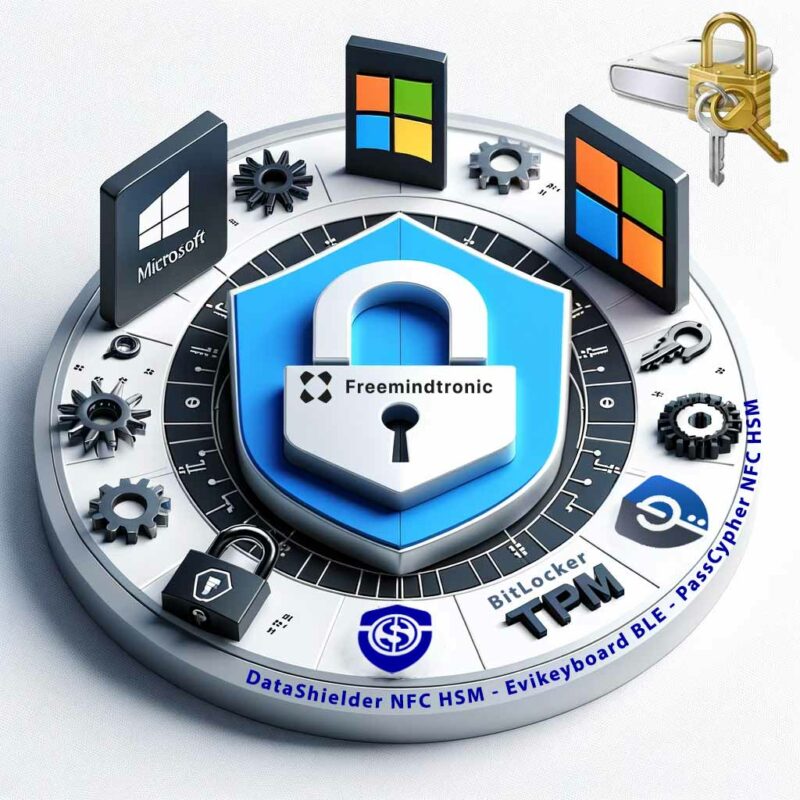
BitLocker Security: Safeguarding Against Cyberattacks

A visual representation of BitLocker Security featuring a central lock icon surrounded by elements representing Microsoft, TPM, and Windows security settings.

BitLocker Security — Windows encryption, recovery mode, TPM 2.0, physical attacks and cryptographic sovereignty — November 2026.

© 2026 Jacques Gascuel — Freemindtronic®. All rights reserved. Original editorial analysis and scientific positioning. Third-party research and vulnerability disclosures remain attributed to their respective authors.

BitLocker Security: Historical Reference, Vulnerabilities, TPM Attacks and Encryption (2006–2026)

[bws_pdfprint display=’print’]

BitLocker Security — express summary

At the volume level, BitLocker protects Windows data using AES encryption. Its effectiveness, however, depends on the complete chain of trust governing access to cryptographic keys, from the TPM and boot environment to recovery procedures and system memory.

On November 10, 2026, Microsoft disclosed two additional physical security bypass vulnerabilities: CVE-2026-97015 (CVSS 6.8) and CVE-2026-119832 (CVSS 5.9). These disclosures follow the public YellowKey vulnerability (CVE-2026-45585) in May 2026.

None of these disclosures establishes a mathematical break of AES. This guide explains the distinction between encryption strength and operational security, how to recover access after Windows updates, and how independent encryption and external secret management can complement BitLocker.

Immediate action: install applicable security updates, verify protection status and recovery credentials, and assess pre-boot authentication according to your physical threat model.

Reading parameters

Initial publication: February 10, 2024
Last updated: November 16, 2026
Language: EN
Complexity: Intermediate / expert
Editorial type: Living historical, scientific and technical cybersecurity reference
Main topic: BitLocker security
Secondary topics: TPM 2.0, WinRE, Secure Boot, recovery keys, physical attacks, AES and independent encryption.
Author: Jacques Gascuel, inventor and founder of Freemindtronic®.

Publication status

Documentary security analysis, not an independent laboratory qualification or product certification. Vulnerability ratings are attributed to their published records. No unpublished exploit or proprietary implementation is disclosed.

Editorial transparency — FM-AI-2025-11-SMD5 V1.1. This article distinguishes vendor disclosures, published scientific research, architectural analysis and editorial recommendations. AI-assisted technical illustrations are conceptual representations subject to human verification and validation. Their intellectual property rights, attribution and conditions of use are governed by the applicable provisions of the Freemindtronic AI Transparency Declaration.

Executive summary

Full-volume encryption reduces exposure when a device is lost, stolen or powered off. It does not guarantee confidentiality after the volume has been unlocked. The November 2026 disclosures reinforce the importance of evaluating authorisation, recovery, hardware trust and memory exposure separately.

Key points

  • Physical access is a prerequisite for the two newly disclosed November CVEs.
  • TPM + PIN reduces selected pre-boot risks but is not universal protection.
  • Recovery credentials must be protected independently.
  • Separately encrypted files may remain protected after a volume encryption bypass.

1. Latest BitLocker vulnerabilities — November 2026

The following selected disclosures are attributed to Microsoft. The scores are CVSS 3.1 base scores, not a universal assessment of organisational risk.

CVE Published CVSS 3.1 Weakness Access Privileges
CVE-2026-97015 10 Nov 2026 6.8 / Medium Heap memory overflow (CWE-122) Physical None
CVE-2026-119832 10 Nov 2026 5.9 / Medium Improper permissions Physical Low
CVE-2026-45585 (YellowKey) 19 May 2026 See advisory Security bypass Physical See advisory

Both November records describe low-complexity physical attacks without user interaction. CISA assessments dated November 10–11 recorded no known exploitation at that time; this is not proof that exploitation has never occurred.

Historical disclosures from 2022 and 2024

The original reference discussed CVE-2022-41099 and CVE-2024-38058. The historical text dated the disclosures to November 2022 and January 2024 and described manual administrative mitigation. Its associations with KB5012170 and KB5024487, respectively, and its historical release-date claims remain unverified. Consult MSRC for the actual affected products and applicable fixes; these legacy associations are not patch instructions.

Selected Windows version thresholds

Windows version CVE-2026-97015 CVE-2026-119832
11 26H2 26300.9711 26300.9974
11 26H1 28000.3231 28000.3501
11 25H2 26200.9711 26200.9974
11 24H2 26100.9711 26100.9974
11 23H2 22631.7652 22631.7711
10 22H2 19045.7807 19045.7846
10 21H2 19044.7807 19044.7846

Selected fixed-version thresholds from the vulnerability records, not a complete product or KB list. Verify applicable updates and servicing eligibility with Microsoft.

2. YellowKey — CVE-2026-45585

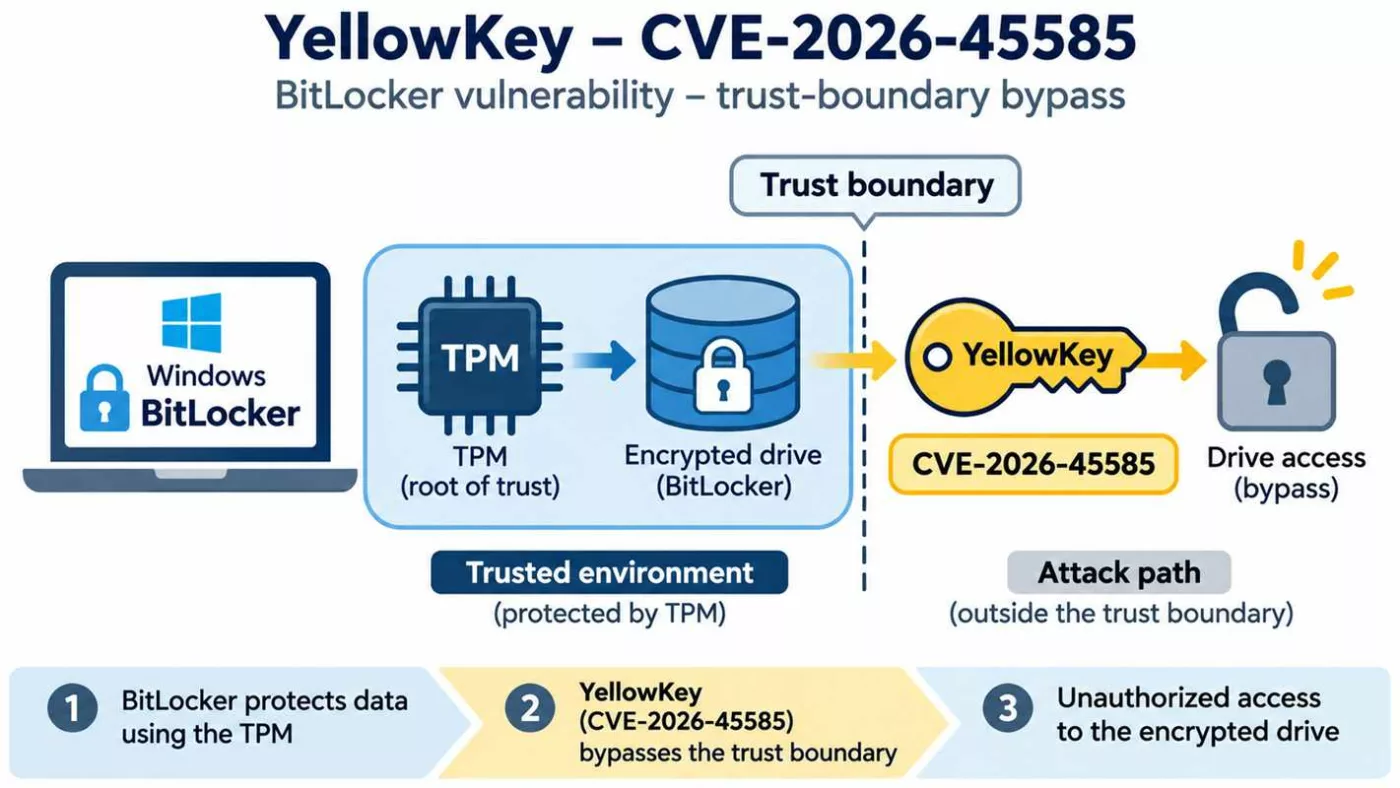
YellowKey CVE-2026-45585 vulnerability diagram showing a Windows BitLocker TPM protection trust-boundary bypass and unauthorized encrypted drive access.
YellowKey CVE-2026-45585: conceptual illustration of a BitLocker trust-boundary bypass enabling unauthorised access to encrypted data without breaking the AES encryption algorithm.

Microsoft published the YellowKey record on May 19, 2026 after a public proof of concept became available. The case concerns a security bypass associated with Windows recovery mechanisms. It illustrates why trusted recovery paths must be included in an encryption threat model.

Consult the current vendor advisory for updates and mitigation details. Microsoft identifies TPM + PIN as a mitigation for the documented scenario; claims of alternative variants should not be treated as established without reproducible evidence. A vulnerability alone does not establish intentional backdoor design.

Official CVE record · Microsoft advisory

Practical hardware-based mitigation: PassCypher NFC HSM, capable of generating secrets of up to 512 bits, can facilitate TPM + PIN adoption through independent hardware-based credential storage and automated input using EviKeyboard with InputStick or proprietary end-to-end encrypted EviBLE HID technology. See sovereign pre-boot authentication and YellowKey mitigation.

Historical context: The reference first published on 10 February 2024 is integrated into the thematic chapters below. Its 2025 recovery-guide revision is retained through the historical incident and configuration guidance. BitLocker also protects removable media and virtual drives; secure disposal depends on effective encryption and key custody.

3. BitLocker encryption architecture and trust boundaries

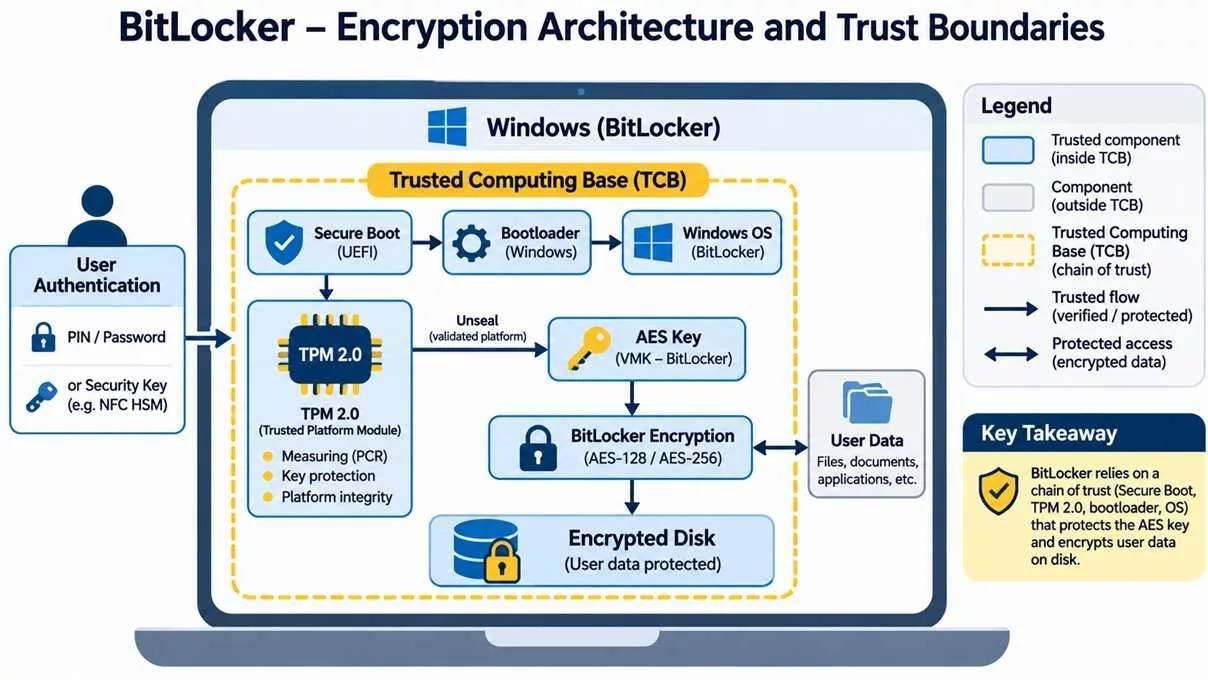
BitLocker encryption architecture diagram showing TPM 2.0, Secure Boot, Windows bootloader, AES-256 disk encryption and trusted computing boundaries.
BitLocker encryption architecture and trust boundaries: TPM 2.0, UEFI Secure Boot, Windows authentication, cryptographic key protection and AES-128/256 disk encryption. The diagram is conceptual; the VMK protects the FVEK, and external NFC HSMs are not native BitLocker protectors.

Architecturally, BitLocker encrypts volumes using AES, including XTS-AES configurations. The Full Volume Encryption Key (FVEK) encrypts volume data; the Volume Master Key (VMK) protects the FVEK. Key protectors govern access to the VMK. A TPM can bind key release to platform measurements and additional authentication conditions.

TPM 2.0 is not a general-purpose RAM protection mechanism. After unlocking, cryptographic material may be available in host memory. Secure Boot authenticates boot components; measured boot records measurements. These functions are complementary, not interchangeable.

Platform measurements + configured authentication
                 ↓
       Key protector authorisation
                 ↓
         Volume Master Key (VMK)
                 ↓
      Full Volume Encryption Key (FVEK)
                 ↓
          Encrypted volume data

This simplified diagram represents the normal unlocking path, not every recovery or protector configuration.

4. Physical attacks, TPM and forensic risks

TPM 1.2 and TPM 2.0 also support cryptographic identity and signature operations. Biometric authentication may use TPM-backed credentials, but this does not mean that biometric templates or all disk keys reside inside the TPM.

TPM 1.2 and TPM 2.0 provide protected key operations, random number generation and signatures. The latter extends algorithm support and authorisation capabilities; neither directly controls host RAM. Platform compatibility and implementation quality remain important.

4.1 Cold boot and memory remanence

Physical controls include locks, safes and secure storage. Hardware and software acquisition tools may be costly or difficult to obtain, although some attacks use inexpensive equipment. These practical constraints are not guarantees of confidentiality.

Residual RAM contents can expose active encryption material on susceptible devices. TPM anti-dictionary protections do not prevent extraction of keys already present in memory. Prefer complete shutdown before loss of physical control and evaluate platform-specific memory protections.

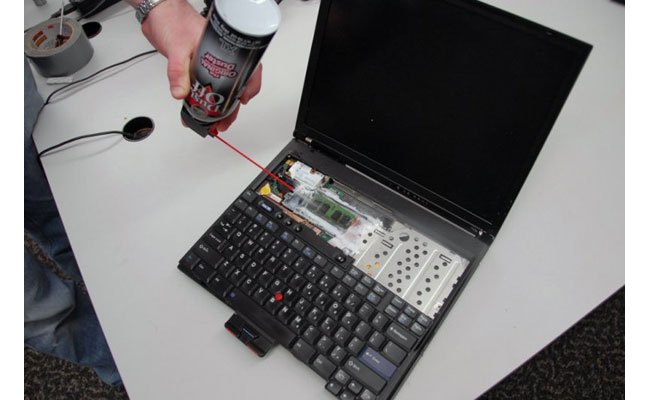
Cold boot attack illustration
Historical illustration: memory remanence and physical access.


Cold Boot research demonstrated that residual DRAM contents decay over time and that cooling can prolong retention on susceptible hardware. Live RAM analysis is a related but distinct forensic technique. Capacity to recover usable keys depends on memory state, equipment and platform protections. Firmware-supported Memory Overwrite Request (MOR) can reduce exposure; neither a startup PIN nor TPM lockout invalidates keys already recovered.

Scientific reference: Halderman et al. (2008).


4.2 DMA attacks

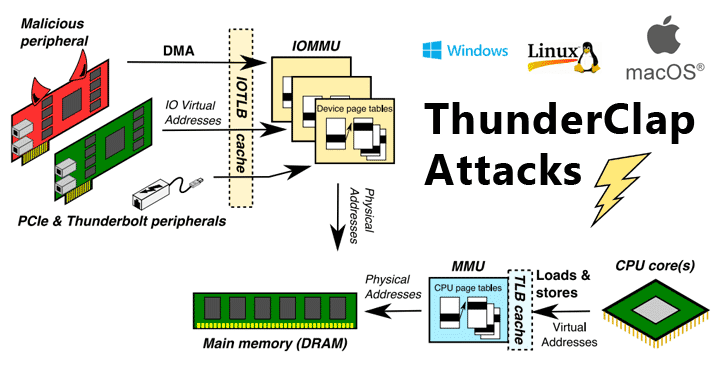
DMA-capable peripherals can threaten host memory on vulnerable systems. Enable Kernel DMA Protection where supported and restrict untrusted peripherals.

Thunderclap DMA attack diagram
Historical illustration: Thunderclap and DMA attack surfaces.

Thunderclap (2019) examined IOMMU isolation across Windows, Linux and macOS. FireWire, Thunderbolt and external PCIe require appropriate port and DMA policies; PCILeech is a historical example of a memory acquisition tool. Encrypting external storage protects its contents, not the host against malicious DMA. See Thunderclap research.

4.3 TPM communication and faulTPM

Published research has demonstrated interception of discrete TPM communications on selected systems and attacks against specific firmware TPM implementations. These findings do not imply that every TPM is vulnerable. The Raspberry Pi Pico demonstration discussed in the original article illustrates the importance of hardware-specific qualification.

Discrete TPM buses, SRTM and firmware TPMs

TPM-only mode allows normal unattended unlocking. Historically, discrete TPM bus interception using inexpensive hardware has illustrated why physical access matters. Stacksmashing’s Raspberry Pi Pico demonstration used a susceptible laptop and Dislocker; it is distinct from the Bus Pirate, a multiprotocol electronic interface supporting SPI, I2C, UART, 1-wire, 2-wire, 3-wire and HD44780 LCD interfaces. Results must not be generalised to every TPM or bus.

Separately, SRTM power-state and measurement attacks and AMD faulTPM research challenge different trust assumptions. Historical references to Intel and Dell platforms require model-specific evidence. Physical isolation, tamper-evident seals, protected bus design (including hardware-specific SPI access controls or firewalls where available), firmware updates and appropriate pre-boot authentication reduce selected risks. Intel CSME and remote attestation may contribute to platform integrity assessment, but are not universal countermeasures.

4.4 TPM implementation defects

CVE-2023-1017 and CVE-2023-1018 concern memory-boundary defects in TPM implementations, not inherently physical fault injection. Consult the hardware vendor for affected firmware and fixes.

Historical reports also identified affected Lenovo systems with Nuvoton TPM implementations. Verify the actual firmware and vendor advisory rather than assuming that all devices share the defects or that BitLocker keys can always be extracted.

4.5 Hardware debugging and fault injection

Hardware debug interfaces such as Intel DCI and fault injection can create additional attack surfaces under specific platform conditions. Disable unauthorised debugging and assess firmware protections. No universal BitLocker decryption capability is established by these attack categories.


Fault injection explores voltage, temperature, radiation and electrical glitching effects on hardware. In contrast, Intel DCI debugging can expose live memory on suitably configured platforms, potentially including the VMK. On a suitably exposed platform, CPU halt and debug-based memory acquisition may enable forensic decryption without the Windows login password or recovery password; this remains configuration-dependent. These are distinct from TPM command-parser defects. Fault-resistant hardware and restricted debug access are relevant controls; remote attestation can report selected measurements but cannot establish immunity.

5. How to fix BitLocker Recovery Mode after a Windows update

Windows updates, firmware changes and changes to measured boot state can trigger recovery. The July 2024 update incident remains a useful historical example. Do not assume a particular PCR change is the cause on every device.

Historical case: July 2024 recovery incident

KB5040442 was associated in the historical article with unexpected recovery prompts. The original explanation attributed this to PCR4, but that causal attribution is unverified. Firmware, bootloader and hardware changes can alter measured state. Review release notes, prepare recovery backups and avoid removing PCR measurements simply to suppress prompts. The incident illustrates the importance of update preparation and vendor communication.

Recovery procedure

  1. Record the recovery key identifier shown on screen.
  2. Retrieve the matching 48-digit recovery password from your authorised backup or organisation.
  3. Enter it on the trusted recovery screen.
  4. After booting, verify Windows update status and BitLocker protection.
  5. If recovery repeats, consult the device vendor or IT administrator before changing firmware, TPM or PCR settings.

Do not clear the TPM, remove protectors or weaken PCR policy merely to suppress recovery prompts. If you cannot recover the credentials, there is no supported universal method to decrypt an intact protected volume.

Microsoft account recovery keys (if backed up to that account).

6. Secure configuration and verification

Consider hardware and software compatibility before deployment. In addition, choose used-space-only or full-volume encryption according to whether previously stored data may remain in unused sectors. For existing devices, assess residual data before selecting the faster option.

Use a supported Windows edition and servicing channel. Full BitLocker management is available on supported Pro, Enterprise and Education editions; qualifying Home devices may offer Device Encryption. Select encryption and protector policies before deployment, preserve recovery credentials and use TPM + PIN where physical risks justify it.


Activation and encryption choices

Check TPM status in Windows Security or TPM management. If required, consult the manufacturer before enabling TPM in UEFI (entry keys can include F2, F12, Del or Esc) or updating firmware. Choose supported protectors for the volume type: TPM + PIN, startup key, password or recovery protector as applicable. Certificate-based protectors have specialised removable-drive uses.

Choose AES-CBC or XTS-AES according to compatibility requirements; XTS-AES is preferred for modern fixed volumes. Evaluate AES-128 versus AES-256, hardware acceleration and performance. Open Manage BitLocker in Control Panel, select the volume, back up recovery credentials and follow the activation wizard. Encryption duration varies with volume size and data.

Verification commands

Run these read-only commands from an elevated PowerShell session:

Get-BitLockerVolume
Get-Tpm
Confirm-SecureBootUEFI
reagentc /info
winver

Verify that protection is on, identify protector types, check the installed Windows version and confirm WinRE status. Avoid publishing recovery passwords or identifying key material in diagnostic logs.

7. Freemindtronic — independent cryptographic protection

Externalizing credential storage and separately encrypting sensitive data introduces additional trust boundaries. EviPass NFC HSM and PassCypher can complement credential management. EviCypher NFC HSM and DataShielder provide a separate encryption approach. EviKeyboard BLE provides a complementary credential input mechanism.

These technologies are not patches for BitLocker CVEs. External storage of secrets does not itself guarantee that credentials entered into a compromised host remain confidential. Independently encrypted files can remain protected after BitLocker is bypassed if their keys and plaintext are not accessible to the attacker.


PassCypher NFC HSM, EviPass, EviKeyboard and EviBLE

The original account describes password-free contactless credential management and smartphone-assisted remote input into BIOS or disk-startup fields, where supported by the host. The historical USB HID analysis distinguishes the USB controller, chipset, processor and TPM; input buffers along this path may expose secrets. Product-specific transport and pairing properties require verification for the deployed version.

Contactless credential storage and smartphone-assisted input can reduce reliance on locally stored secrets. EviKeyboard BLE can deliver supported pre-boot credentials through USB HID where firmware accepts the keyboard. The historical article describes AES-128 CBC for its BLE transport; this product-specific claim requires version-specific verification. Host USB buffers, chipset and input processing may still expose credentials in memory. Physical acquisition requires suitable access and equipment, while memory volatility can limit recovery.

PassCypher’s historical features include sandboxed URL checks, anti-typosquatting, password integrity checks and Browser-in-the-Browser (BTIB) phishing protections. These reduce selected risks but cannot eliminate deception. High-entropy generated passwords must comply with the actual protector’s length and character restrictions; a generated secret exceeding 256 bits does not make a BitLocker PIN a 256-bit key.

High-entropy secret generation: up to 512 bits

PassCypher NFC HSM can generate cryptographic secrets of up to 512 bits, exceeding the nominal key length of AES-256. A uniformly random 512-bit secret has a theoretical search space of 2512 possibilities, compared with 2256 for a 256-bit key.

This generation capacity enables users to create highly unpredictable authentication secrets without relying on human memory or predictable password construction.

However, BitLocker imposes its own authentication format, length and character restrictions. PassCypher can generate secrets adapted to these constraints, including complex enhanced startup PINs. The effective entropy depends on the accepted character set, secret length and generation method.

This capability does not transform AES-256 into AES-512 or provide BitLocker with 512-bit encryption strength.

External hardware-based BitLocker credential management

PassCypher NFC HSM enables independent hardware-based custody of BitLocker startup PINs and recovery passwords. Consequently, users can manage these sensitive credentials outside the computer they protect, without requiring memorisation of complex authentication secrets.

Freemindtronic provides two complementary credential delivery approaches:

  • EviKeyboard with InputStick: smartphone-assisted credential input through an external USB HID keyboard emulator, including supported BIOS, UEFI and BitLocker pre-boot environments.
  • EviBLE HID: Freemindtronic’s proprietary end-to-end encrypted Bluetooth Low Energy secure keyboard emulation technology for credential delivery through compatible endpoints.

These approaches must be distinguished from native operating system Bluetooth keyboard pairing. Pre-boot operation requires a compatible receiving interface recognised by the target firmware and BitLocker environment.

The 48-digit BitLocker recovery password can also be managed independently within the NFC HSM. Its native format and cryptographic properties remain defined by Microsoft.

Mitigating YellowKey through sovereign pre-boot authentication

Microsoft identifies TPM + PIN as a mitigation against the documented YellowKey vulnerability (CVE-2026-45585).

By combining external hardware-based secret management with automated credential input, PassCypher NFC HSM, EviKeyboard and EviBLE can facilitate the adoption of stronger pre-boot authentication without the inconvenience of memorising complex PINs.

Cryptographic sovereignty and defence in depth. Rather than replacing BitLocker or its trusted platform module, Freemindtronic’s technologies introduce an independent hardware-based credential custody boundary. This approach supports stronger authentication configurations while maintaining user control over externally managed secrets.

The mitigation against YellowKey derives from the TPM + PIN configuration documented by Microsoft, rather than from an increase in AES key length.

The effectiveness of this architecture against CVE-2026-97015 and CVE-2026-119832 remains subject to specific technical qualification. External credential custody and encrypted transmission do not prevent every attack against a compromised host or recovery environment. Applicable Microsoft security updates remain essential.

DataShielder and EviCypher

The historical design describes AES-256 independent data encryption, randomly generated and segmented keys, external HSM/NFC HSM custody and transient operational key destruction, including HSM PGP contexts. These mechanisms can reduce exposure to TPM bus interception and fault injection when the independent trust boundary remains intact. Key erasure effectiveness and plaintext exposure require implementation-specific assessment; no near-zero recovery probability is established here.

Post-quantum algorithms do not inherently resolve memory corruption, access control defects or insecure key release.

Historical timeline of BitLocker security (2006–2026)

BitLocker emerged with Windows Vista in 2006–2007. Since then, its threat model has evolved from disk theft towards hardware, firmware, recovery and identity attacks. The following selected milestones distinguish product evolution from security research.

Period Milestone Security significance
2006–2007 Windows Vista Initial BitLocker deployment.
2008 Halderman et al. — Lest We Remember: Cold Boot Attacks on Encryption Keys (2008) Memory remanence challenges data-at-rest assumptions.
2009 Windows 7 / BitLocker To Go Removable storage protection.
2012–2013 Windows 8 / 8.1 UEFI Secure Boot and wider device encryption.
2015 Windows 10 version 1511 XTS-AES support.
2018–2019 Meijer and van Gastel — Self-encrypting deception, IEEE S&P 2019 SSD firmware becomes a critical trust dependency.
2021 Windows 11 TPM 2.0 baseline on supported hardware.
2022–2023 BlackLotus and TPM research Boot trust and hardware implementation risks.
2024 Freemindtronic reference; July recovery incident; BitPixie research Operational recovery and downgrade exposure.
2025 BitUnlocker Recovery-path trust defects.
2026 YellowKey; academic survey; Secure Boot CA transition; November CVEs Continuing evolution of attack surfaces.

Further reading: Microsoft — BitLocker overview and Kenchaiah et al. — The Hardware Isolation Gap, Electronics 15(9), 1959 (6 May 2026). This is a selected chronology, not an exhaustive CVE register.

BitUnlocker (2025): Windows Recovery Environment vulnerabilities

Microsoft researchers Netanel Ben Simon and Alon Leviev presented BitUnlocker at Black Hat USA 2025 and DEF CON 33. Their findings concern the conditions under which recovery software can access a protected volume. Consequently, a trusted recovery environment must be evaluated as part of the security boundary.

CVE Affected trust decision
CVE-2025-48800 Authorisation of scheduled recovery operations
CVE-2025-48003 Trust verification of recovery applications
CVE-2025-48804 Integrity verification of recovery boot images
CVE-2025-48818 Boot configuration and recovery decryption authorisation

Mitigation and relevance to YellowKey

All four discoveries received fixes in July 2025. Moreover, Microsoft recommends TPM + PIN and secure boot-component version enforcement (REVISE). YellowKey is a later disclosure involving recovery trust; however, common attack surfaces do not establish a shared root cause. Source: Microsoft STORM — BitUnlocker (13 August 2025).

BlackLotus, BitPixie and BitLocker downgrade attacks

Administrative UEFI passwords and restriction of legacy boot options can complement revocation policy. However, they do not replace supported security updates or validated recovery media.

BlackLotus and UEFI bootkits

BlackLotus illustrates how a vulnerable signed boot component can undermine Secure Boot. CVE-2022-21894 concerns a Secure Boot bypass, whereas CVE-2023-24932 underlies subsequent revocation guidance. Neither is a mathematical attack against AES. See Microsoft — BlackLotus investigation guidance (2023).

BitPixie and REVISE

BitPixie research highlighted risks from older vulnerable boot components in configurations that still trust them. In particular, installing a newer boot manager does not necessarily revoke an older signed version. Therefore, version enforcement and revocation are distinct from ordinary patch installation. See MSRC — CVE-2023-21563 and Microsoft KB5025885 — Secure Boot revocation guidance.

Historical CVE-2023-21563 analysis highlights physical access, vulnerable boot components and potential key exposure on affected Windows configurations. Apply applicable revocations, restrict legacy boot paths and secure UEFI administration. Validate recovery media before enforcement; remote attestation can supplement integrity monitoring.

Evil Maid attacks

An unattended device can be altered before its owner returns. For example, a compromised boot path could attempt to capture later authentication input. Secure Boot, measured boot, physical custody and tamper evidence reduce selected risks. However, none alone guarantees integrity against every physical adversary.

Secure Boot certificate expiration and BitLocker in 2026

Microsoft is transitioning from its 2011 Secure Boot certificate hierarchy to replacement certificates issued in 2023. This transition affects boot trust rather than AES encryption keys.

Legacy certificate Expiration period
Microsoft Corporation KEK CA 2011 June 2026
Microsoft UEFI CA 2011 June 2026
Microsoft Windows Production PCA 2011 October 2026

Operational continuity and recovery

Expiration does not automatically decrypt a volume or prevent a previously working machine from booting. Nevertheless, systems that fail to receive updated trust material may lose access to future boot protections. Administrators should inventory firmware compatibility, recovery credentials, Secure Boot trust databases and revocation status. Before deploying revocations, test recovery media and maintain a supported recovery path.

Official guidance: Microsoft — Secure Boot certificate expiration and CA updates and Microsoft KB5025885 — Secure Boot revocation guidance.

Scientific research: the hardware isolation gap in BitLocker forensics

The review The Hardware Isolation Gap: A Systematic Survey of BitLocker Forensics in the TPM 2.0 Era, published on 6 May 2026 in Electronics, examines research from 2006 to 2025. It provides a useful synthesis of changing forensic access opportunities as BitLocker became more closely integrated with platform hardware.

How to interpret forensic evidence

Compare the device state, TPM implementation, protector, firmware, attacker access and evidence-acquisition method before generalising any result. In particular, reported success rates in a research corpus are not universal probabilities for real-world devices. Furthermore, a survey is not an independent reproduction of each experiment, and its historical coverage predates subsequent 2026 disclosures.

Reference: Kenchaiah et al. — The Hardware Isolation Gap, Electronics 15(9), 1959 (6 May 2026).

Forensic preservation

In authorised investigations, preserve chain of custody and document the initial power state, encryption status, evidence handling and every state change. A running system and a powered-off encrypted device present different evidentiary risks. Avoid uncontrolled changes that could destroy volatile evidence or trigger recovery.

Self-encrypting SSDs, TCG Opal and Microsoft eDrive

Self-encrypting drives (SEDs) perform cryptographic operations in storage hardware. TCG Opal defines storage security management capabilities, while Microsoft eDrive historically enabled compatible hardware encryption integration. However, a hardware encryption claim does not establish the security of firmware or authentication.

Research disclosed in 2018 and published at IEEE Security and Privacy in 2019 identified serious defects in selected commercial SSDs. The findings also challenged historical BitLocker configurations that delegated encryption to the drive. See Meijer and van Gastel — Self-encrypting deception, IEEE S&P 2019.

Software versus hardware encryption

Mode Trust dependency Verification
Software BitLocker Windows cryptographic implementation and host key handling Check reported encryption method and policy.
Hardware encryption SSD firmware, access enforcement and drive lifecycle Check model, firmware and vendor advisories.

Microsoft subsequently advised reviewing hardware encryption policy. Changing a policy does not necessarily migrate an existing encrypted volume. Therefore, plan any supported migration with backups and recovery validation. See Microsoft ADV180028 — self-encrypting drives.


Credential theft and social engineering

Impersonation of Microsoft or technical support can induce a user to disclose a recovery password or credential. Verify requests independently, train users and report suspicious activity. TPM lockout limits applicable authentication attempts, not disclosure of valid credentials.

BitLocker recovery key sovereignty and lifecycle management

Recovery passwords can also be printed or saved in a protected file or encrypted external drive. The historical article mentioned Azure Key Vault as a possible custom custody service; it is not a standard native BitLocker recovery escrow destination. Any such integration requires separate access controls and recovery validation.

The 48-digit recovery password constitutes an alternative access mechanism. Accordingly, its custody can be as important as the choice of AES key length. Device Encryption may automatically escrow recovery information under supported account or organisational configurations.

Custody model Benefits Risks
Microsoft account Convenient account-based recovery Account compromise or loss of access.
Microsoft Entra ID / AD DS Managed organisational recovery Privileged administrator access and directory compromise.
Offline controlled backup Independent custody Loss, theft or insufficient redundancy.
Separate application encryption Independent confidentiality boundary Additional key lifecycle and plaintext exposure risks.

Offline options include a protected file, removable medium or printed copy. An organisation may separately manage protected escrow through a key-management service such as Azure Key Vault, subject to its own integration and access controls; this is not presented as a native BitLocker backup destination. Separate application encryption is an additional boundary, not a recovery-password custody model.

Recovery lifecycle

Maintain an inventory of recovery identifiers without publishing secrets. Additionally, restrict retrieval, log authorised access, validate backups and rotate exposed recovery protectors through supported procedures. Separate recovery credentials from the device they protect. For organisations, document delegation, revocation and disaster recovery. See Microsoft — BitLocker recovery process.

BitLocker sleep, hibernation and shutdown security

Physical risk changes with the power state. For example, locking the Windows desktop does not relock the system volume. Likewise, sleep or Modern Standby can retain sensitive material in memory.

State Security consideration
Running / locked Volume normally remains unlocked.
Sleep / Modern Standby RAM may retain active keys.
Hibernation Memory state is saved to storage; protection depends on configuration and resume authentication.
Full shutdown Active keys normally cease to be available, subject to residual memory and platform-specific risks.
Fast Startup Hybrid shutdown differs from a full shutdown.

For sensitive travel or unattended equipment, favour a validated shutdown or appropriately protected hibernation policy. Furthermore, assess DMA protection and pre-boot authentication according to the actual platform. Source: Microsoft — BitLocker countermeasures.

BitCracker, GPU password guessing and TPM anti-hammering

GPU acceleration can reduce the cost of testing guesses against certain password-protected encryption metadata. BitCracker is a research example of this attack class. However, password guessing is not equivalent to brute-forcing the full AES key space, and feasibility depends on protector type, entropy and derivation costs. See BitCracker research project.

TPM anti-hammering constrains applicable hardware authorisation attempts. In contrast, offline guessing against extractable password-protected material can have different constraints. Therefore, use suitable high-entropy credentials and do not equate a startup PIN with a disk encryption key. Artificial intelligence may prioritise likely guesses, but it does not eliminate cryptographic search complexity.

Post-quantum security: AES-128, AES-256 and TPM algorithms

Grover’s algorithm provides a theoretical quadratic advantage for ideal unstructured search. Thus, AES-256 offers a larger nominal security margin against quantum key search than AES-128. However, logical circuit depth, error correction and physical resources prevent interpreting this as a practical present-day attack.

Shor’s algorithm instead concerns mathematical problems underlying RSA and elliptic-curve cryptography. Consequently, consider signatures, attestation and key establishment separately from symmetric volume encryption. TPM 2.0 is not inherently a post-quantum specification.

Limits of post-quantum protection

XTS-AES protects storage confidentiality but is not a general authenticated-encryption construction. Moreover, replacing public-key algorithms with PQC cannot repair unsafe recovery authorisation, memory corruption or credential theft. References: NIST FIPS 197 — AES, NIST SP 800-38E — XTS-AES and NIST — Post-Quantum Cryptography.

Permanent BitLocker attack taxonomy and countermeasure matrix

The table separates attack targets from countermeasures. These measures reduce specific risks rather than guaranteeing immunity. No demonstrated mathematical AES break is implied by the listed practical attacks.

Attack family Target / prerequisite Defensive focus
Cold boot / RAM analysis Residual or live memory Power-state policy and physical custody
DMA / Thunderclap Accessible memory via peripherals IOMMU, DMA policy and port control
TPM bus interception Exposed discrete TPM communications Pre-boot authentication and platform assessment
faulTPM Specific firmware TPM implementation Vendor updates and hardware assessment
Fault injection / Intel DCI Physical hardware or debug interface Disable unauthorised debug; hardware assurance
BlackLotus / BitPixie Boot integrity or rollback Revocation and secure version enforcement
BitUnlocker / YellowKey Recovery trust Supported updates, WinRE and protector policy
Evil Maid Unattended device Custody, boot integrity and tamper evidence
Phishing / recovery theft User or escrowed credentials Access governance and education
SSD firmware defects Delegated storage encryption Firmware assurance and software mode assessment
GPU guessing Weak password protector Entropy and protector selection
Quantum search Theoretical cryptographic search Algorithm agility and security margin

Editorial change log and evidence policy

10 February 2024: initial publication, as recorded by the author. 2024–2025: historical revisions preserved in the supplied corpus. 16 November 2026: updated vulnerability review, historical timeline, forensic literature, boot trust, recovery sovereignty, SSD security and quantum analysis.

Historical material has been consolidated into the relevant thematic chapters; outdated technical claims are qualified in context. The reference distinguishes vendor advisories, research reports and editorial analysis. It does not represent a complete vulnerability inventory or independent experimental qualification.

8. Limits, evidence and scope of validity

The November vulnerability descriptions do not establish the exact exploit path, VMK extraction, TPM compromise or the ability to bypass a startup PIN. CVSS ratings describe standardised impact and prerequisites; physical exposure must be evaluated in context.

This publication does not claim independent reproduction of the 2026 vulnerabilities, universal resistance of complementary products, or certification of any device configuration.

9. Conclusion

Overall, BitLocker remains a useful defence for data at rest. Its security must be evaluated across the complete authorisation and recovery chain. Maintaining supported software, securing pre-boot authentication and recovery credentials, and applying independent encryption where justified provide complementary layers of protection.

Breaking an encryption algorithm is not necessary when the mechanism that authorizes decryption can be compromised.

11. Technical glossary

AESDefinition
Advanced Encryption Standard.
XTS-AESDefinition
Storage encryption mode designed for data units on disks.
TPMDefinition
Trusted Platform Module: protected cryptographic operations and platform measurements.
PCRDefinition
Platform Configuration Register: records measured state.
VMKDefinition
Volume Master Key: protects the FVEK.
FVEKDefinition
Full Volume Encryption Key: encrypts volume data.
WinREDefinition
Windows Recovery Environment.
DMADefinition
Direct Memory Access.
CVSSDefinition
Common Vulnerability Scoring System.
HSMDefinition
Hardware Security Module.
PQCDefinition
Post-quantum cryptography.
TCBDefinition
Trusted Computing Base: components on which a security property depends.
REVISEDefinition
Secure version enforcement for critical boot components.
DBXDefinition
UEFI Secure Boot forbidden signature database.
SEDDefinition
Self-encrypting drive.
IOMMUDefinition
Input/output memory management unit, used to constrain DMA.
SRTMDefinition
Static Root of Trust for Measurement.
SVNDefinition
Security version number used in rollback prevention.
EscrowDefinition
Controlled custody of recovery information.
GroverDefinition
Quantum algorithm providing a theoretical quadratic search advantage.

12. Frequently asked questions about BitLocker security

CVE-2026-97015 and CVE-2026-119832 are physical security bypass vulnerabilities disclosed November 10.

No cryptographic break of AES is established by these disclosures.

CVE-2026-45585 is a publicly disclosed security bypass. Consult the Microsoft advisory.

Generally no. Apply security updates and verify protection instead.

No. It mitigates selected pre-boot risks.

Yes, provided independent keys and plaintext remain inaccessible to the attacker.

BitLocker is an encryption feature included in Microsoft Windows. It protects your data by encrypting the entire disk, making the protected volume unreadable without valid unlocking material. See the architecture chapter for TPM and key protectors.

BitLocker can encrypt internal hard drives, external USB drives (using BitLocker To Go), and even virtual hard drives (VHD). It is a versatile solution for securing various types of storage.

Eligible Windows Home devices may support Device Encryption.

Performance varies with workload and hardware. AES-NI acceleration can reduce overhead.

To activate BitLocker on Windows 11, go to Settings > Privacy & Security > Device Encryption. If the option isn’t available, search for Manage BitLocker in the Control Panel. Follow the instructions to enable BitLocker on the desired drive.

To deactivate BitLocker, navigate to Settings > Privacy & Security > Device Encryption > Manage BitLocker. Select the drive you want to decrypt and choose Turn off BitLocker. Keep in mind that this process will decrypt your data and may take some time.

Automatic encryption depends on device eligibility and setup/account conditions.

BitLocker may request a recovery key if a Windows update changes the system configuration or boot files. To prevent this, ensure that you save your recovery key securely and update your firmware and drivers.

You can retrieve your BitLocker recovery key from:

Your Microsoft account (if backed up there)

A USB flash drive (if you saved it there)

A printed copy you stored securely

Your organisation’s IT department if using a company-managed device

There is no supported universal recovery bypass; vulnerabilities can nevertheless bypass protection in specific configurations.

Ensure you have the correct recovery key. If the drive is inaccessible, you may use BitLocker repair tools like the repair-bde command in Windows to attempt data recovery.

BIOS updates or hardware changes can trigger BitLocker recovery mode. Ensure you have your recovery key before making such changes. Afterward, re-enable BitLocker to restore normal functionality.

BitLocker primarily uses AES (Advanced Encryption Standard) with 128-bit or 256-bit key lengths, depending on your configuration. AES-256 offers stronger encryption for highly sensitive data.

BitLocker protects data from unauthorised access but does not prevent malware infections. Use antivirus software alongside BitLocker for comprehensive protection.

Yes, BitLocker supports multi-factor authentication by combining a TPM with a PIN or a startup key on a USB drive.

Encryption supports compliance but does not by itself establish GDPR compliance.

BitLocker encrypts data using AES, which prevents unauthorised access even if the physical drive is removed. With a TPM and PIN, the encryption key remains secure.

Yes, BitLocker can be used without a TPM by enabling the “Allow BitLocker without a compatible TPM” policy and using a password or USB startup key for authentication.

No, BitLocker is a Windows-exclusive feature. However, tools like Dislocker can be used on Linux or Mac to access BitLocker-encrypted drives.

To use BitLocker, you need:

A compatible version of Windows (Pro, Enterprise, or Education)

A TPM 1.2 or 2.0 chip (optional)

A modern processor with encryption acceleration for optimal performance

Yes, BitLocker To Go is specifically designed to encrypt external drives like USB sticks and portable hard drives.

Recent vulnerabilities include:

CVE-2023-1017 and CVE-2023-1018 affecting TPM 2.0

Risks from physical attacks like Cold Boot or Bus Pirate attacks

Ensure regular firmware updates and use multi-factor authentication to mitigate these risks.

If no valid protector remains available, there is no supported universal recovery method. Maintain independent, verified backups.

Updates for these vulnerabilities include TPM firmware patches that address buffer overflow risks. Regularly updating your TPM firmware ensures protection against these and other emerging threats.

Updating your TPM firmware helps mitigate recent vulnerabilities like CVE-2023-1017 and CVE-2023-1018, ensuring your device maintains optimal security against physical and software-based attacks.

External credential storage does not guarantee that input is never exposed on a compromised host.

The historical product description specifies AES-256 credential encryption and NFC-enabled access. Protection after device loss depends on the deployed pairing, authentication and key custody controls. See the product analysis.

Yes, PassCypher is designed to work seamlessly with tools like DataShielder and EviCypher, creating a comprehensive security ecosystem for protecting sensitive data.

DataShielder provides a separate AES-256 encryption layer under independent key custody. See the architectural analysis and limitations.

Independent keys and plaintext may still be exposed during active processing depending on implementation.

Yes, DataShielder supports encryption for external drives, adding an additional layer of security to portable storage devices encrypted with BitLocker.

Yes. An older trusted boot component may restore a vulnerable path unless applicable revocations and version enforcement are deployed.
Not automatically. Nevertheless, outdated trust material can restrict future boot security updates.
No. Its security depends on the actual drive firmware and authentication implementation.
Not necessarily. A locked session usually leaves the operating system volume unlocked.
No practical quantum break is established here. AES-256 offers a greater theoretical search margin; public-key migration is a separate issue.
The authorised owner or organisation should select a custody model, restrict access and validate recovery backups.