
2026, Tech Fixes Security Solutions
Android foreground service compliance — Google Play requirements, user control, and local-only NFC HSM PC connection
Jan
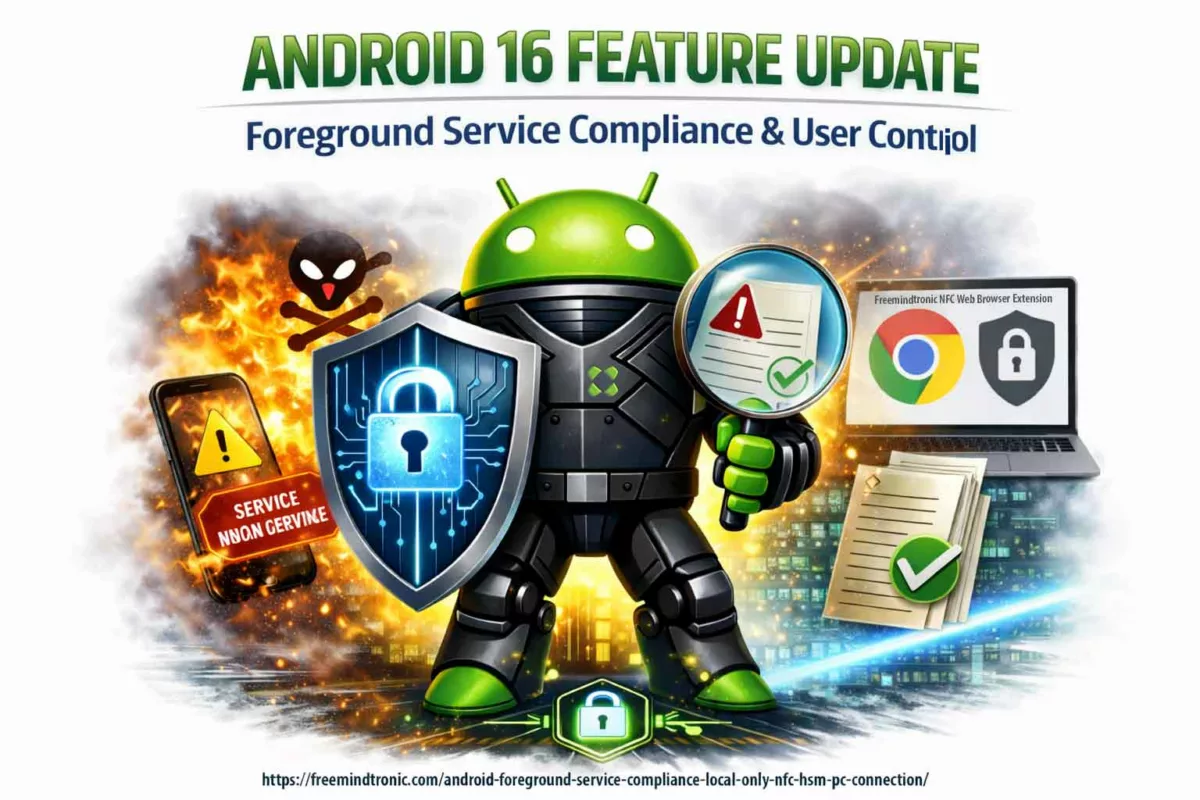
Android foreground service: Google Play compliance, user control, and NFC HSM PC Connection via a Chromium-based extension. This dossier shows how a Foreground Service (FGS) requirement becomes a verifiable trust marker. The session is strictly local-only (no proxy, no VPN, no routing). It relies on local pairing via EviDNS Zeroconf. It also exposes a persistent notification with a STOP action. Finally, it enforces granular data controls and a 2-minute audit path.
Executive summary
Context
Android continues to restrict background execution. At the same time, it tightens the governance of foreground services. The goal is clear: reduce invisible work, limit abuse, and preserve battery and reliability.
With Android 16 (API level 36), enforcement becomes more direct. As a result, compliance becomes observable during real-world review and testing.
However, a well-designed foreground service is not a penalty. Instead, it becomes a trust marker. It is built on transparency, user control, and a minimal operational scope.
Purpose
This dossier provides a verifiable justification for using an Android foreground service. It is a required dependency for a core feature: PC Connection.
In other words, it documents why the service exists. It also shows how Google Play requirements can support transparency and security maturity.
Scope
Feature in scope: PC Connection (phone ↔ desktop). It enables the use of NFC HSM devices from a computer. It does so through a Freemindtronic Chromium-based browser extension. No workstation software is required.
Importantly, the session is strictly local-only. There is no proxy, no VPN, and no routing. The local port is configurable (default: 10001).
Design doctrine
The service is not used to “stay active”. Instead, it makes a sensitive session visible and stoppable. It also keeps the session user-controllable.
Specifically, it uses a persistent notification and an explicit STOP action. Moreover, auto-login remains reversible. Finally, the user can restrict which data categories the extension is allowed to request.
Strategic differentiator
Android and Google Play keep hardening enforcement. Consequently, opaque implementations become structurally fragile.
By contrast, a demonstrable design reduces ambiguity. It combines user control, local-only scope, and operational transparency. Therefore, it becomes a competitive advantage.
This dossier explains the dependency. It also explains how users keep control. Finally, it shows how compliance can be turned into a durable differentiator.
Key takeaway
The Android foreground service is used only for the PC Connection session. The session stays visible and stoppable (persistent notification + STOP). This enables the use of an NFC HSM from a desktop via a Chromium-based extension.
In addition, the user can disable auto-login. The user can also restrict each authorized data category. The user can verify the strictly local-only scope (no proxy/VPN/routing). Finally, the user can audit compliance in 2 minutes.
📱 Freemindtronic (EviPro) on Google Play: open listing
Technical note
Summary reading time: ~2 minutes
Full reading time: ~20–25 minutes
Verification time (quick audit): ~2 minutes
Publication date: 2026-01-16
Last updated: 2026-01-20
Level: Android / Security / Audit
Posture: Local-only, user-in-control, least privilege
Category: Tech Fixes & Security Solutions
Available languages: FR · EN · CAT · ES
Impact level: 8.4 / 10 — store compliance, software transparency & local session security
This dossier is part of Tech Fixes & Security Solutions. It extends prior work on sovereign architectures and user control. It also addresses a recurring risk: treating “background persistence” as acceptable by default.
Here, the issue is broader than Android. It is the ability to prove (audit) behavior. It is also the ability to document (compliance) it. Finally, it is the ability to bound it (least privilege).
The dossier focuses on PC Connection (Chromium extension), local pairing via EviDNS Zeroconf, and per-data-category controls. Therefore, it shows how a Google Play requirement can become a concrete trust marker.
This work continues publications in: Tech Fixes & Security Solutions and, for sovereign and trusted architecture topics: Digital Security.
It follows the Freemindtronic Andorra AI transparency statement — FM-AI-2025-11-SMD5.

2026 Tech Fixes Security Solutions
Service premier plan Android : Sécurité et contrôle utilisateur

2025 Tech Fixes Security Solutions Technical News
SSH VPS Sécurisé avec PassCypher HSM

2025 Tech Fixes Security Solutions
Secure SSH key for VPS with PassCypher HSM PGP
2026 Tech Fixes Security Solutions
Android foreground service compliance — Google Play requirements, user control, and local-only NFC HSM PC connection

2024 Tech Fixes Security Solutions
Unlock Write-Protected USB Easily (Free Methods Only)

2025 Digital Security Tech Fixes Security Solutions Technical News
SSH Key PassCypher HSM PGP — Sécuriser l’accès multi-OS à un VPS

2023 EviKey & EviDisk EviKey NFC HSM NFC HSM technology Tech Fixes Security Solutions Technical News
Secure SSH Key Storage with EviKey NFC HSM

2025 Tech Fixes Security Solutions
NFC HSM SSL Cert IP: Trigger HTTPS Certificate Issuance DNS-less
2025 Tech Fixes Security Solutions
Let’s Encrypt IP SSL: Secure HTTPS Without a Domain
2025 Tech Fixes Security Solutions
Emoji and Character Equivalence: Accessible & Universal Alternatives

2024 Tech Fixes Security Solutions
How to Defending Against Keyloggers: A Complete Guide
In mobile security and Android, this note belongs to the Tech Fixes & Security Solutions category. Moreover, it supports Freemindtronic’s sovereign operational toolkit (HSM, user control, local-only architectures, audit).
- Executive summary
- Android foreground service: why it has become a security marker
- Threat model: mobile ↔ desktop session, risks, and bounded scope
- Android foreground service: Google Play requirements (official sources)
- Android background execution vs foreground service
- Field feedback: approval, then rejection, of the Foreground Service
Connected Device declaration
- An ambiguous rejection signal, documented by the community
- Why this type of rejection is difficult to diagnose
- Resolution strategy: making the justification unambiguous
- Android 14+ — foreground service (FGS): declared type and verifiable justification
- Product impact and mitigation (Android 15/16, NFC, BAL, OEM specifics)
- Compatibility burden and update cycle impact
- Core feature: PC Connection for NFC HSM (Chromium extension)
- EviDNS Zeroconf: local, serverless pairing for desktop extensions
- Android foreground service: user controls (notification, STOP, settings)
- Least privilege: granular permissions
- Key proof: full and granular user control
(data, alerts, port, shutdown)
- Enabled by default, but never enforced
- Least privilege enforced at the data level
- Alert control: notifications, vibration, ringtone
- Local network scope: no proxy, no VPN, no routing
- What the PC Connection does not do
- Turning compliance into a competitive advantage
- Verifiable transparency: downloads, signatures, version history
- Implementation checklist for auditors
- Evidence pack (Google Play review / internal audit)
- Evidence ↔ Google Play requirements mapping (reviewer view)
- Quick audit: verify a foreground service and local-only scope (2 minutes)
- Sovereign use case: transparency and operational continuity
- Glossary
- FAQ — Android foreground service
- Related links
Android foreground service: why it has become a security marker
A foreground service is designed for operations that must remain active, visible to the user, and stoppable at any time.
In practice, it is often misused by applications that try to remain active silently, automate actions without explicit user intent, or extend background activity beyond what is strictly required.
For a security product, the correct posture is not to “work around the rule”, but to align with it.
The user must always know when a sensitive session is active, what it is doing, and how to stop it immediately.
This requirement becomes critical when the phone acts as a gateway between hardware modules (NFC HSM) and a desktop browser environment.
Android: background execution vs foreground service
Across recent Android versions, background execution has been progressively restricted.
The objective is clear: limit invisible activity, reduce abuse, and preserve battery life and system reliability.
In this context, any feature that must remain active without being in the foreground must be justified and made perceptible.
This is precisely the role of a foreground service.
It makes sensitive activity visible (notification), stoppable (STOP), and explicitly bounded in time.
This approach follows a foreground service Android security architecture, aligned with Android foreground service compliance and Google Play requirements.
Here, visibility, immediate shutdown, and a strictly local-only scope are central criteria.
Key point: the correct question is not “how to stay active in the background”, but “how to make a persistent dependency auditable and controllable”. When designed correctly, a foreground service becomes a transparency marker, not a workaround.
Official Android Developers source — required foreground service types (Android 14+, including connectedDevice for interactions with peripherals such as NFC and Bluetooth):
https://developer.android.com/about/versions/14/changes/fgs-types-required
Threat model: why the PC Connection must remain visible and bounded
Realistic assumption: a phone used as a gateway (mobile ↔ desktop) represents an attack surface.
In this context, the foreground service acts as a mechanism of control and proof (notification + STOP), not as a way to persist silently.
| Risk | Example | Freemindtronic measure |
|---|---|---|
| Invisible persistence | Service running without user awareness | Foreground service with persistent notification and immediate STOP |
| Over-permission | Open session equals excessive access | Granular control by data category (least privilege) |
| Network expansion | Disguised proxy/VPN, implicit routing | Local-only: no proxy, no VPN, no routing |
| Operational failure | OS stops the service, breaking the workflow | Session explicitly dependent on the FGS, therefore predictable and verifiable |
Protection against capture and interception attacks:
the Freemindtronic application enforces system-level screenshot locking across all sensitive screens.
This mechanism prevents screenshots, screen recording, and equivalent capture APIs, including attempts by resident malware.
All screenshots and visual evidence provided for review purposes were produced using a debug build in which this protection is intentionally disabled.
In addition, PC Connection relies on a contactless, no-keyboard-input model, both on the phone and on the computer.
As a result, keylogger-based attacks are structurally ineffective, which significantly reduces the attack surface on the workstation side.
Android foreground service: Google Play requirements (official sources)
Google Play strictly governs foreground services. They must be justified by a core, user-beneficial feature. In addition, they must remain perceptible at all times through an explicit notification. Finally, they must be stoppable on demand. Since Android 14, declaring an explicit foreground service type is mandatory.
Official Android & Google Play references:
- Android 14 — Required foreground service types : https://developer.android.com/about/versions/14/changes/fgs-types-required
- Android SDK Platforms (includes Android 16 / API 36) : https://developer.android.com/tools/releases/platforms
- Android Manifest — Permission
FOREGROUND_SERVICE: https://developer.android.com/reference/android/Manifest.permission#FOREGROUND_SERVICE - Google Play Policy — Foreground service requirements : https://support.google.com/googleplay/android-developer/answer/13392821
- Android Developers — Declare a Foreground Service (API 34+) : https://developer.android.com/develop/background-work/services/fgs/declare
In this dossier, these requirements are applied to a real, verifiable case (PC Connection + NFC HSM). As a result, the user-in-control model (notification, STOP, opt-out, granular controls) turns a compliance constraint into evidence of security maturity.
Field feedback: approval, then rejection, of the Foreground Service Connected Device declaration
Real publication context: the FOREGROUND_SERVICE_CONNECTED_DEVICE declaration was accepted during an initial submission. It included a demo video and a justification that covered Android 14 and Android 15 requirements. However, during a late-December update, the same declaration was rejected. The reviewer requested “additional details” without providing actionable guidance on what was missing.
This situation is not isolated. Moreover, multiple developers report similar cases. In those reports, a previously accepted foreground service declaration is later rejected during an update. The rejection message can be ambiguous. Specifically, it may suggest the issue is either the justification text or the video, without stating which part is insufficient.
An ambiguous rejection signal, documented by the community
- Reddit – r/androiddev: developers describe repeated foreground-service-related rejections, with clarification requests that do not identify what to fix (text or video). Link: https://www.reddit.com/r/androiddev/comments/1fsuii4/has_anyone_had_repeat_issues_with_app_submission/
- Zoom developer forum: Play Store update rejection tied to foreground service permissions, with a demo video deemed insufficiently explicit and limited operational guidance. Link: https://devforum.zoom.us/t/app-update-rejected-due-to-foreground-service-permissions/103026
- Google Play Console support thread: developers report rejections for “insufficient information” about foreground service usage, without clarity on the missing criterion. Link: https://support.google.com/googleplay/android-developer/thread/299748806
Why this type of rejection is difficult to diagnose
- Lack of granularity: the rejection message does not state whether the issue is the Play Console justification, the video, or their consistency.
- Implicit reviewer expectation changes: what is “sufficient” at time T can be evaluated differently during a later update.
- Implicit criteria: Play often expects an even more explicit demonstration of the trio user-initiated → perceptible → stoppable, as well as immediate functional dependency.
Resolution strategy: making the justification unambiguous
When a rejection is generic, the only robust approach is to remove all room for interpretation.
- Play Console text: phrase the justification as a verifiable test: “if the user presses STOP, the session ends immediately and the extension loses NFC HSM access within the same second.”
- Video: show, without cuts, the full sequence: user action → visible notification → STOP → immediate session loss on the extension side.
- Semantic alignment: explicitly reuse Google Play terms: core feature, user benefit, perceptible, stoppable, cannot be deferred.
- Remove misunderstandings: explicitly restate “not a VPN, not a proxy, no routing, strictly local scope.”
This field feedback explains why this dossier includes an implementation checklist, an evidence ↔ Google Play requirements mapping, and a reproducible evidence pack. In short, when a rejection is generic, the only effective response is a demonstration that no longer depends on interpretation.
Android 14+ — foreground service (FGS): declared type and verifiable justification
Declared type and immediate functional dependency
- Declared type:
FOREGROUND_SERVICE_CONNECTED_DEVICE - Dependent core feature: PC Connection (phone ↔ Chromium extension)
- Justification: the phone acts as an active gateway to an NFC HSM device used from a computer, initiated explicitly by the user.
If the foreground service is stopped (via the STOP action in the notification or by disabling auto-login), the PC Connection session is immediately terminated, and the browser extension loses NFC HSM access. Therefore, the task cannot be deferred by the system without breaking the expected feature. Android reference — Foreground Service types: https://developer.android.com/develop/background-work/services/fgs/service-types
Android 15: continuity of the doctrine
It further tightens discipline around foreground services (startup, usage, behavioral expectations) and the consistency between user action, runtime duration, and purpose. Consequently, the trajectory confirms the “visible, stoppable, bounded” principle. It also favors demonstrable implementations (explicit notification + STOP + immediate functional dependency). Reference: https://developer.android.com/about/versions/15/changes/foreground-services
Android 16 (API level 36): quotas, diagnostics, operational limits
Foreground services — changes (includes Android 16 / API level 36): https://developer.android.com/develop/background-work/services/fgs/changes
Android 16 cap: Android 16 introduces a stricter framework of quotas, execution limits, and diagnostics. As a result, it favors short, local-only, explicitly user-controlled workflows over implicit or prolonged sessions. Diagnostic reference: https://developer.android.com/develop/background-work/services/fgs/troubleshooting
Android continues to improve diagnostics and reduce allowed scenarios. Therefore, a local-only workflow that is visible and stoppable remains the most robust strategy across successive hardening waves.
Operational detail — Freemindtronic Android NFC app
Operational detail: the foreground service is strictly event-driven. Launching the app is not enough to activate it. Instead, it starts only when an NFC tag is presented. Then, it remains inactive in the absence of NFC events, with no local server and no always-on service.
Product impact and mitigation (Android 15/16, NFC, BAL, OEM specifics)
Symptom
- Symptom: the NFC tag is correctly detected by the system, yet the attempt to relaunch or bring the UI to the foreground via
PendingIntentis blocked by BAL (Background Activity Launch). Consequently, the user perceives no reaction, or degraded behavior, even though the NFC event is received.
Cause
- Cause: Android 15, and even more Android 16, formally harden the rules for starting activities from the background. In particular,
PendingIntentobjects created by the app no longer implicitly carry the right to start or resume an activity in the foreground. This change directly impacts legacy NFC flows that relied on UI relaunch viaPendingIntent, including when the target activity is alreadyRESUMED. Official Android reference: https://developer.android.com/guide/components/activities/background-starts
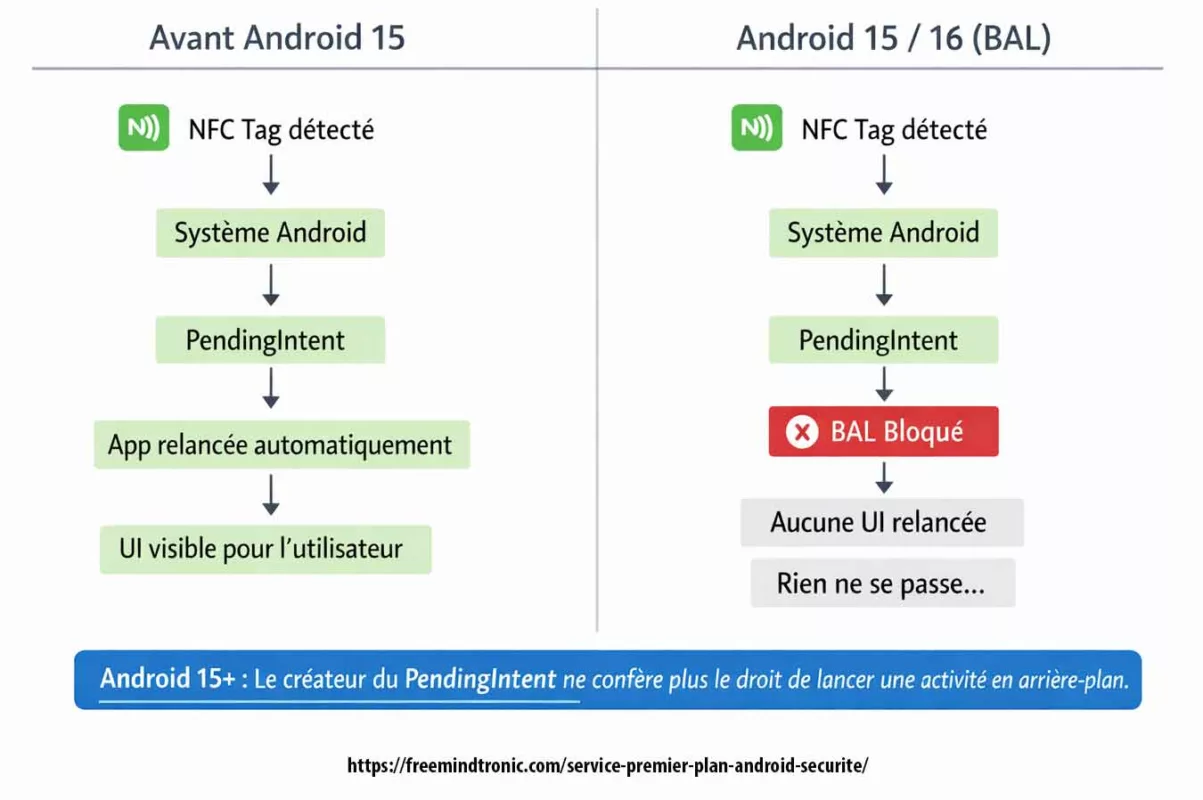
This behavior is observable even on Google Pixel (AOSP). Therefore, it confirms a structural platform change rather than an OEM-specific behavior.
Technical evidence — BAL block (Android 15 / 16)
On Android 15, and even more on Android 16 (API level 36), blocking background activity launches (Background Activity Launch) is a structural platform mechanism. Moreover, it is directly observable in system logs.
Typical Logcat excerpt (anonymized) during an NFC event that attempts to relaunch the UI via PendingIntent:
Background activity launch blocked: pkg=com.freemindtronic.EviPro reason=background_activity_launch_not_allowed intent=Intent { act=android.nfc.action.TAG_DISCOVERED ... } callerApp=ProcessRecord{...}
This message confirms that:
- the NFC event is received by the system,
- the UI relaunch attempt is explicitly blocked by Android,
- the denial is independent from the app and results from BAL hardening at the platform level.
Therefore, this evidence clearly separates: structural Android change ≠ application bug.
- Additional NFC risk (platform): alongside BAL restrictions, NFC stack instabilities and behavior changes are observed on Android 15 and Android 16. They include NFC service crashes (
DeadObjectException), intermittent tag read failures, and version-dependent differences. These items are documented in Google Issue Tracker, including Android 16: https://issuetracker.google.com/issues/456078994
Additional NFC risk (OEM)
- Additional NFC risk (OEM): the issue is amplified on some devices due to manufacturer overlays and aggressive power optimizations. Public feedback and tickets report degraded or inconsistent NFC behavior on:
- Samsung Galaxy (One UI 7/8 – Android 15/16): aggressive activity suspension, intermittent NFC disablement after updates, and behavioral differences between screen-on and screen-off states.
- Xiaomi / Redmi / Poco (MIUI / HyperOS – Android 15/16): strong background restrictions, interactions between NFC, Bluetooth, and power saving, causing NFC scan failures or missing UI resumes.
- OnePlus / Oppo (OxygenOS / ColorOS – Android 15/16): restrictive background task handling and NFC service variability across builds.
- Fairphone 5 (Android 15): regressions reported after updates, with incomplete or delayed recognition of certain NFC tags.
- Google Pixel (Android 15/16 AOSP): AOSP reference showing BAL is structural even without an OEM overlay, confirming it is not only a manufacturer issue.
Robust mitigation
- Robust mitigation: remove any dependency on implicit UI relaunch via
PendingIntent. Instead, NFC processing must run inside the existing activity instance when it is already active (appropriatelaunchMode, handle events throughonNewIntent()). Alternatively, continue the flow through an explicit user-initiated action (notification action), in line with the Android “user-initiated” model recommended for Android 15+.
Key takeaway: starting with Android 15, NFC detection can work correctly without relaunching the UI. BAL blocks any implicit relaunch via PendingIntent. Therefore, a compliant implementation must process the event in the existing instance or require an explicit user action.
Known limits / behaviors not guaranteed by Android
- Android does not guarantee automatic UI relaunch after a system event (NFC, intent, PendingIntent), especially starting with Android 15 (BAL).
- NFC stack behavior can vary by Android version, system state (screen off, Doze, OEM restrictions), and manufacturer implementations.
- Session continuity depends on the user-initiated model and on maintaining Android foreground service Google Play compliance (visible notification, STOP, bounded duration).
These limits are structural to the Android platform. Therefore, they are neither an application bug nor a functional deviation.
Evidence and audit
- Evidence and audit: Android system logs explicitly reveal BAL blocks (“Background activity launch blocked” or equivalent messages) during NFC events. These logs are objective technical evidence. As a result, they should be archived in the internal compliance evidence pack and produced during Google Play review or security audits when needed.
This demonstrable functional dependency is a key element of Android foreground service Google Play compliance, as expected by reviewers since Android 14+.
Compatibility burden and update cycle impact
This section explains why these changes are not a minor code tweak, but a structural transformation of legacy Android workflows.
Since Android 6, the platform has stacked successive restrictions. Consequently, a “simple targetSdk upgrade” can become a structural refactor. The stack includes: background execution hardening, BAL restrictions on activity starts, stricter FGS governance with justification requirements, and NFC variability across versions and OEM implementations.
Starting with Android 15, apps that create PendingIntent objects no longer implicitly inherit BAL privileges. Therefore, explicit opt-in becomes required, which breaks many legacy workflows (notification → UI resume, “system event → bring activity to front”, NFC scenarios, etc.).
At the same time, Android 15/16 introduce documented behavior changes (targetSdk and compat framework changes). In addition, public tickets also show platform-level NFC instabilities. As a result, multi-device testing becomes more complex, degraded modes multiply, and release cycles slow down mechanically.
Official references (Android/Google):
• BAL restrictions (Android 15+), opt-in required for PendingIntent: https://developer.android.com/guide/components/activities/background-starts
• Android 15 — behavior changes (targeting API 35): https://developer.android.com/about/versions/15/behavior-changes-15
• Android 15 — compat framework changes (BAL privileges rescind by creator): https://developer.android.com/about/versions/15/reference/compat-framework-changes
• Android 16 — behavior changes (Android 16 / API level 36): https://developer.android.com/about/versions/16/behavior-changes-16
• Set up the Android 16 SDK (API 36): https://developer.android.com/about/versions/16/setup-sdk
• Google Play target API level requirement (enforced migration cadence): https://developer.android.com/google/play/requirements/target-sdk
• Android Developers Blog (Android 15 AOSP) — PendingIntent creators block BAL by default: https://android-developers.googleblog.com/2024/09/android-15-is-released-to-aosp.html
Developer feedback & public tickets (similar issues):
• StackOverflow (Android 15 BAL hardening, activity blocked via PendingIntent): https://stackoverflow.com/questions/77679032/with-android-15-bal-hardening-this-activity-start-may-be-blocked-if-the-pi-creat
• GitHub (Flutter community — request for BAL opt-in support, activity no longer starts): https://github.com/fluttercommunity/plus_plugins/issues/3688
• Reddit (React Native — activity launch blocked on Android 15): https://www.reddit.com/r/reactnative/comments/1k1zpk0/android_15_background_activity_launch_issue/
• Google Issue Tracker (NFC broken Android 15 Beta 2): https://issuetracker.google.com/issues/340933949
• Google Issue Tracker (NFC service dead / attempted recover): https://issuetracker.google.com/issues/341807213
• Google Issue Tracker (NFC crash DeadObjectException Android 16): https://issuetracker.google.com/issues/456078994
Core feature: PC Connection for NFC HSM (Chromium extension)
This section ties the foreground service to a core workflow. It also clarifies what breaks when the service stops.
Local phone ↔ desktop session: purpose and bounded scope
In practice, the Android app opens a local phone ↔ desktop session. Through this session, the Chromium-based extension sends explicitly authorized requests to the phone. Consequently, operations stay limited to NFC HSM actions defined by the user.
Local encrypted channel: segmented-key protocol and per-session unique key
Next, the session uses a local encrypted channel. It applies a segmented-key protocol and generates a unique key per session. As a result, the design avoids secret reuse and improves resilience against local interception.
Local HTTP endpoint: configurable port and anti-ambiguity (10001)
To support desktop calls, the service exposes a local HTTP endpoint on a configurable port (default: 10001). Therefore, the endpoint serves one purpose only: PC Connection. It does not act as a proxy, a tunnel, or a generic network relay.
Moreover, the endpoint remains session-bounded (unique per-session key, limited duration, immediate STOP). Accordingly, it provides no routing capability (no proxy, no tunnel, no routing).
User-initiated trigger: visible, stoppable, bounded
Importantly, the app does not run an “always-on” background daemon. Instead, the user triggers a perceptible session that stays time-bounded and stoppable at any moment.
Reviewer point: the user starts the PC Connection session explicitly. Without an explicit user action (PC Connection activation / expected usage), the app does not keep a foreground service running.
Finally, the workflow enables NFC HSM usage from a desktop browser without cloud dependency and without external infrastructure.
Local discovery: EviDNS Zeroconf (serverless)
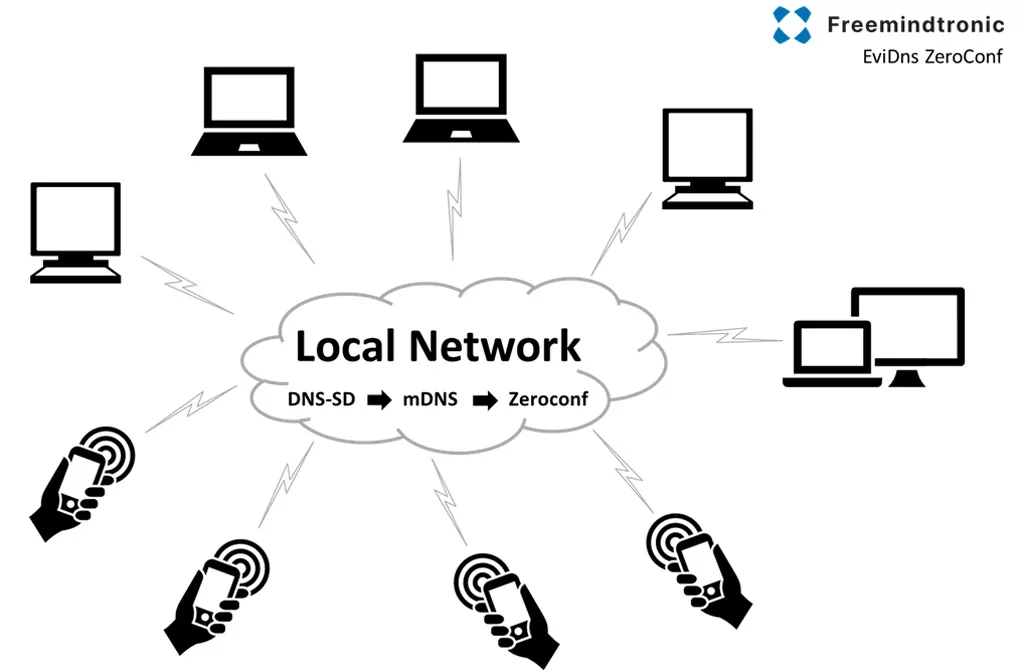
On the desktop side, PC Connection relies on EviDNS Zeroconf. As a result, Freemindtronic extensions discover the phone automatically on the local network. They also retrieve its IP address and pairing port. Meanwhile, the process stays fully local: it requires no dedicated DNS/DHCP server and exposes nothing beyond the local perimeter.
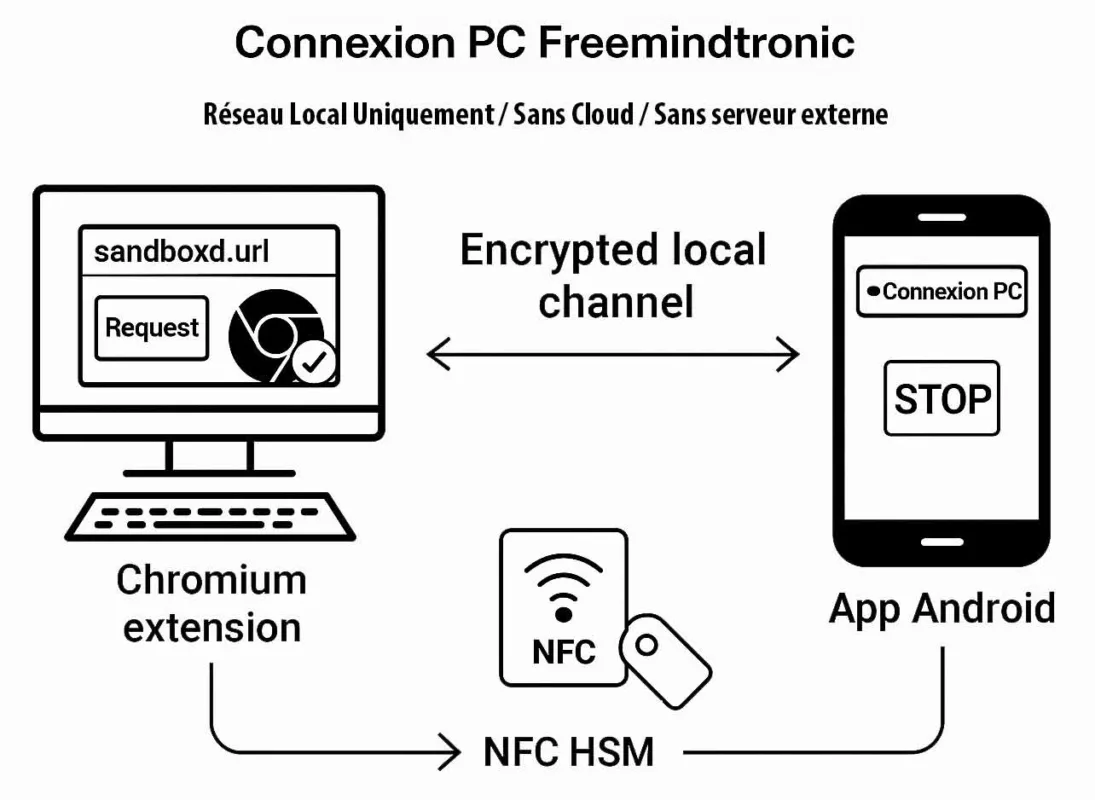
Freemindtronic secure scenario — A request initiated from the Chromium extension triggers the NFC HSM interaction on the Android phone. The secret is read locally and transmitted via a local encrypted channel based on a segmented-key protocol with a unique key per session. No external server is involved at any point.
Demonstrable functional dependency
PC Connection relies on a continuous session that remains visible and user-controlled on the Android phone. If the user presses STOP (or disables the feature), the session ends immediately. Consequently, the browser extension loses access and the desktop cannot use the NFC HSM until the user starts a new session.
EviDNS Zeroconf: serverless local pairing for desktop extensions
EviDNS Zeroconf (serverless) simplifies and secures local setup. Specifically, it supports service discovery and pairing between a desktop computer and an NFC terminal (phone) on the same network.
In practical terms, EviDNS lets desktop extensions locate the phone and retrieve the parameters required for PC Connection (IP + port). Therefore, it improves multi-OS robustness. Additionally, it removes any dependency on external infrastructure.
- Serverless: the local pairing does not rely on a dedicated DNS/DHCP server.
- Automatic discovery: the extension identifies the NFC terminal on the local network and collects IP/port for the session.
- Sovereign alignment: pairing stays within the user’s local perimeter, so the workflow does not need cloud to “keep” the connection.
- Reference: https://freemindtronic.com/technology/evidns-zeroconf-serverless-technology/
- “How it works” details: https://freemindtronic.com/technology/evidns-serverless-technology-how-it-works-find-connect-nfc-devices/
- Technical guides: https://freemindtronic.com/support/faq-technical-guides/
Key point
On the desktop side, Freemindtronic extensions use EviDNS Zeroconf to discover the phone on the local network and retrieve its IP address and pairing port — without a dedicated DNS/DHCP server.
Android foreground service: user controls (notification, STOP, settings)
A foreground service remains defensible only when user control is explicit, continuous, and verifiable.
This applies not only to the end user, but also to auditors and Google Play reviewers.
In practice, auto-connection may be enabled by default to preserve a smooth experience.
However, the user always retains full control.
At any time, the session can be stopped immediately through the STOP action in the notification.
In addition, the user can disable auto-login using a dedicated switch (Wi-Fi icon) in the “Freemindtronic Extension” settings.
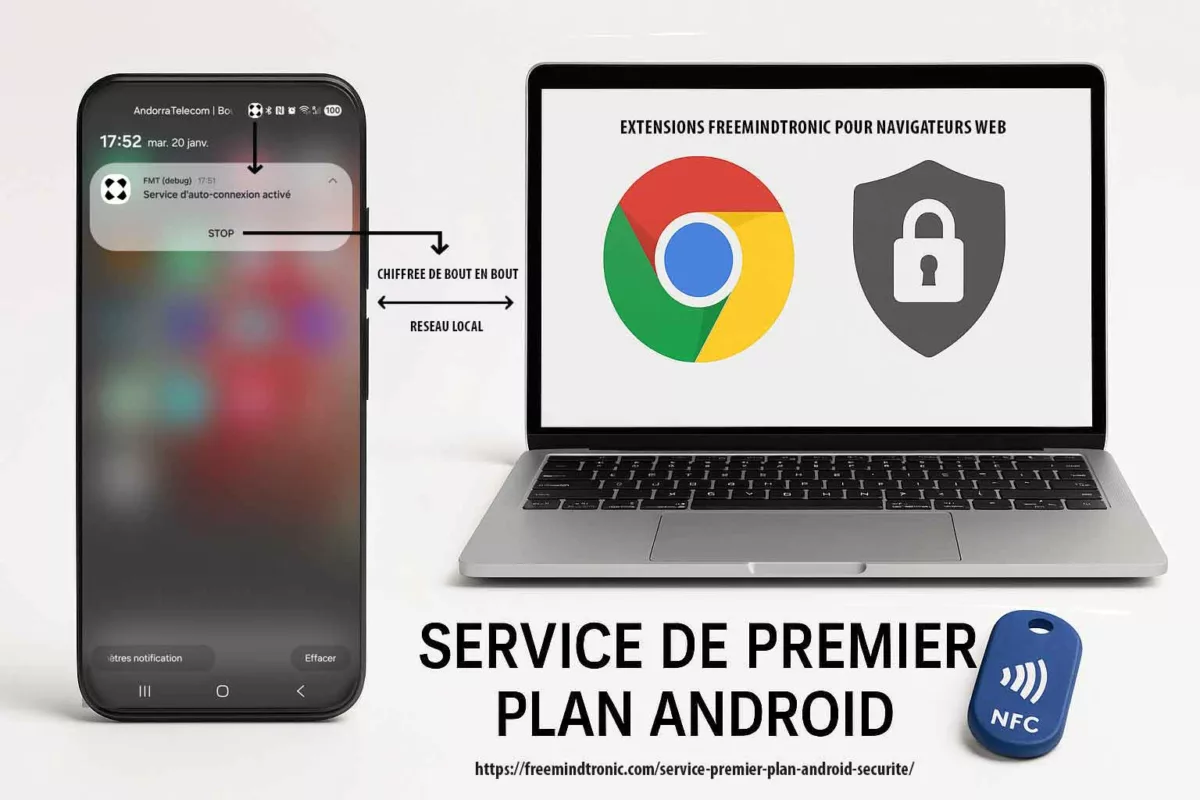
PC Connection relies on four concrete controls that an auditor can validate within seconds:
| Control | Where it appears | What it demonstrates |
|---|---|---|
| Persistent notification | Android notification center | Session visibility; no hidden activity |
| STOP action | Button in the notification | Immediate user-driven termination (stoppable) |
| Configurable auto-connection | Extension settings (Auto-login + Wi-Fi icon) | “Enabled by default” does not mean “enforced” |
| Configurable local port | Application settings (default 10001) | Operational transparency and predictable scope |
Important note: when the user presses STOP, both the foreground service notification and the associated session terminate immediately.
By design, the system retains no residual UI state.
As a result, capturing an “after STOP” screen is impossible.
This immediate disappearance is precisely the proof that the service is stoppable and non-persistent.
Edge case (Android 13+): if the user denies the POST_NOTIFICATIONS permission, the session can no longer remain fully perceptible.
Therefore, to stay aligned with Google Play requirements, the flow must either guide the user to re-enable notifications or prevent activation of a non-visible PC Connection session.
Key proof: full and granular user control (data, alerts, port, shutdown)
One decisive point stands out: the user does not endure the foreground service.
Instead, the user controls it entirely.
This control remains observable through a persistent notification, an immediate STOP action, explicit deactivation options, and fine-grained authorization by data category.
Enabled by default, but never enforced
At installation, the auto-connection service may be enabled by default to ensure immediate availability of PC Connection.
However, this usability choice remains strictly bounded.
At any moment, the user can stop the session or disable automatic startup with a single action.
As a result, the principle remains clear: “enabled by default ≠ permanent ≠ uncontrollable.”
| Observable proof | Where | What it demonstrates |
|---|---|---|
| Persistent notification “Auto-connection service active” | Phone (Android status bar) | Session visibility and transparency |
| STOP button (shutdown action) | Android notification | Immediate user-driven termination (stoppable) |
| “Auto-login” switch (Wi-Fi icon) | User settings > “Freemindtronic Extension” | Simple and explicit deactivation |
| Configurable HTTP port (default 10001) | Service settings | Explicit local scope and clear diagnostics |
| Custom device name | Pairing settings | Local traceability and controlled association |
Least privilege enforced at the data level
One of the rare differentiators lies in the ability to restrict PC Connection to what is strictly required.
Each request category between the browser extension and the phone remains individually controlled.
Consequently, a persistent session becomes a user-bounded session rather than an open channel.
| Setting | Data type / usage | Control |
|---|---|---|
| isLogIn | Credential requests | ON / OFF |
| isLogWeb | Web extension requests | ON / OFF |
| isLogInAdd | Adding new accounts | ON / OFF |
| isLogCard | Credit card data | ON / OFF |
| isLogWebCard | Cards via web extension | ON / OFF |
| isLogCryptoMain | Cryptocurrency requests | ON / OFF |
| isLogCrypto | Detailed crypto data | ON / OFF |
| isLogIOTA | IOTA information | ON / OFF |
| isLogBank | Bank account data | ON / OFF |
| isLogBip39 | BIP39 seed phrases | ON / OFF |
| isLogPhone | Phone numbers | ON / OFF |
| isLogNote | Secure notes | ON / OFF |
| isLogCipher | Encryption keys (AES) | ON / OFF |
| isLogCloud | Cloud data (if applicable) | ON / OFF |
| isLogPing | Connection ping | ON / OFF |
Alert control: notifications, vibration, ringtone
In addition, the user can configure how the session signals activity.
This flexibility improves perceptibility while avoiding intrusive behavior.
| Setting | Function |
|---|---|
| isLogPingNotification | Notification on ping |
| isLogVibrate | Vibration on requests |
| isLogRing | Audible alert on requests |
Why this matters: a compliant foreground service is not merely “visible”.
It must also remain stoppable, disableable, and ideally rights-bounded.
Here, the user controls both the session itself and every exposed data class.
Key takeaway: the foreground service grants no extended access by default.
Instead, it materializes a visible and stoppable session boundary, within which each data category remains explicitly controlled by the user. This approach combines visibility, user control, and a measurable reduction of the attack surface, notably through the absence of keyboard input and enforced screenshot blocking.
Local network scope: no proxy, no VPN, no routing
A “local session” is not a marketing claim.
Rather, it represents a measurable and verifiable architectural commitment.
The illustration below highlights a critical transparency point:
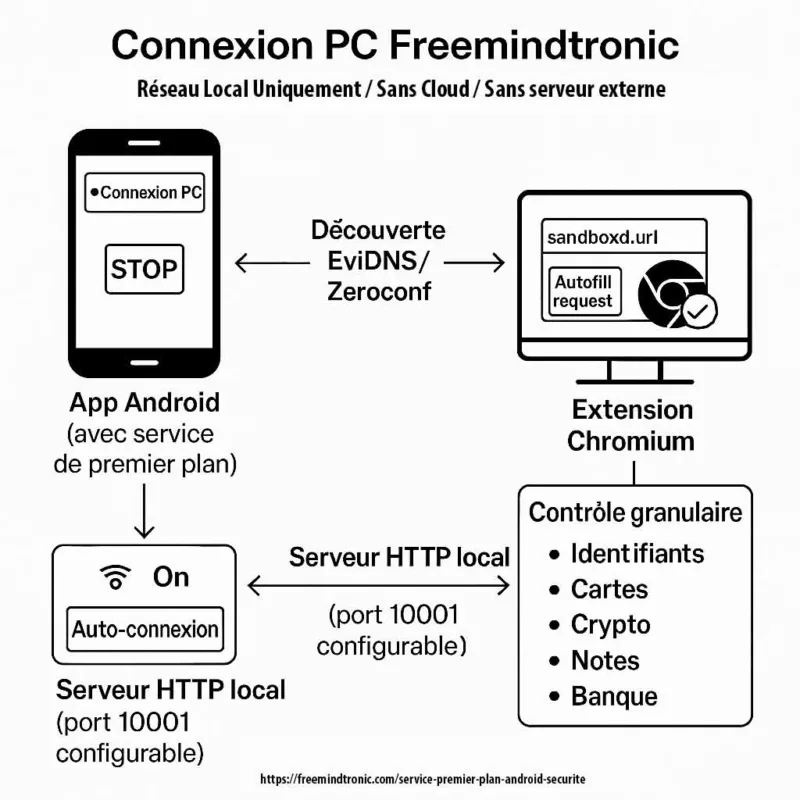
the communication port used between the Android phone and the Freemindtronic browser extension is explicitly configurable by the user (default: 10001).
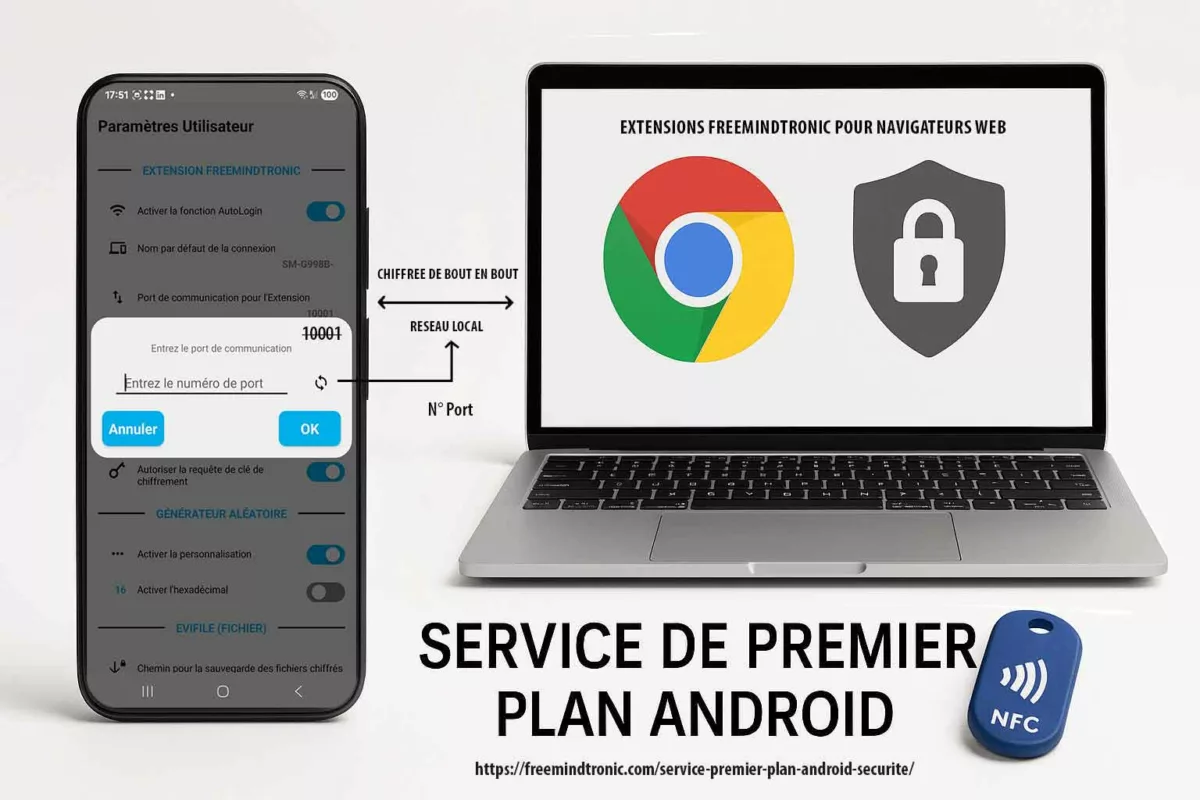
This deliberate choice allows users, auditors, and Google Play reviewers to verify immediately that PC Connection operates within a bounded and unambiguous local network scope.
Accordingly, the foreground service does not conceal any tunneling behavior, generic relay, or implicit traffic redirection.
PC Connection deliberately reduces its operational perimeter:
- No proxy: the application does not function as a generic HTTP or SOCKS proxy and does not relay third-party traffic.
- No VPN: it creates no network tunnel, does not intercept browsing activity, and does not implement
VpnService. - No routing: the feature does not redirect remote traffic or act as a network gateway.
- Explicit, configurable port: the exchange port (default 10001) remains visible, modifiable, and limited to PC Connection.
- No cloud dependency: no external server is required to maintain the session.
This explicit network bounding aligns with the Freemindtronic sovereign model:
no account, no user identification, and no central database.
All exchanges remain confined to the user’s local network, while secrets stay under user control and protected by NFC HSM devices.
Key point: port configurability is not an implementation detail.
Instead, it proves that PC Connection operates neither as a proxy nor as a VPN, but as a visible, auditable, local session enabled by a strictly bounded Android foreground service.
What the PC Connection does not do
- It does not collect user data for analytics or profiling purposes.
- It does not transfer secrets to any remote server; the session is designed to remain local-only.
- It does not operate as a proxy or a VPN and performs no generic traffic interception.
- It does not run silently in the background; the notification and STOP action make the state observable at all times.
Turning compliance into a competitive advantage
Beyond baseline requirements, PC Connection applies least privilege at the data level through per-category granular permissions.
Few competing solutions implement this level of control.
Meanwhile, store policies now require security applications to document and demonstrate their behavior.
This obligation is not a formality; instead, it acts as a maturity filter.
Over time, solutions that cannot explain a persistent activity in a verifiable way expose themselves to:
- publication rejections and prolonged review cycles,
- operating system–level restrictions,
- loss of trust caused by opaque behavior,
- increased regulatory pressure on sensitive use cases.
By contrast, the Freemindtronic implementation makes the foreground service measurable.
The session remains visible, stoppable immediately, configurable through auto-login settings, and strictly bounded to a local scope.
As a result, this operational clarity aligns with high-assurance environments.
It also becomes a differentiator when other solutions rely on ambiguous background behavior.
| Approach | Visible (notification) | Immediate stop | Per-data-type granularity | Local scope | Cloud dependency |
|---|---|---|---|---|---|
| Freemindtronic (PC Connection) | Yes | Yes (STOP + auto-login disable) | Yes (per category) | Yes (local-only) | No |
| Generic “background” approach | Often no | Often no | Rarely | Variable | Often yes |
| “Cloud-first” approach | Variable | Variable | Variable | No (network-dependent) | Yes |
Verifiable transparency: downloads, signatures, version history
A trust marker does not rely on statements alone.
Instead, it must allow independent verification.
For this reason, Freemindtronic publishes resources that support auditability and long-term software traceability.
| Resource | What it provides | Link |
|---|---|---|
| Official downloads | Direct access to software, version information, and checksums (MD5/SHA256 depending on pages), enabling reproducible verification | https://freemindtronic.com/support/download/ |
| Version history | Traceability of changes over time (internal audit, compliance, change justification) | https://freemindtronic.com/version-history-of-software-freemindtronic-andorra/ |
| Technical guides (FAQ) | Procedures, IP/port references, and architectural explanations for support and audit | https://freemindtronic.com/support/faq-technical-guides/ |
This documented transparency reinforces the credibility of a “local-only” architecture.
It also strengthens the ability to meet compliance requirements without relying on an opaque cloud layer.
Implementation checklist for auditors
The following points can be verified quickly by a reviewer, an auditor, or a security team.
This checklist also serves as a practical guide for any solution that must justify a foreground service in a sensitive context.
- Visible: a persistent notification clearly indicates an active session.
- Stoppable: a STOP action is directly accessible from the notification.
- Configurable: auto-connection can be disabled in user settings (extension: Auto-login).
- Minimal duration: the service runs only during the PC Connection session.
- Bounded scope: communication remains local; no proxy, VPN, or routing behavior.
- Least privilege: granular permissions are enforced per data category.
- Operational transparency: the port is configurable and behavior remains deterministic.
Evidence pack (Google Play review / internal audit)
To reduce back-and-forth, provide the following minimum evidence set during review:
- Capture 1: persistent notification showing “Auto-connection service active”.
- Capture 2: the STOP action visible inside the notification.
- Capture 3: “Freemindtronic Extension” settings page with the Auto-login switch and the Wi-Fi icon.
- Capture 4: port screen (default 10001) plus the phone name (pairing).
- Capture 5: an example of granular controls (at least 5 categories ON/OFF).
This evidence pack is designed for a Google Play reviewer evaluating a foreground service.
It provides observable, reproducible artifacts aligned with official requirements.
What Google Play can verify without reading the code
- A persistent notification is present during a PC Connection session
- The service stops immediately through STOP (no residual state)
- The browser extension loses the session instantly
- No
VpnServicedeclaration is involved - The local port is explicit (10001 by default, configurable)
These checks are sufficient to establish FGS compliance without source inspection.
What the reviewer will NOT see
- No source code to analyze in order to understand behavior.
- No remote server, no cloud, and no third-party API involved.
- No network tunnel, no VPN, and no implicit proxy behavior.
- No invisible persistent activity after STOP.
- No screenshots can be captured on sensitive screens in production builds (system-level screenshot locking).
- No keyboard input is required during PC Connection usage (on both phone and computer), making keylogger attacks ineffective.
Video plan (60–90 s): enable PC Connection → show the notification → press STOP → relaunch → disable Auto-login → confirm it does not restart → show port 10001 → prove the extension loses the session when STOP is pressed.
Android foreground service: evidence ↔ Google Play requirements mapping (reviewer view)
| Google Play requirement | Evidence provided | What the reviewer checks |
|---|---|---|
| Core feature with user benefit | PC Connection demo (extension ↔ phone) | The service is required for the primary workflow |
| Perceptible at all times | Persistent notification | No “hidden” execution |
| Stoppable on demand | STOP action inside the notification | Immediate stop with minimal friction |
| Cannot be deferred without breaking UX | Immediate session loss on the extension side when STOP is pressed | Demonstrable functional dependency |
| Minimal / bounded duration | Service runs only during the PC Connection session | No persistence beyond the need |
- Google Play policy (FGS requirements): https://support.google.com/googleplay/android-developer/answer/13392821
Quick audit: verify an Android foreground service and the local-only scope (2 minutes)
This procedure allows an auditor or a reviewer to verify, within minutes, three core properties: visibility, immediate stoppability, and a strict local-only scope.
- Verify perceptibility: enable PC Connection, then open the Android notification shade and confirm the presence of a persistent notification.
- Verify stoppability: press STOP in the notification and confirm that the session terminates immediately.
- Verify deactivation: in the “Freemindtronic Extension” settings, disable auto-login (switch + Wi-Fi icon), then confirm that no automatic restart occurs.
- Verify functional dependency: observe that the browser extension loses the session as soon as the service stops.
- Verify local scope: confirm that the port (default 10001) is a local parameter and that no cloud service is required for the session to operate.
Tip: on the extension side, automatic phone discovery (IP + port) can rely on EviDNS Zeroconf (serverless). This approach simplifies local pairing without requiring any dedicated infrastructure.
References: https://freemindtronic.com/technology/evidns-zeroconf-serverless-technology/ and https://freemindtronic.com/support/faq-technical-guides/
Sovereign use case: transparency and operational continuity
In sovereign or high-constraint environments, the worst scenario is not only an incident.
More critically, it is an operational dead end caused by an opaque tool.
A feature that silently depends on background execution may be restricted by the OS and fail precisely when it matters most.
By designing PC Connection around a foreground service that is visible, stoppable, configurable, and strictly local, the user can prove—at runtime—what is executing and why.
As a result, this transparency increases resilience against policy hardening.
It also reduces the risk of last-minute incompatibilities during sensitive deployments.
Finally, when comparable scenarios involve attempted exfiltration, a hardware-rooted sovereign approach limits the impact.
If secrets remain confined to NFC HSM devices and operations stay explicitly mediated by the user, any data recovered out of context remains unusable in clear form.
Note: PC Connection does not rely on the Play Integrity API or on SafetyNet to operate.
Compliance rests on observable mechanisms (notification, STOP, local scope), not on remote or opaque attestations.
Glossary
Foreground service type (FGS type)
Foreground service type API 34+
As a result, the system—and Google Play—can understand why the app runs a visible task.
Since Android 14, developers must declare an appropriate type for each foreground service and, when required, also declare the associated FGS permission.
This requirement turns a technical constraint into a compliance proof and a trust marker for audit.
Keywords: Android 14 foreground service type, API 34 FGS types required, Play Console FGS declaration.
Foreground Service declaration in Play Console
FGS declaration + reviewer video
First, the developer describes the feature that uses the foreground service.
Next, the developer explains the impact if the system defers or interrupts the task.
Finally, a video link demonstrates how the user triggers the feature, making the justification verifiable.
Keywords: Google Play foreground service requirements, foreground service video demonstration, reviewer evidence pack.
Foreground Service permission
FOREGROUND_SERVICE_* permissions
In practice, the app does more than display a notification; it aligns its manifest with the real purpose of the service.
Moreover, this granularity helps auditors verify that the app does not over-declare capabilities.
Keywords: FOREGROUND_SERVICE permission Android, manifest permission API 34, least privilege Android service.
Foreground service notification
Persistent notification and immediate control
It materializes the ongoing execution and exposes an immediate control (STOP), proving that the task remains stoppable.
This visible signal directly satisfies the Google Play rule: no hidden activity.
Keywords: foreground service notification, visible foreground service, stop foreground service.
POST_NOTIFICATIONS
Android 13+ notification permission
If the user denies notifications, the app must remain consistent with the “perceptible” requirement.
Accordingly, the flow should either guide the user or prevent activation of a non-visible session.
This behavior strengthens the store-readiness of an FGS workflow.
Keywords: Android 13 notification permission, foreground service notification blocked, perceptible to user.
shortService / systemExempted
FGS exceptions (special cases)
However, these cases do not apply to typical persistent session usage.
Therefore, a security app benefits from stating that it remains within the standard model:
core feature, notification, STOP, and minimal duration.
Keywords: short foreground service, systemExempted foreground service, foreground service policy.
Reference: https://support.google.com/googleplay/android-developer/answer/13392821
Demonstrable functional dependency
Immediate test (STOP proof)
FAQ — Android foreground service
Why must an FGS be declared in Play Console, and not only in the manifest?
Google Play reviewer requirements: description, impact, video
It also evaluates the user-facing justification.
For each declared foreground service type, the developer must describe the feature, explain what happens if the task is deferred or interrupted, and provide a video showing the user action that triggers PC Connection.
As a result, this process reduces reviewer back-and-forth and makes the FGS auditable.
Reference: https://support.google.com/googleplay/android-developer/answer/13392821
Why choose CONNECTED_DEVICE instead of REMOTE_MESSAGING for PC Connection?
Type justification: NFC HSM and local gateway
Instead, it maintains a local session that serves a hardware-based use case: accessing an NFC HSM from a desktop via a Chromium extension.
In this model, the phone acts as an active gateway to a device and to a bounded local flow.
Moreover, STOP immediately terminates the session, which proves functional dependency without implicit persistence.
Keywords: CONNECTED_DEVICE NFC, foreground service connected device use case, local-only phone-to-browser bridge.
Reference: https://support.google.com/googleplay/android-developer/answer/13392821
Does the foreground service turn the app into a proxy, VPN, or network relay?
No: strict local-only scope and user control
PC Connection implements neither a proxy, nor a VPN, nor any form of routing.
Instead, it maintains a strictly local-only session and exposes it visibly through a notification.
The user can stop the session instantly via STOP, at which point the extension immediately loses access to the NFC HSM.
Keywords: no VpnService, no Android proxy, local-only foreground service security.
What changes with Android 15 for foreground services in security workflows?
Duration, user action consistency, immediate STOP
Consequently, it favors implementations that start on a user action, remain visible, and stop immediately on demand.
Therefore, a short, local-only, stoppable session becomes more robust than implicit persistence.
Reference: https://developer.android.com/about/versions/15/changes/foreground-services
If Android blocks or stops the service, how can it be diagnosed without background workarounds?
FGS troubleshooting: understand refusals and fix them cleanly
Next, use the official Foreground Services diagnostics to identify “not allowed” errors and operational limits.
By doing so, you correct the root cause instead of bypassing the framework.
Reference: https://developer.android.com/develop/background-work/services/fgs/troubleshooting
What should the Play Console video show to validate a foreground service?
User trigger, notification, STOP, immediate impact
Then display the persistent notification to prove perceptibility.
Next, press STOP to demonstrate immediate termination.
Finally, show the functional impact: the extension loses the session as soon as the service stops, proving the task cannot be deferred without breaking the expected experience.
Reference: https://support.google.com/googleplay/android-developer/answer/13392821
If the user blocks notifications, does PC Connection remain compliant?
Perceptible also means controllable
Google Play expects execution to remain perceptible.
Therefore, if notifications are blocked (Android 13+), the app must stay consistent: either guide the user to re-enable notifications or adapt the flow to avoid a non-visible active session.
This approach preserves the “visible, stoppable, bounded” logic and reduces reviewer confusion.
Keywords: foreground service notification blocked, Android 13 POST_NOTIFICATIONS, perceptible to user.
Reference: https://support.google.com/googleplay/android-developer/answer/13392821
Why does Google insist on “user-initiated” for a foreground service?
The session starts because the user wants it
Instead, it must serve a core feature that the user triggers and understands.
Accordingly, the app ties the start to an explicit action (PC Connection), exposes the state through a notification, and provides immediate termination via STOP.
This design demonstrates continuous user intent and avoids any interpretation of “disguised persistence”.
Reference: https://support.google.com/googleplay/android-developer/answer/13392821
If Android refuses to start the service (“Start not allowed”), what should be done?
Diagnose first, then fix type, permission, and scenario
Then consult the official Foreground Services diagnostics, which document common “not allowed” causes and expected fixes.
By addressing the cause instead of bypassing background limits, Play compliance remains intact.
Reference: https://developer.android.com/develop/background-work/services/fgs/troubleshooting
What is an Android foreground service?
Official definition and security role
It always displays a persistent notification indicating ongoing activity.
This model prevents sensitive background execution and now serves as a transparency and security marker.
Official reference: https://developer.android.com/develop/background-work/services/foreground-services
How do you start a foreground service on Android?
User-initiated start and immediate notification
The user triggers a core feature (for example, PC Connection), after which the app starts the service and displays the persistent notification immediately.
Since Android 14, the app must also declare a consistent service type and, when required, the associated permission.
Official reference: https://developer.android.com/develop/background-work/services/fgs/declare
Why must a foreground service display a notification?
Perceptibility, user control, and auditability
It is the core user-control mechanism.
It makes the task perceptible, enables an immediate stop (for example, STOP), and prevents any hidden activity.
For Google Play and Android, a sensitive task without a notification equals non-compliance.
Reference: https://support.google.com/googleplay/android-developer/answer/13392821
How can foreground service notifications be removed?
Stop the service instead of hiding its state
The only correct way to remove the notification is to stop the service.
If notifications are blocked at the system level (Android 13+), the app must avoid maintaining a non-perceptible session or guide the user to restore visibility.
Official reference: https://developer.android.com/develop/background-work/services/foreground-services
Related links
- Tech Fixes & Security Solutions category:
https://freemindtronic.com/tech-fixes-security-solutions/ - Technical News category:
https://freemindtronic.com/news/technical-news/ - Digital Security category:
https://freemindtronic.com/news/digital-security/ - EviDNS Zeroconf technology (serverless):
https://freemindtronic.com/technology/evidns-zeroconf-serverless-technology/ - EviDNS: how it works (IP/port discovery):
https://freemindtronic.com/technology/evidns-serverless-technology-how-it-works-find-connect-nfc-devices/ - Technical FAQ guides (EviDNS / IP + port):
https://freemindtronic.com/support/faq-technical-guides/ - Official downloads (MD5/SHA256 hashes):
https://freemindtronic.com/support/download/ - Version history (traceability):
https://freemindtronic.com/version-history-of-software-freemindtronic-andorra/ - Freemindtronic technologies overview:
https://freemindtronic.com/technology/ - Freemindtronic overview:
https://freemindtronic.com/freemindtronic/ - Application — Freemindtronic (EviPro) on Google Play:
https://play.google.com/store/apps/details?id=com.freemindtronic.EviPro