
Sep
A USB drive that suddenly becomes write-protected is a common issue on modern Windows systems. If you are trying to unlock write-protected USB media on Windows 10 or Windows 11 without using third-party software, this guide explains the exact causes, limits, and safe recovery paths.
Express Summary — Unlock Write-Protected USB (Windows)
⮞ Reading Note
This express digest takes ≈ 4 minutes. It delivers the essentials: root causes, fastest fixes, and the point where you must stop and preserve data.
⚡ The discovery
A USB drive that was writable yesterday suddenly becomes read-only: Windows blocks copy, delete, rename, and even simple edits. This can be a physical lock, a Windows restriction (policy/registry), a logical read-only flag, or a firmware-level protection mode when NAND memory is failing.
✦ Immediate impact
- File operations fail (copy, delete, rename) with “write-protected” errors
- Formatting may be blocked (if protection is firmware-enforced)
- Security risk: a USB used across systems increases exposure to malware and policy locks
⚠ Strategic message — when unlocking is the wrong objective
Write protection is not always a malfunction. In modern systems, it is often a deliberate safety boundary. Windows may enforce it by policy; USB controllers may enforce it to prevent irreversible data corruption when flash memory degradation is detected.
The critical mistake is to assume that every write-protected state must be unlocked. The real objective is classification: identifying whether the device is in a reversible state or has reached a hardware-defined end-of-life condition, where further action becomes harmful.
⎔ Sovereign countermeasure
Reduce reliance on “trusting the endpoint”: isolate sensitive secrets from general-purpose systems, enforce controlled workflows for removable storage, and treat USB drives as semi-disposable assets with rotation and health monitoring.
Want to go further?
Le advanced summary clarifies the modern causes (Windows 11 policies, BitLocker To Go edge cases, firmware fail-safe) and prepares the full Chronicle.
Reading parameters
Express summary: ≈ 4 min
Advanced summary: ≈ 6 min
Full Chronicle : ≈ 35–40 min
Publication date : 2024-01-01
Last updated : 2026-01-03
Complexity level : Advanced — Windows storage policies & removable media
Technical density : ≈ 65 %
Available languages : EN · FR · ES · CAT
Thematic focus : USB write protection, DiskPart, CHKDSK, BitLocker To Go, firmware lock
Editorial type : Tech Fix — Reference Guide (Freemindtronic)
Impact level : 7.8 / 10 — data integrity & operational continuity
Références officielles
– Microsoft DiskPart documentation
– Microsoft CHKDSK documentation
– Microsoft BitLocker overview
– Microsoft removable storage access control
☰ Quick navigation
- Back to top
- Express summary
- Advanced summary
- What is a USB flash drive?
- Chronicle — Unlock Write-Protected USB
- Common causes of USB write protection (2024)
- Method 1 — Physical lock
- Method 2 — Windows Registry
- Method 3 — DiskPart
- Method 4 — CHKDSK
- Method 5 — BitLocker To Go
- Method 6 — Group Policy / write control
- Method 7 — Event Viewer signals
- Method 8 — Reformat (last resort)
- Prevention — reduce recurrence
- Manufacturer-specific USB behaviors
- Forum tricks — what works, what to avoid
- Decision checkpoint — when to stop
- Real-world case
- Known non-recoverable scenarios
- Logical vs firmware lock
- USB decision tree
- Glossary — USB & Storage terms
- FAQ
- What we didn’t cover
- Why this guide cannot be reduced
- Sovereign knowledge vs generated answers
- Editorial note
- Related topic — Evikey NFC
- Strategic outlook

2024 2025 2026 Cyber Doctrine Cyberculture
Quantum Threats to Encryption: RSA, AES & ECC Defense
Sep

2025 Cyber Doctrine Cyberculture
Souveraineté individuelle numérique : fondements et tensions globales
Nov

2026 Cyber Doctrine Cyberculture
Individual Digital Sovereignty: Foundations, Global Tensions, and Proof by Design
Jan

2024 Cyber Doctrine Cyberculture
Digital Authentication Security: Protecting Data in the Modern World
Sep

2025 Cyber Doctrine Cyberculture
Time Spent on Authentication: Detailed and Analytical Overview
Jan

2025 Cyber Doctrine Cyberculture
Authentification sans mot de passe souveraine : sens, modèles et définitions officielles
Nov

2025 Cyber Doctrine Cyberculture
Sovereign Passwordless Authentication — Quantum-Resilient Security
Nov

2025 Cyber Doctrine Cyberculture
Llei andorrana doble ús Llei 10/2025: reforma estratègica del Codi de Duana
Jun

2024 Cyber Doctrine Cyberculture Legal information
ANSSI Cryptography Authorization: Complete Declaration Guide
Oct

2024 Cyber Doctrine Cyberculture
ITAR Dual-Use Encryption: Navigating Compliance in Cryptography
Aug


The posts displayed above ↑ belong to the same editorial section: Tech Fixes & Security Solutions. They extend this Chronicle by covering practical remediation patterns, operational diagnostics, and resilient handling of security and integrity incidents across the Freemindtronic ecosystem.
Advanced Summary — When write protection becomes a system behavior (2024)
This complements the express digest. It does not repeat the steps; it explains why write protection has become more common on Windows 11-era systems and why some USB sticks become permanently read-only.
In 2024, removable storage sits at the intersection of three forces: security policy hardening (corporate and consumer), file-system integrity controls (especially with exFAT on unstable media), and controller-level protection mechanisms that activate when flash memory degradation is detected. As a result, “write-protected” may mean:
- Policy lock — Windows prevents writes by design (registry/group policy/device control)
- Logical lock — disk attributes or metadata errors mark the volume read-only
- Encryption boundary — BitLocker To Go introduces states where writes are blocked until properly unlocked
- Firmware lock — the controller refuses writes to avoid corrupting data when NAND cells are failing
Key Insights
- DiskPart can clear flags, not firmware fail-safes.
- CHKDSK fixes file-system structures, not dying flash memory.
- If formatting fails repeatedly, prioritize data extraction and replacement.
Summary
- Express summary
- Advanced summary
- What is a USB flash drive?
- Chronicle — Unlock Write-Protected USB (Windows)
- Common causes (2024)
- Prevention — reduce recurrence
- Logical vs firmware lock (comparison)
- USB decision tree
- Glossary — USB & Storage terms
- FAQ — USB write protection
- What we didn’t cover
- Why this guide cannot be reduced to a single answer
- Related topic — Evikey NFC
- Strategic outlook
What Is a USB Flash Drive — Hardware Basics You Need to Understand
Before attempting to unlock a write-protected USB, it is essential to understand what a USB flash drive actually is. Contrary to common assumptions, a USB stick is not a simple passive storage device. It is a compact embedded system combining multiple hardware components that actively manage data integrity and lifespan.
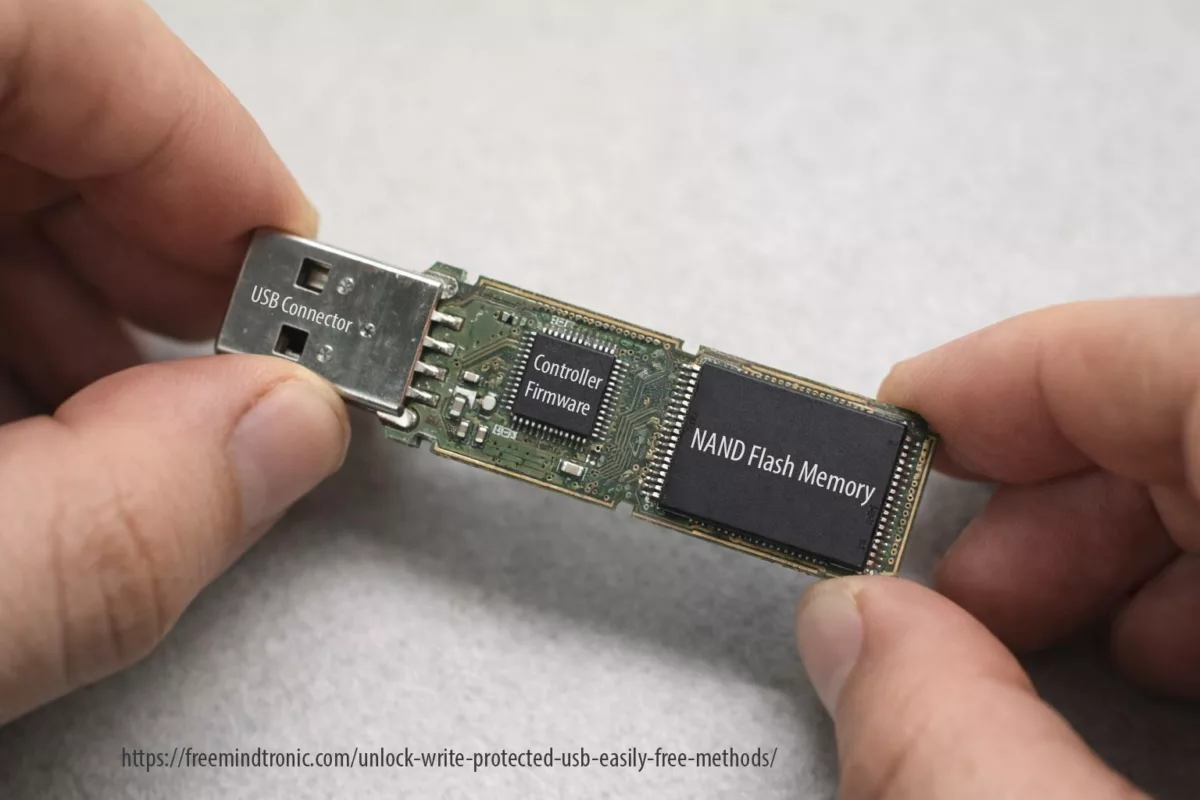
At its core, a USB flash drive contains two critical elements: a USB controller and NAND flash memory.
The USB controller: the decision-maker
The controller is a microcontroller that manages all read and write operations. It implements wear-leveling algorithms, error correction (ECC), bad block management, and firmware-level safety rules. When the controller detects that NAND memory has reached critical wear thresholds or repeated I/O failures, it can intentionally enforce a permanent read-only state.
NAND flash memory: finite by design
NAND flash memory stores data using cells with a limited number of write cycles. Once these limits are exceeded, data integrity can no longer be guaranteed. At that point, the controller prioritizes preservation of readable data over continued writes.
Why this matters for write protection
This hardware reality explains why some write-protected USB drives cannot be unlocked by software tools. Registry edits, DiskPart commands, or formatting attempts operate at the operating-system level. They cannot override firmware decisions made by the controller to protect failing NAND memory.
Understanding this distinction is key: some write protection states are reversible, while others signal the end of the device lifecycle.
Unlock write-protected USB on Windows (Reference 2024)
When a USB flash drive becomes read-only, Windows is reacting to a specific signal: policy restriction, file-system inconsistency, encryption boundary, or controller-level protection.
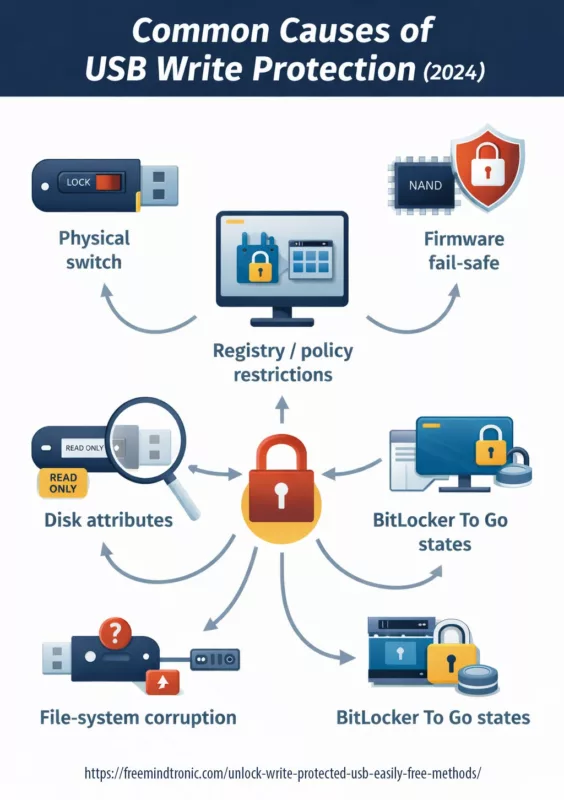
Common causes of USB write protection (2024)
Before “fixing”, classify. A reversible lock can be cleared safely. A firmware lock should be treated as an end-of-life signal: extract data, replace the device, and update your workflow.
- Physical switch (rare, but real)
- Registry / policy restrictions (common on reused PCs)
- Disk attributes (logical read-only)
- File-system corruption (especially after unsafe ejection)
- BitLocker To Go states (locked volumes / permission boundary)
- Firmware fail-safe (NAND wear, controller protection)
Method 1 — Check the physical lock
This sounds obvious, but it’s often overlooked.
- Remove the USB drive from your computer.
- Inspect its casing (or SD adapter) for a small LOCK / UNLOCK switch.
- Toggle the switch to the unlocked position.
- Reinsert the USB drive and test it again.
If the device remains write-protected, move on to software-based solutions.
If your device (or SD adapter) has a lock switch, it overrides everything. Toggle to unlock, reinsert, and retest.
Method 2 — Remove USB Write Protection Using the Windows Registry
This method targets Windows policies that explicitly block writing to removable drives.
⚠ Warning: Editing the registry incorrectly can affect system stability. Follow the steps exactly.
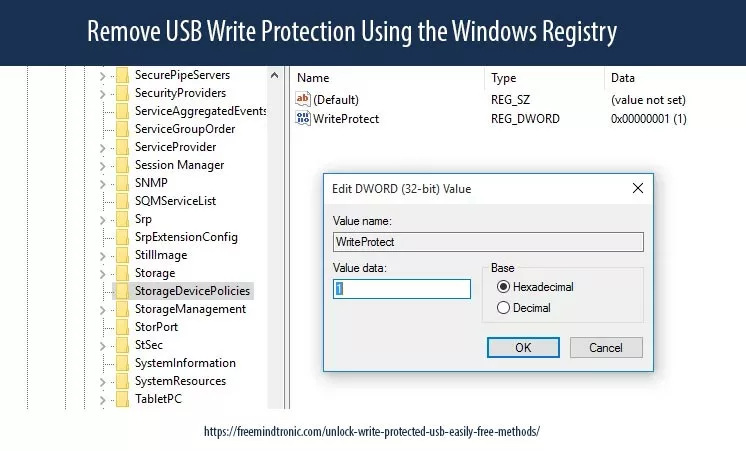
Registry: StorageDevicePolicies
- Open Regedit as admin.
- Go to
HKEY_LOCAL_MACHINESYSTEMCurrentControlSetControlStorageDevicePolicies - Set
WriteProtectto 0 (DWORD). - Restart Windows.
If StorageDevicePolicies does not exist, you can create it and add WriteProtect. This is typical on systems that inherited restrictions.

From this point onward, each method is also a diagnostic test.
If a method completes successfully but the device state does not change, this is not a failure — it is a signal.
Method 3 — Use DiskPart to Clear the Read-Only Attribute
DiskPart allows you to modify disk attributes directly at the system level. This method is frequently searched under queries such as diskpart clear readonly USB or USB write-protected cannot format.
- Open Command Prompt (Admin).
- Type the following commands, pressing Enter after each one:
diskpart
list disk
select disk X
attributes disk clear readonly
exit
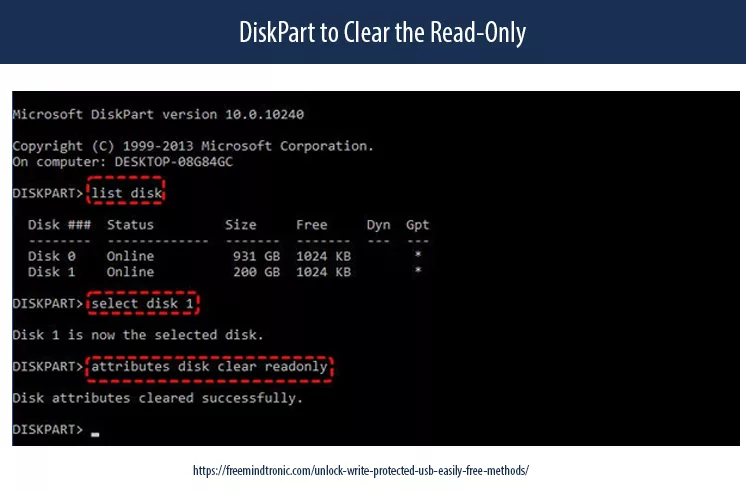
Be precise when selecting disk X. If this works, the issue was likely logical.
Safely remove and reconnect the USB device.
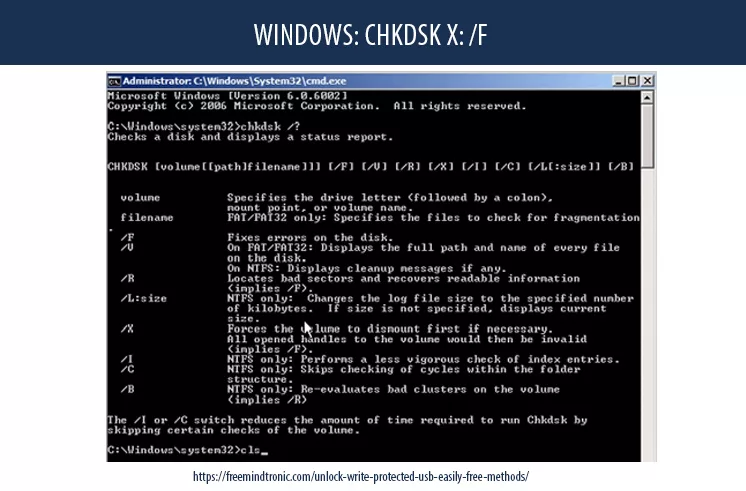
Method 4 — CHKDSK: repair file-system errors
If corruption exists, Windows may mount read-only. CHKDSK repairs structural issues:
chkdsk X: /f
Replace X: with the USB letter. If errors reappear soon after, the medium is unstable.
Method 5 — Unlock Write-Protected USB when BitLocker To Go blocks writes (Windows 10/11)
If the USB drive is encrypted, BitLocker can block write operations while the volume remains locked, only partially unlocked, or opened under a session that lacks write permission. Before attempting any fix, verify the items below.
- The volume is fully unlocked (not just visible in File Explorer).
- You are using an account/session with permission to write to the volume.
- Device policies do not restrict writes to encrypted removable media.
Official references (Microsoft)
Method 6 — Unlock Write-Protected USB caused by Group Policy or removable storage write control
On some Windows systems, removable storage writes are blocked intentionally. This is common on managed or reused PCs where administrators enforce restrictions under Removable Storage Access or BitLocker removable drive policies. If you control the device, review policy settings; if the machine is managed, the restriction may be enforced centrally.
Official references (Microsoft)
Method 7 — Event Viewer signals: distinguish file-system integrity issues from hardware I/O failure
If the same USB drive repeatedly flips to read-only, Windows logs often reveal whether you are dealing with file-system corruption or repeated disk I/O errors. Open Event Viewer and review Windows Logs → System. Look for recurring warnings/errors from sources such as Disk or Ntfs. Persistent I/O errors strongly correlate with controller fail-safes and end-of-life behavior.
Official references (Microsoft)
Method 8 — Reformat to remove USB write protection (Last Resort, data loss expected)
If the drive remains accessible but still appears locked, formatting may restore normal behavior — but it will erase all data. Only proceed after extracting anything you can.
- Open File Explorer → right-click the USB drive.
- Select Format.
- Choose exFAT or FAT32 (based on your compatibility needs).
- Uncheck Quick Format if available and you want a deeper pass.
- Start the process.
If formatting fails with a write-protection error, the USB memory controller is likely enforcing read-only at firmware level. Treat this as end-of-life: extract readable data and replace the device.
Official references (Microsoft)
Prevention (2024 hygiene)
- Always use “Safely remove hardware” (reduces corruption)
- Avoid using the same USB across high-risk machines
- Prefer exFAT for cross-platform, NTFS for Windows-only + permissions (context dependent)
- Rotate removable media and retire devices showing repeated errors
As ransomware and device-control policies expand, “write protection” increasingly appears as a security boundary, not a random malfunction. Expect more controlled removable-storage environments — and more firmware fail-safes on low-cost media.
Manufacturer-specific USB behaviors (forums vs reality)
Community forums often suggest “magic fixes” for write-protected USB drives. Some of these tricks work — but only because certain manufacturers implement specific controller behaviors.
- Consumer flash drives frequently switch to read-only mode when internal error thresholds are reached. This is a protective firmware behavior, not a Windows bug.
- Many models use conservative wear-leveling. Repeated CHKDSK or formatting attempts may accelerate the transition to permanent read-only mode.
- USB flash controllers often expose limited recovery states; when write protection appears, it usually reflects internal health checks rather than logical flags.
- Some drives historically supported recovery utilities, but success rates vary and are highly model-dependent.
Forum advice often ignores a critical distinction: logical locks can be cleared, but controller-enforced locks cannot. Applying aggressive “fixes” repeatedly may worsen data integrity.
Forum tricks — what works, what to avoid
Many online discussions recommend extreme or repetitive actions to unlock write-protected USB drives. Here is a technical reality check.
✔ Sometimes useful — Clearing read-only flags with DiskPart when the issue is purely logical.
✔ Reasonable — Running CHKDSK once to repair file-system metadata after unsafe removal.
⚠ Risky — Repeated formatting attempts after firmware-level write protection appears.
✖ Dangerous — Low-level controller reflashing tools shared on forums (high data-loss risk).
✖ Misleading — Registry “tweaks” claiming to unlock all USB drives regardless of hardware state.
A recurring forum myth is that persistence will eventually “break” write protection. In reality, modern controllers are designed to resist exactly that.
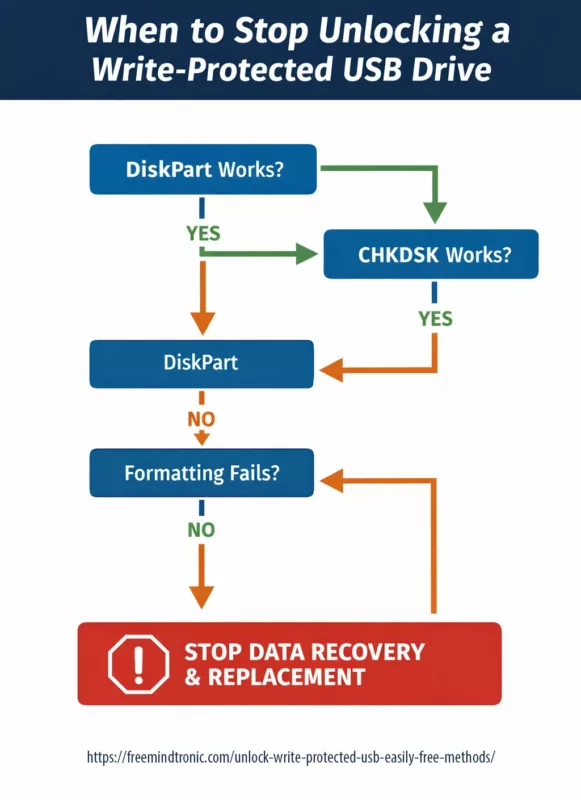
Decision checkpoint — when to stop trying
Before attempting another fix, ask these questions:
- Does DiskPart fail to clear the read-only attribute?
- Does formatting fail immediately with write-protection errors?
- Do Windows logs report repeated I/O or medium errors?
If the answer is “yes” to all three, the safest action is to stop write attempts, extract readable data, and replace the device.
Treat persistent write protection as an end-of-life signal, not a challenge to overcome.
Real-world case — when nothing changes
Field feedback (user comment):
“no use all the tips tried but it is in the same stage”
This type of feedback is common — and important. It reflects a scenario where all documented methods are executed correctly, yet the USB device remains write-protected with no observable change.
From a technical standpoint, this outcome is not a failure of the steps. It is a diagnostic result.
When a USB drive stays in the same state after:
- clearing logical read-only flags,
- checking registry or policy restrictions,
- running CHKDSK,
- and attempting formatting,
the most likely explanation is firmware-level write protection enforced by the USB controller. This protection is intentional and designed to prevent further data corruption when internal error thresholds or NAND wear limits are reached.
In such cases, persistence does not increase success. It increases risk. No change is not failure — it is the diagnosis.
When no method alters the device state, stop write attempts. Extract readable data if possible, then replace the device. Lack of change is not failure — it is a signal
Known non-recoverable USB write-protection scenarios
Not all write-protected USB situations are recoverable. Based on field experience and controller behavior, the following scenarios are generally considered non-reversible.
- Persistent write protection after DiskPart and formatting attempts
When logical flags are cleared but the device remains read-only and formatting fails immediately, the controller is likely enforcing a permanent lock. - Repeated I/O or medium errors reported by the operating system
These signals often indicate failing NAND cells. Write protection is triggered to prevent silent data corruption. - USB drives that suddenly switch to read-only after heavy use
Consumer-grade flash drives may enter irreversible read-only mode once internal wear thresholds are exceeded. - Write-protected devices that remain readable but never writable again
This is a classic end-of-life behavior: data extraction remains possible, but write access is permanently disabled. - Failures that persist across multiple systems and operating systems
If the same USB device is read-only on different machines, the cause is almost certainly hardware-level.
Attempting aggressive fixes in these scenarios can accelerate data loss. Once firmware-level protection is suspected, preservation takes priority over correction.
Logical lock vs Firmware lock — comparison table
| Criteria | Logical / Policy Lock | Firmware / Controller Lock |
|---|---|---|
| Origin | Windows registry, group policy, disk attributes, file-system errors | USB controller firmware (NAND wear, internal error thresholds) |
| DiskPart effect | ✓ Clears read-only flags | ✖ No effect |
| CHKDSK effect | ✓ Repairs file-system metadata | ✖ No effect on hardware |
| Formatting | ✓ Usually possible | ✖ Fails immediately |
| Data recovery chance | High | Limited to read-only extraction |
| Recommended action | Proceed with policy/flag/file-system fixes | Stop write attempts, extract data, replace device |
USB write protection — decision tree
USB becomes write-protected
│
├─ Does the device have a physical lock?
│   ├─ YES → Unlock switch → Retest
│   └─ NO
│
├─ Can DiskPart clear readonly?
│   ├─ YES → Logical lock resolved
│   └─ NO
│
├─ Does CHKDSK repair errors?
│   ├─ YES → Monitor device stability
│   └─ NO
│
├─ Does formatting fail immediately?
│   ├─ YES → Firmware / controller lock
│   │        → Extract data (read-only)
│   │        → Replace USB device
│   └─ NO
│
└─ Check policies / BitLocker states
    └─ Adjust governance or unlock volume
Glossary — USB & Storage Terms
This internal glossary clarifies key technical terms used throughout this Chronicle. Click a term to reveal its definition.
USB write-protection concepts
Write-Protected USBClick
Read-Only AttributeClick
Windows and system-level mechanisms
DiskPartClick
CHKDSKClick
BitLocker To GoClick
Removable Storage PolicyClick
Storage hardware and controller behavior
Firmware LockClick
NAND Flash MemoryClick
USB ControllerClick
Wear-LevelingClick
Operational and lifecycle concepts
File System (exFAT / NTFS)Click
Safely Remove HardwareClick
End-of-Life (EOL)Click
Frequently Asked Questions — USB write protection
Understanding sudden write protection
In most cases, write protection does not appear randomly. Instead, it is triggered by a specific condition. For example, a physical lock may be enabled, Windows may enforce a storage policy, or disk attributes may mark the device as read-only. Additionally, file-system corruption after unsafe removal, encryption states such as BitLocker To Go, or controller fail-safes activated by failing flash memory can all lead to a sudden read-only state.
What DiskPart can — and cannot — do
DiskPart is effective when the issue is purely logical. It clears read-only flags set at the disk or volume level. However, if the USB controller itself enforces write protection at firmware level, DiskPart has no authority to override it. In that case, the command completes, but the device state remains unchanged.
Why formatting is sometimes blocked immediately
When formatting fails instantly with write-protection errors, this usually indicates firmware-enforced protection. In other words, the controller has detected critical NAND wear or repeated I/O errors and has intentionally disabled write access to prevent further data corruption.
Reversible locks versus end-of-life signals
Not necessarily. Logical locks or policy-based restrictions are often reversible. By contrast, firmware-level write protection typically marks the device as having reached end-of-life. In this scenario, the priority shifts from repair to data preservation.
When persistence becomes counterproductive
Once DiskPart, CHKDSK, and formatting attempts all fail, continuing to force write operations rarely improves the outcome. On the contrary, repeated attempts may accelerate data loss. At this point, stopping is not giving up — it is the correct operational decision.
When no change is itself a diagnosis
If all documented methods were applied correctly and the USB device remains in the same state, this is not a failure of the guide. Rather, it strongly suggests firmware-level write protection enforced by the USB controller. This protection is intentional and designed to preserve remaining readable data once internal error thresholds or NAND wear limits are reached. Therefore, further write attempts are discouraged. The recommended action is to extract readable data if possible, then replace the device.
What CHKDSK actually repairs
CHKDSK repairs file-system structures and metadata inconsistencies. However, it does not repair physical flash memory. If errors reappear quickly after repair, the storage medium itself is likely degrading.
Interpreting repeated formatting failures
Often, yes. When formatting consistently fails under write-protection errors, firmware enforcement or hardware degradation is the most likely cause. In such cases, the safest approach is to focus on data extraction and device replacement rather than recovery attempts.
Reducing future write-protection incidents
To reduce recurrence, treat removable media as semi-disposable assets. Rotate USB drives regularly, retire devices showing early warning signs, always eject safely, and avoid mixing the same USB device between high-risk and trusted environments.
⧉ What We Didn’t Cover
Why this guide cannot be reduced to a single answer
Modern generative systems excel at summarizing procedures. However, USB write protection is not a single problem with a single fix. It is a classification problem.
This Chronicle deliberately separates logical locks, policy restrictions, encryption states, and firmware-enforced protection. Collapsing these into a single “solution” increases the risk of data loss and misdiagnosis.
In other words, this guide is not designed to be consumed as a static answer, but as a decision framework. Its value lies in the reasoning path, not in isolated commands.
Sovereign knowledge vs generated answers
The rise of generative systems changes how information is accessed. Instead of navigating documents, users increasingly receive synthesized answers. While efficient, this shift introduces a structural risk: context compression.
USB write protection is not a single problem with a universal fix. It is a classification problem involving hardware limits, operating system policies, encryption states, and controller-level safeguards. Reducing this complexity to a single generated answer increases the likelihood of misdiagnosis and data loss.
This Chronicle deliberately preserves decision paths, failure boundaries, and stop conditions. Its purpose is not to produce an output, but to support informed judgment at each step.
In this sense, sovereign knowledge is not opposed to automation. It defines the conditions under which automation must stop and responsibility returns to the operator.
Editorial note — Freemindtronic perspective
Freemindtronic publications are built around a clear constraint. From the outset, they must remain usable even when access to information becomes mediated, filtered, or partially opaque.
Consequently, for technical domains such as removable storage, security controls, or data integrity, blindly executing isolated commands is no longer sufficient. Instead, operational clarity emerges from knowing when not to act, when to stop, and when preservation outweighs correction.
This Chronicle directly reflects that editorial stance. It does not promise universal fixes. Rather, it maps operational boundaries and highlights concrete signals indicating when a device has reached a non-recoverable state.
Moreover, in environments increasingly shaped by centralized platforms and automated mediation, maintaining local reasoning capacity is no longer optional. It becomes a practical form of operational sovereignty.
Sovereignty begins where automated answers end — precisely at the moment informed responsibility is required.
Related topic — Evikey NFC and hardware-level resilience for USB storage

This Chronicle explains how and why USB drives become write-protected, including scenarios caused by firmware fail-safes, flash memory degradation, or integrity violations. In this context, it is important to highlight architectures that significantly reduce these risks at the hardware level.
Evikey NFC integrates multiple layers of physical and electronic protection designed to mitigate the most common causes of flash memory degradation and controller-enforced write protection. These protections operate autonomously, without relying on the operating system or software drivers.
Integrated protections against flash memory degradation
- Automatic electronic protection against overvoltage and undervoltage, preventing electrical stress on the controller and NAND memory.
- Advanced ESD protection rated at 2 × 27 kV on the data channel, drastically reducing damage from electrostatic discharge.
- Thermal control and cutoff mechanisms, acting as a protective circuit breaker in abnormal temperature conditions.
- Full military-grade resin encapsulation, making the device fully waterproof and mechanically resistant, with durability comparable to hardened steel.
Embedded diagnostics and forensic traceability
Unlike conventional USB flash drives, Evikey NFC embeds an immutable internal black box that records security and operational events. This traceability can be consulted contactlessly via NFC using an Android device, without requiring the USB to be mounted by the operating system.
- Non-tamperable event logging of electrical, thermal, and security incidents.
- Self-diagnostic system reporting the operational health of the device.
- Tracking of flash memory write counts since first use, enabling objective assessment of NAND wear.
Impact on write-protection diagnosis
Because Evikey NFC eliminates most external causes of flash memory damage, any unexpected write-protection state can be analyzed with greater clarity. If a device becomes locked, the diagnostic process can quickly distinguish between:
- Write protection intentionally enforced by the Evikey NFC security model, or
- External or environmental factors unrelated to flash degradation.
Notably, the flash memory itself does not rely on traditional physical write-lock mechanisms, as access control is handled upstream through contactless authentication. This architectural choice removes an entire class of ambiguous failure states commonly encountered with standard USB drives.
As a result, Evikey NFC does not aim to unlock failing USB devices. Instead, it prevents most of the conditions that lead to irreversible firmware-level write protection and significantly simplifies diagnosis if a lock state occurs.
For readers interested in the technical foundations and concrete implementations of this architecture, the following official Freemindtronic resources provide detailed documentation:
- Evikey NFC technology for USB sticks — overview
- Evikey NFC features — hardware protections and access control mechanisms
- Evikey secure NFC USB drive — undetectable mode
Concrete implementations of this architecture are available as secure, contactless USB devices:
When recovery mechanisms reach their limits, resilient hardware design becomes the decisive factor.
Strategic Outlook
In 2024, a “write-protected USB” rarely represents an isolated malfunction. More often, it signals the visible edge of a deeper rule: a security policy, an integrity control, or a hardware fail-safe.
Therefore, the most effective response is not brute force. Instead, it relies on classification, data preservation, and disciplined operational hygiene. Once removable storage is treated as an asset with a defined lifecycle, the incident ceases to be surprising and becomes manageable.
This is why this Chronicle does not end with a fix, but with a boundary: a point where action stops and responsibility begins.